public

Rpg Maker Developers Group

Simple enough for a child, powerful enough for a developer

2 Followers

VXACEMenu Command Backgrounds

BMM Archive · July 15, 2026

Preserved forum archive. This topic stores the original first post and locally mirrored RPG Maker Web attachments when available. It is posted by the BMMPlay archive account, not by the original creator.

Original Source

  • Original title: Menu Command Backgrounds
  • Original author: Z3R0X505
  • Original date: April 11, 2013
  • Source thread: https://forums.rpgmakerweb.com/threads/menu-command-backgrounds.11584/
  • Source forum path: Game Development Engines > Ruby Game System (RGSS) Scripts > RGSS3 Scripts (RMVX Ace)

Summary

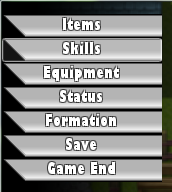
Introduction This is a simple script that allows you to place command backgrounds behind the commands in the menu. Screenshot

Archived First Post

Introduction

This is a simple script that allows you to place command backgrounds behind the commands

in the menu.

Screenshot

Protected download
Script

#==============================================================================## Command Backs by Z3R0X505 ##------------------------------------------------------------------------------## Places a background behind each of the menu commands. ##==============================================================================## Terms of Use: ## Free to use in commercial and non-commercial projects as long as credited. ##==============================================================================#module Menu_Backs # Name of the picture placed inside the Graphics/System/ folder. # This picture has to be 160 wide and 24 in height. Command_Back = "Command_Back"end#======================== Don't edit past here! ===============================#class Scene_Menu < Scene_MenuBase alias start_backs start def start start_backs create_backs end def create_backs @menu_back = Sprite.new(@viewport) width = 160 height = @command_window.height - 24 @menu_back.bitmap = Bitmap.new(width, height) bitmap = Cache.system(Menu_Backs::Command_Back) @viewport.z = @command_window.z - 1 rect = Rect.new(0, 0, 160, 24) y = 0 loop do break if y >= height @menu_back.bitmap.blt(0, y, bitmap, rect) y += 24 end @menu_back.y = @command_window.y+12 endendclass Window_MenuCommand < Window_Command alias init_opacity initialize def initialize init_opacity self.opacity = 0 end def visible_line_number item_max + 1 end def standard_padding return 0 end def item_rect(index) rect = Rect.new rect.width = 160 rect.height = 24 rect.x = index % col_max * (item_width + spacing) rect.y = index / col_max * item_height + 12 rect endend

Credits

  • Shanghai Simple Scripts for the menu command backgrounds and the general final fantasy 13 idea.
  • Z3R0X505

Note: Modifies standard_padding & item_rect methods for window_menucommand other than that it should

         be fine in terms of compatibility with other scripts.

Downloads / Referenced Files

Log in to download

Log in, then follow the RPG Maker Developers Group to see these download links.

Log in to download

License / Terms Note

#==============================================================================## Command Backs by Z3R0X505 ##------------------------------------------------------------------------------## Places a background behind each of the menu commands. ##==============================================================================## Terms of Use: ## Free to use in commercial and non-commercial projects as long as credited. ##==============================================================================#module Menu_Backs # Name of the picture placed inside the Graphics/System/ folder. # This picture has to be 160 wide and 24 in height. Command_Back = "Command_Back"end#======================== Don't edit past here! ===============================#class Scene_Menu < Scene_MenuBase alias start_backs start def start start_backs create_backs end def create_backs @menu_back = Sprite.new(@viewport)...

Referenced Images / Attachments

Capture.PNG
Capture.PNG
Creator Claims / Removal

If you are the original creator and want this listing reassigned, edited, or removed, join BMMPlay and contact the moderators with proof that matches the original RPG Maker Web profile, linked GitHub, itch.io page, or another public creator identity.

#module#class#039#rgss3#script-archive

Replies (0)

No replies yet.

0 replies 1 view

Log in to reply.

User Avatar