=begin
#--------------------------------------------------------------------------
#Very Simple Item Menu Edit
#Version 1,0
#June 6, 2014
#By smallhobbit (or lemongreen)
#--------------------------------------------------------------------------
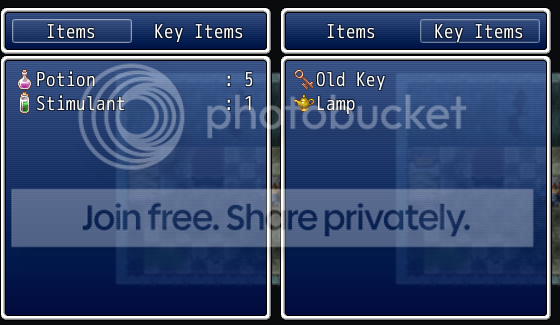
A simple edit to the item menu so it only shows Items and Key Items as well as
gets rid of the Help Text; also, only regular Items have numbers. Supposed to
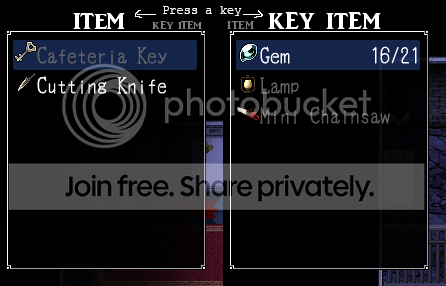
emulate the item menu from "Mad Father"

Just paste it in above Main and it'll work. (though probably not with other
Item menu changing scripts)
=end


class Window_ItemCategory < Window_HorzCommand
  #--------------------------------------------------------------------------
  # * Get Window Width
  #--------------------------------------------------------------------------
  def window_width
    Graphics.width/2
  end
  #--------------------------------------------------------------------------
  # * Get Digit Count (changed number)
  #--------------------------------------------------------------------------
  def col_max
    return 2
  end
  #--------------------------------------------------------------------------
  # * Create Command List (Items & Key Items only)
  #--------------------------------------------------------------------------
  def make_command_list
    add_command(Vocab::item,     :item)
    add_command(Vocab::key_item, :key_item)
  end
end

class Window_ItemList < Window_Selectable
  #--------------------------------------------------------------------------
  # * Get Digit Count (changed number)
  #--------------------------------------------------------------------------
  def col_max
    return 1
  end
  #--------------------------------------------------------------------------
  # * Include in Item List? (removed weapons and armor)
  #--------------------------------------------------------------------------
  def include?(item)
    case @category
    when :item
      item.is_a?(RPG::Item) && !item.key_item?
    when :key_item
      item.is_a?(RPG::Item) && item.key_item?
    else
      false
    end
  end
  #--------------------------------------------------------------------------
  # * Draw Item (changed draw_item_number)
  #--------------------------------------------------------------------------
  def draw_item(index)
    item = @data[index]
      rect = item_rect(index)
      rect.width -= 4
      draw_item_name(item, rect.x, rect.y, enable?(item))
     if item.is_a?(RPG::Item) && !item.key_item?
      draw_item_number(rect, item)
    else
      false
    end
  end
  #--------------------------------------------------------------------------
  # * Draw Number of Items
  #--------------------------------------------------------------------------
  def draw_item_number(rect, item)
    draw_text(rect, sprintf(":%2d", $game_party.item_number(item)), 2)
  end
end

class Scene_Item < Scene_ItemBase
  #--------------------------------------------------------------------------
  # * Start Processing (removed help window
  #--------------------------------------------------------------------------
  def start
    super
    create_category_window
    create_item_window
  end
  #--------------------------------------------------------------------------
  # * Create Category Window
  #--------------------------------------------------------------------------
  def create_category_window
    @category_window = Window_ItemCategory.new
    @category_window.viewport = @viewport
    @category_window.y = 20
    @category_window.set_handler(:ok,     method(:on_category_ok))
    @category_window.set_handler(:cancel, method(:return_scene))
  end
  #--------------------------------------------------------------------------
  # * Create Item Window
  #--------------------------------------------------------------------------
  def create_item_window
    wy = @category_window.y + @category_window.height
    wh = Graphics.height - 150
    @item_window = Window_ItemList.new(0, wy, Graphics.width/2, wh)
    @item_window.viewport = @viewport
    @item_window.set_handler(:ok,     method(:on_item_ok))
    @item_window.set_handler(:cancel, method(:on_item_cancel))
    @category_window.item_window = @item_window
  end
end




 Amazon Fire TV 50-Inch 4-Series 4K UHD Smart TV
4K smart TV with Fire TV built in for streaming, games, and living room viewing.
View on Amazon
Amazon Fire TV 50-Inch 4-Series 4K UHD Smart TV
4K smart TV with Fire TV built in for streaming, games, and living room viewing.
View on Amazon

