

Sprite Sheet: 8 Frames for Single Direction?
BMM_Archive · July 15, 2026

Original Source
- Original title: Sprite Sheet: 8 Frames for Single Direction?
- Original author: Nigredo92
- Original date: April 28, 2016
- Source thread: https://forums.rpgmakerweb.com/threads/sprite-sheet-8-frames-for-single-direction.61054/
- Source forum path: Game Development Engines > Legacy Engine Support > RPG Maker XP Support
Summary
After browsing the web and the forums, I couldn't really find a straight answer. All the solutions seem to involve plugging in a script or changing this manually, and only apply to sprite sheets which are customized to 8x4. Basically, I want to use 8 FRAMES on the default sprite sheet for 'down'. The sprite only moves that direction anyway, and that sprite is only used once, so using a script seems impractical. I have zero experience with scripting and I'd like to avoid using them for now. The current default is...
Archived First Post
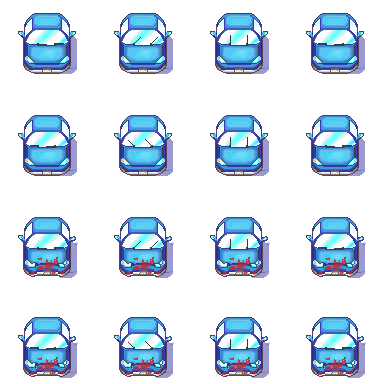
Basically, I want to use 8 FRAMES on the default sprite sheet for 'down'. The sprite only moves that direction anyway, and that sprite is only used once, so using a script seems impractical. I have zero experience with scripting and I'd like to avoid using them for now.
The current default is using only 4 frames. It makes the animation look choppy; not as smooth as I want.
Is there a way to automatically cycle between row 1/2 or 3/4 while the character is moving down, or do I have to change the graphic manually every 4 frames? (Something equally impractical.)
If it helps any to visualize, the sprite is a car moving straight down the screen, top to bottom, with windshield wipers swiping left and right.
Would the solution be to turn the character left or right? If i do, will the sprite still move top to bottom when 'turned'?
Thanks!
-Nigredo92
Downloads / Referenced Files
RPG Maker Web attachments are mirrored locally when available. Other external links remain hosted by their original creator or third-party service.
- Local mirror: 22070-701d4120ef9c6a05365c2fc3ef3a89d5.png
SHA-256:e251c3bef78d3d3b6050b210271ee94cca8d7ea0f4c755fa2061de773b26c03c
Original attachment URL: https://forums.rpgmakerweb.com/attachments/autofinalpng-png.37218/
Referenced Images / Attachments
Creator Claims / Removal
If you are the original creator and want this listing reassigned, edited, or removed, join BMMPlay and contact the moderators with proof that matches the original RPG Maker Web profile, linked GitHub, itch.io page, or another public creator identity.
Replies (0)
No replies yet.
Topic Summary
Loading summary...