

How do I know which index is on the sprite file?
BMM_Archive · July 15, 2026

BMM_Archive
Preserved forum archive. This topic stores the original first post and locally mirrored RPG Maker Web attachments when available. It is posted by the BMMPlay archive account, not by the original creator.
Original Source
- Original title: How do I know which index is on the sprite file?
- Original author: rpgmakerxp
- Original date: March 3, 2016
- Source thread: https://forums.rpgmakerweb.com/threads/how-do-i-know-which-index-is-on-the-sprite-file.57868/
- Source forum path: Game Development Engines > Legacy Engine Support > RPG Maker XP Support
Summary
Hi I'm trying to have the sprite change graphics automatically using a script. The instructions are as follows: " Code: # To change sprites:
Archived First Post
Hi I'm trying to have the sprite change graphics automatically using a script. The instructions are as follows:
"
"
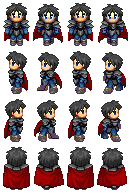
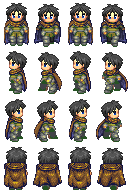
The actor_id for it would be 001. The filename of the sprite graphic would be "spritexb-8028.png". The Index of the sprite graphic is where I am lost. How do I find the index? What does it look like when you type it out?
Also would the sprites below be counted as a single-sprite file or since it has many sprites it also has many indices?
I provided some sprites below as examples. Where the sprite changes "armor" using this script.
Here's a link where I found the script.
"
Code:
#	 To change sprites:
#
#	 <ge: actor_id, sprite_name, sprite_index>
#
#	 actor_id: The ID of the actor to be change graphics.
#	 sprite_name: The filename of the sprite graphic to be placed.
#	 sprite_index: The index of the sprite graphic to be placed.
#
#	 To change face:
#
#	 <fe: actor_id, face_name, face_index>
#
#	 actor_id: The ID of the actor to be change face.
#	 face_name: The filename of the face graphic to be placed.
#	 face_index: The index of the face graphic to be placed.
#
#	 Notes:
#	 * If you use a single-sprite file (files with $ at the
#	 beginning), you may also add it but the index must be 0.
#	 * If the notetag is not fit in a single line, shorten the filename or
#	 use the other method below.
#	 * You may put many notetags for the different actors at the same
#	 equipment.
"
The actor_id for it would be 001. The filename of the sprite graphic would be "spritexb-8028.png". The Index of the sprite graphic is where I am lost. How do I find the index? What does it look like when you type it out?
Also would the sprites below be counted as a single-sprite file or since it has many sprites it also has many indices?
I provided some sprites below as examples. Where the sprite changes "armor" using this script.
Here's a link where I found the script.
Downloads / Referenced Files
RPG Maker Web attachments are mirrored locally when available. Other external links remain hosted by their original creator or third-party service.
- Local mirror: 19117-eae20f979cebb535308dd6bccff5280a.png
SHA-256:fbe8899f3bdb5083d6e0a4721088e64c287dbc46e3c05c7593efa7fa6cacc8f5
Original attachment URL: https://forums.rpgmakerweb.com/attachments/spritexb-8028-png.32866/ - Local mirror: 19118-f9b3db4f073752a21eb185fe26a75b99.png
SHA-256:1177e1c05150fa0d8af86b7e16ea94df04acbd58a3b5ecefb16d2093c4de6642
Original attachment URL: https://forums.rpgmakerweb.com/attachments/spritexb-1646-png.32867/
Referenced Images / Attachments
Creator Claims / Removal
If you are the original creator and want this listing reassigned, edited, or removed, join BMMPlay and contact the moderators with proof that matches the original RPG Maker Web profile, linked GitHub, itch.io page, or another public creator identity.
Replies (0)
No replies yet.
0
replies
27
views
Topic Summary
Loading summary...