

[RMXP] Changing transparent background color
BMM_Archive · July 15, 2026

Original Source
- Original title: [RMXP] Changing transparent background color
- Original author: Trekker
- Original date: May 8, 2014
- Source thread: https://forums.rpgmakerweb.com/threads/rmxp-changing-transparent-background-color.26814/
- Source forum path: Game Development Engines > Legacy Engine Support > RPG Maker XP Support
Summary
This is about anything that has a transparent background in RMXP. I was unable to find anyone with a similar issue after searching the forum threads and Google. Google Images of "RPG Maker XP" don't show anyone having a red background for the transparent part of the tileset graphic panel (left side of screen). The red background also occurs in the Database (F9), where transparent parts may be shown in different images under tabs. This also affects the map when transparent tiles are shown. Doesn't look nice. What's interesting is...
Archived First Post
I was unable to find anyone with a similar issue after searching the forum threads and Google. Google Images of "RPG Maker XP" don't show anyone having a red background for the transparent part of the tileset graphic panel (left side of screen). The red background also occurs in the Database (F9), where transparent parts may be shown in different images under tabs. This also affects the map when transparent tiles are shown. Doesn't look nice.
What's interesting is this... every time I create a new project, the transparent color is either medium blue or green (they are very different). Then every time after closing RMXP and restarting it (without modifying any settings or files), any project that is opened will have the same red background for all transparent parts. It stays like that indefinitely.
Here are some screenshots. Does anyone know what could be causing this?
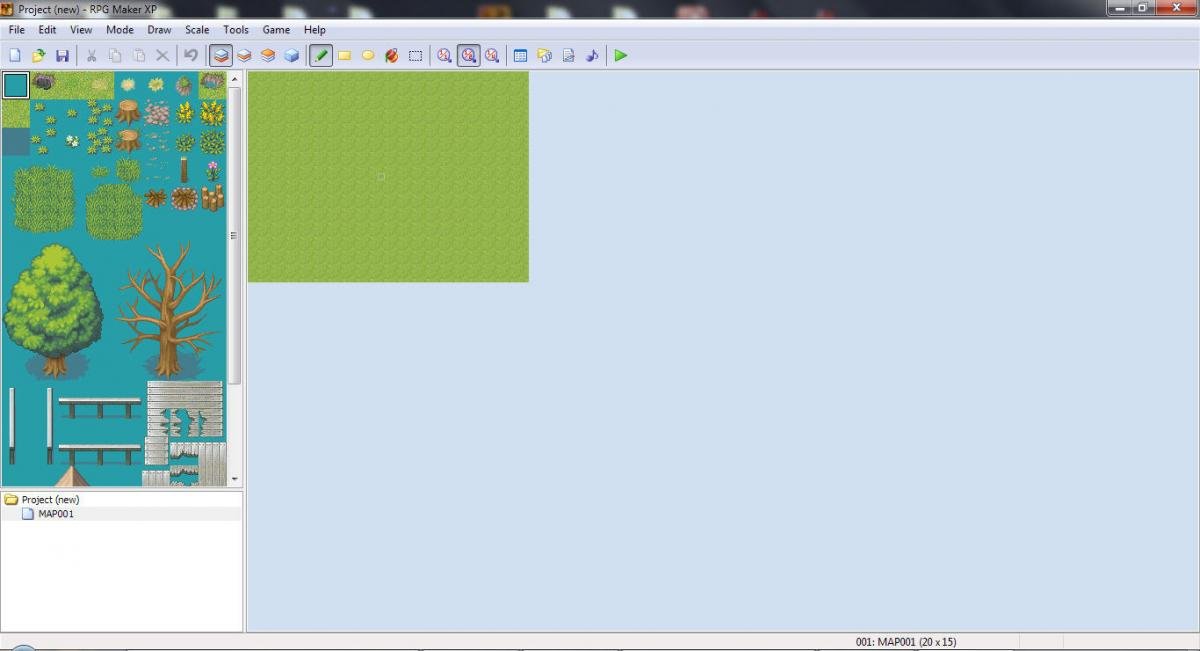 New project is created, blue background is shown in tileset graphic panel
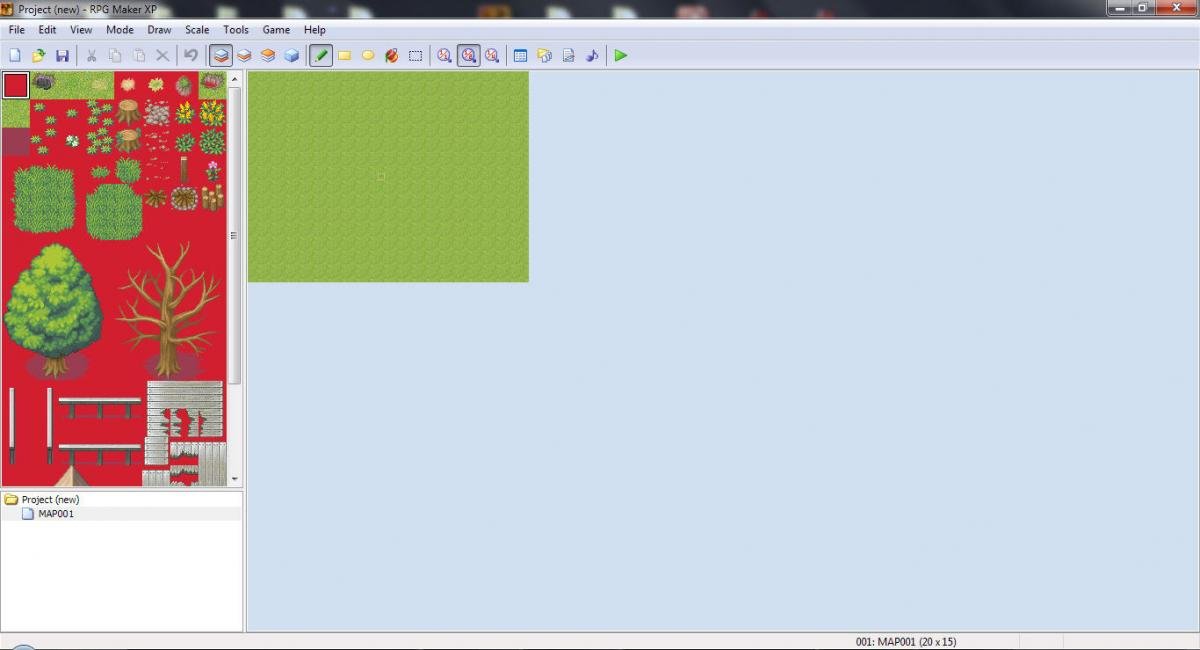 After RMXP restart, red background is shown in tileset graphic panel
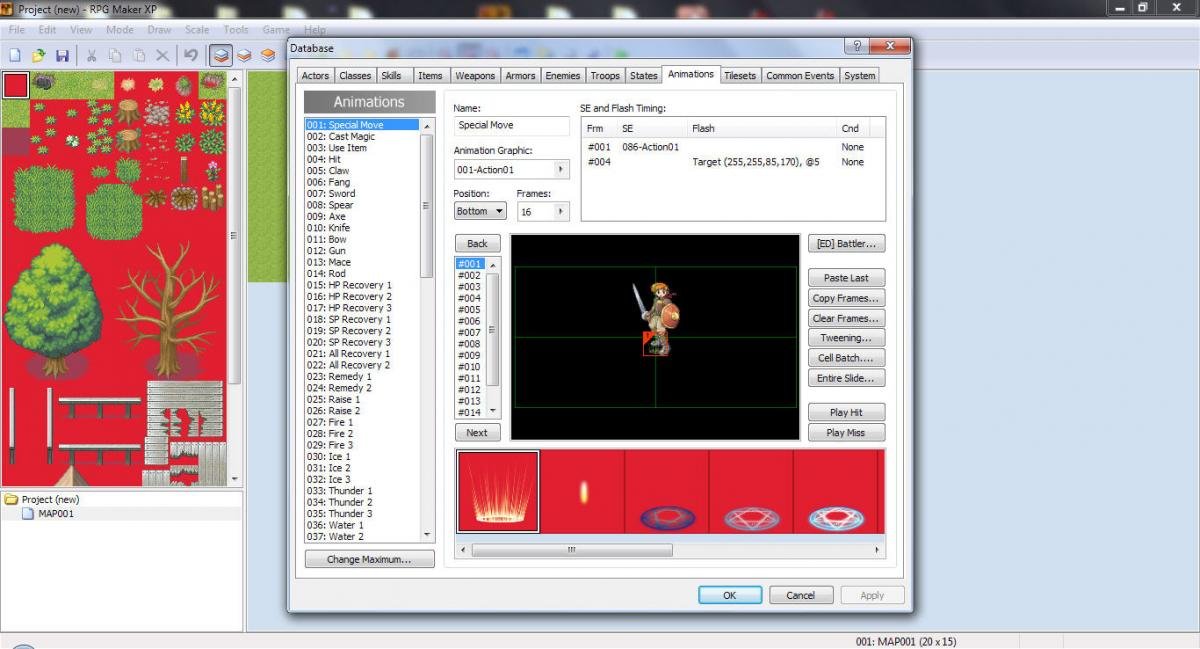 After RMXP restart, red background is also shown in Database graphics
Downloads / Referenced Files
RPG Maker Web attachments are mirrored locally when available. Other external links remain hosted by their original creator or third-party service.
- Local mirror: 5524-bfe72a113305d14225dcb2e750ea397a.jpg
SHA-256:698fd9c1cc7e624ce9261ed282362ce6ee971d5498c0795de39fc6c3bdfb895c
Original attachment URL: https://forums.rpgmakerweb.com/attachments/1-new-project-when-created-jpg.12917/ - Local mirror: 5525-ae66233a58160f2c461bcbcbd8c6255b.jpg
SHA-256:1c32c6a0c8d21eca1cf9949bfc226eddb06d40296316d22c39d304aef0cc30ec
Original attachment URL: https://forums.rpgmakerweb.com/attachments/2-new-project-after-restart-jpg.12918/ - Local mirror: 5526-9c63a144ffcdfb149d343407edacbb71.jpg
SHA-256:b2791a54fbf94d429ad1b124c55f4da21e489b9df8ac6c0c7ac969ca709daa41
Original attachment URL: https://forums.rpgmakerweb.com/attachments/3-new-project-after-restart-jpg.12919/
Referenced Images / Attachments
Creator Claims / Removal
If you are the original creator and want this listing reassigned, edited, or removed, join BMMPlay and contact the moderators with proof that matches the original RPG Maker Web profile, linked GitHub, itch.io page, or another public creator identity.
Replies (0)
No replies yet.
Topic Summary
Loading summary...