

Help with event graphic problems?
BMM_Archive · July 15, 2026

Original Source
- Original title: Help with event graphic problems?
- Original author: Messed-UpSaia
- Original date: September 23, 2015
- Source thread: https://forums.rpgmakerweb.com/threads/help-with-event-graphic-problems.45022/
- Source forum path: Game Development Engines > Legacy Engine Support > RPG Maker XP Support
Summary
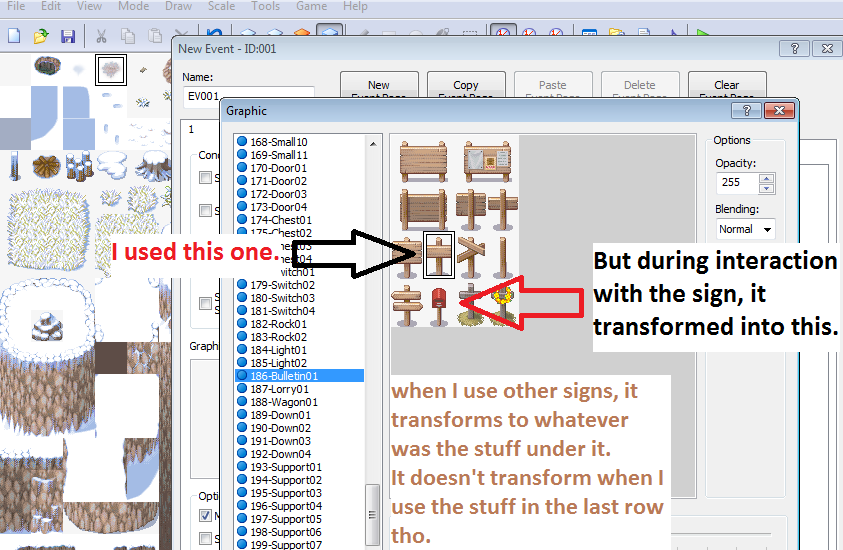
Hello! I'm a noob in xp since I recently moved there from ace because I thought I could create maps smoother in xp, but since I can't use multiple tile sets in one map (for snow field), and I needed a sign by some road - because the snow field tileset doesn't have it - so I just used an event graphic. I did this: used a sign grapic in event menu > show text like "Road closed" > then I clicked apply then Ok.
Archived First Post
I'm a noob in xp since I recently moved there from ace because I thought I could create maps smoother in xp, but since I can't use multiple tile sets in one map (for snow field), and I needed a sign by some road - because the snow field tileset doesn't have it - so I just used an event graphic.
I did this:
used a sign grapic in event menu > show text like "Road closed" > then I clicked apply then Ok.
then I play tested it, but when the character makes contact with the sign, it transforms into something else but returns to normal after the interaction. What could be the problem?
That's all, I hope you guys can help...
Downloads / Referenced Files
RPG Maker Web attachments are mirrored locally when available. Other external links remain hosted by their original creator or third-party service.
- Local mirror: 13032-7cda912b335710e7d3f49b36aefb16c9.png
SHA-256:3afc51e06e6cb56918fe4f31fa8551b47788d395555baf1374f706f95b5e4af7
Original attachment URL: https://forums.rpgmakerweb.com/attachments/problem-png.23843/
Referenced Images / Attachments
Creator Claims / Removal
If you are the original creator and want this listing reassigned, edited, or removed, join BMMPlay and contact the moderators with proof that matches the original RPG Maker Web profile, linked GitHub, itch.io page, or another public creator identity.
Replies (0)
No replies yet.
Topic Summary
Loading summary...