

How to make event disappear after leaving and coming back?
BMM_Archive · July 15, 2026

BMM_Archive
Preserved forum archive. This topic stores the original first post and locally mirrored RPG Maker Web attachments when available. It is posted by the BMMPlay archive account, not by the original creator.
Original Source
- Original title: How to make event disappear after leaving and coming back?
- Original author: Cicura
- Original date: June 5, 2015
- Source thread: https://forums.rpgmakerweb.com/threads/how-to-make-event-disappear-after-leaving-and-coming-back.40860/
- Source forum path: Game Development Engines > Legacy Engine Support > RPG Maker XP Support
Summary
So I'm really really trying to understand how to make a game and after wayyy too much work, I finally got an event to work how I wanted! Konoe sets Mori (the cat) down, and it walks off upstairs, wanting her to follow. { "lightbox_close": "Close", "lightbox_next": "Next",
Archived First Post
So I'm really really trying to understand how to make a game and after wayyy too much work, I finally got an event to work how I wanted! Konoe sets Mori (the cat) down, and it walks off upstairs, wanting her to follow.
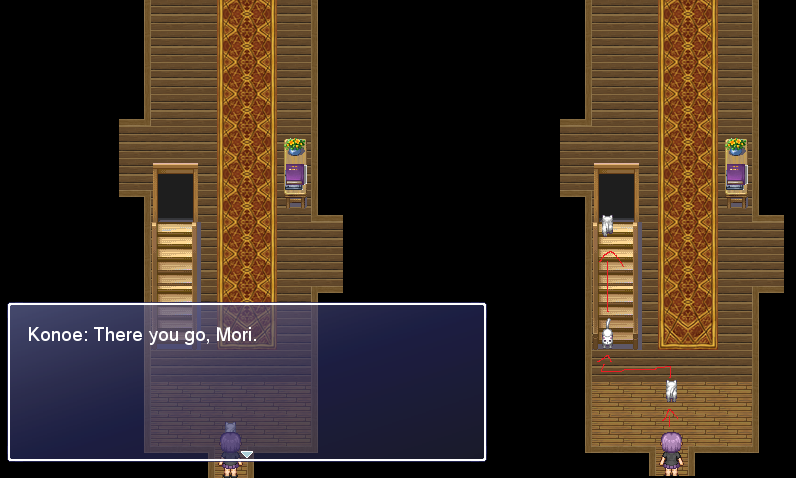
What I need help with is when I go upstairs and come back, or if I choose to go outside again and come back, I don't want Mori to still be in the room. I want him to be upstairs now!
Here's my code:
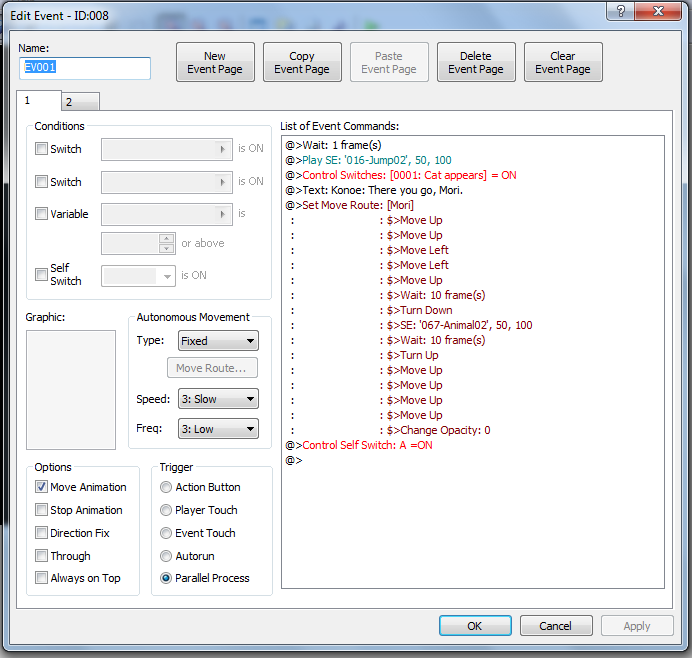
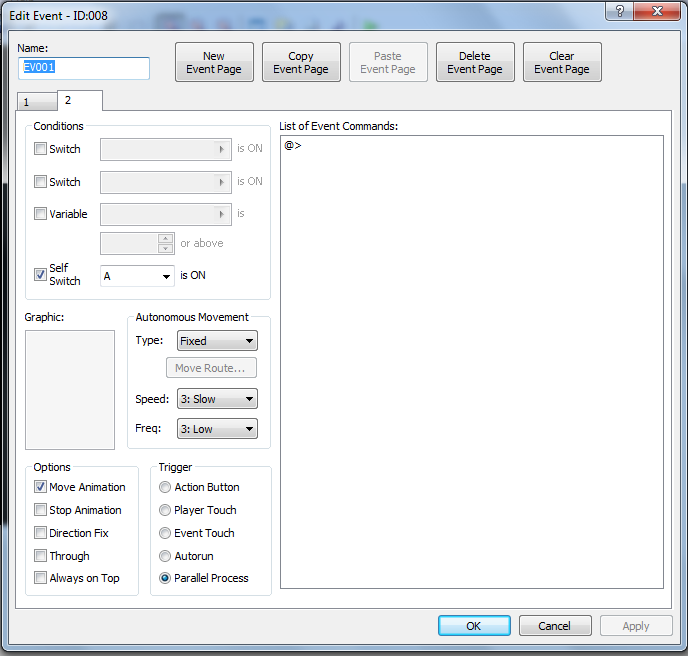
From everything I've read, you don't use erase event, you use control switches. I could swear I was doing exactly as I read in other posts and the people who asked the questions there said "thanks, it works" but not for me! What am I doing wrong >.<?
What I need help with is when I go upstairs and come back, or if I choose to go outside again and come back, I don't want Mori to still be in the room. I want him to be upstairs now!
Here's my code:
From everything I've read, you don't use erase event, you use control switches. I could swear I was doing exactly as I read in other posts and the people who asked the questions there said "thanks, it works" but not for me! What am I doing wrong >.<?
Downloads / Referenced Files
RPG Maker Web attachments are mirrored locally when available. Other external links remain hosted by their original creator or third-party service.
- Local mirror: 11151-879c8cbd7a633bac6fcf0626794b60fa.png
SHA-256:4d0134889296cdbc9630e57cc797aab5ef47dd281e458340941e69cf87613a64
Original attachment URL: https://forums.rpgmakerweb.com/attachments/1-png.21272/ - Local mirror: 11152-6ed0b957ab675d780f1cb1abd01940b1.png
SHA-256:e06a3cb4a2e91a4f723b098a94ee55488bf3c722c8efb8875c64a1f6cb0e6ad5
Original attachment URL: https://forums.rpgmakerweb.com/attachments/2-png.21273/ - Local mirror: 11153-1cef33d14cfd497a9e5702baa7447123.png
SHA-256:050c10fd75a31976114c223105dc966c72e0c9529396b78f44b9a09952711d86
Original attachment URL: https://forums.rpgmakerweb.com/attachments/3-png.21274/
Referenced Images / Attachments
Creator Claims / Removal
If you are the original creator and want this listing reassigned, edited, or removed, join BMMPlay and contact the moderators with proof that matches the original RPG Maker Web profile, linked GitHub, itch.io page, or another public creator identity.
Replies (0)
No replies yet.
0
replies
15
views
Topic Summary
Loading summary...