

RPG Maker MV Deployment to Windows Store via Visual Studio Issue
BMM_Archive · July 15, 2026

Original Source
- Original title: RPG Maker MV Deployment to Windows Store via Visual Studio Issue
- Original author: cunningorb
- Original date: June 27, 2017
- Source thread: https://forums.rpgmakerweb.com/threads/rpg-maker-mv-deployment-to-windows-store-via-visual-studio-issue.80400/
- Source forum path: Game Development Engines > RPG Maker Javascript Plugins > RPG Maker Mobile Deployment
Summary
When I deploy my game to the Windows Store, the plugins do not work. I am really loving RPG Maker MV! I do however have an issue deploying to the Windows Store using Visual Studio 2017 and Cordova 6.3.1. Points to note: Plugins run in RPG Maker MV 1.5 testing. Plugins run in debugging using Visual Studio.
Archived First Post
I am really loving RPG Maker MV! I do however have an issue deploying to the Windows Store using Visual Studio 2017 and Cordova 6.3.1. Points to note:
- Plugins run in RPG Maker MV 1.5 testing.
- Plugins run in debugging using Visual Studio.
- Plugins run on release version testing for ARM and x86 using Visual Studio.
- Plugins run on Android version in Google Play store.
- All software is up to date (RPG Maker MV, Visual Studio 2017, Windows 10)
- Deploying to .exe for Windows works fine, plugins ran in that version.
- All .js files are in UTF-8 encoding.
https://forums.rpgmakerweb.com/index.php?threads/rpg-maker-mv-visual-studios-utf-8-problem.74989/
https://forums.rpgmakerweb.com/index.php?threads/need-tutorial-for-deploying-to-windows-store.75297/
If we can resolve this together as a community I will be more than happy to put a tutorial together on how I did it start to finish. It was not actually that hard to get a game made and published using Visual Studio.
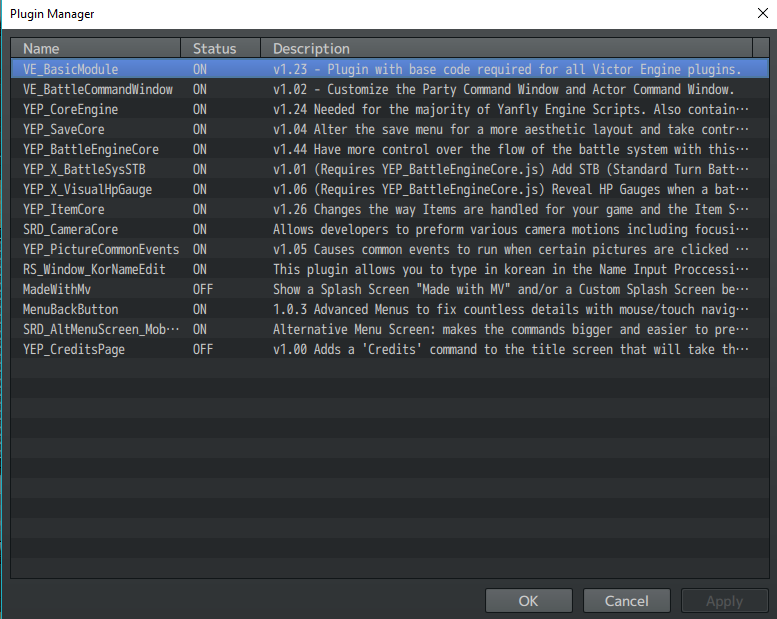
For reference, here are the plugins I'm using.
10/24/2017 Update: Fix Found
Details: https://forums.rpgmakerweb.com/inde...-visual-studio-issue.80400/page-2#post-788226
Downloads / Referenced Files
RPG Maker Web attachments are mirrored locally when available. Other external links remain hosted by their original creator or third-party service.
- Local mirror: 45840-1e66e36f12b298cc22975e5aaa0ec6d7.png
SHA-256:3d554bdaf089ee5efc966402138562efc1053bf9c192ade969972b16f36a4911
Original attachment URL: https://forums.rpgmakerweb.com/attachments/capture-png.67342/
Referenced Images / Attachments
Creator Claims / Removal
If you are the original creator and want this listing reassigned, edited, or removed, join BMMPlay and contact the moderators with proof that matches the original RPG Maker Web profile, linked GitHub, itch.io page, or another public creator identity.
Replies (0)
No replies yet.
Topic Summary
Loading summary...