

Successful iPhone App Export - What I did differently
BMM_Archive · July 15, 2026

BMM_Archive
Preserved forum archive. This topic stores the original first post and locally mirrored RPG Maker Web attachments when available. It is posted by the BMMPlay archive account, not by the original creator.
Original Source
- Original title: Successful iPhone App Export - What I did differently
- Original author: marshzd
- Original date: October 23, 2015
- Source thread: https://forums.rpgmakerweb.com/threads/successful-iphone-app-export-what-i-did-differently.46605/
- Source forum path: Game Development Engines > RPG Maker Javascript Plugins > RPG Maker Mobile Deployment
Summary
First of all, this isn't a fix all for every situation. This is just what I had to do in order to get things to work. Basically two steps in 4-3-1 were adjusted. 1) I was getting an error in 4-3-1 when I attempted to Archive. { "lightbox_close": "Close",
Archived First Post
First of all, this isn't a fix all for every situation. This is just what I had to do in order to get things to work. Basically two steps in 4-3-1 were adjusted.
1) I was getting an error in 4-3-1 when I attempted to Archive.
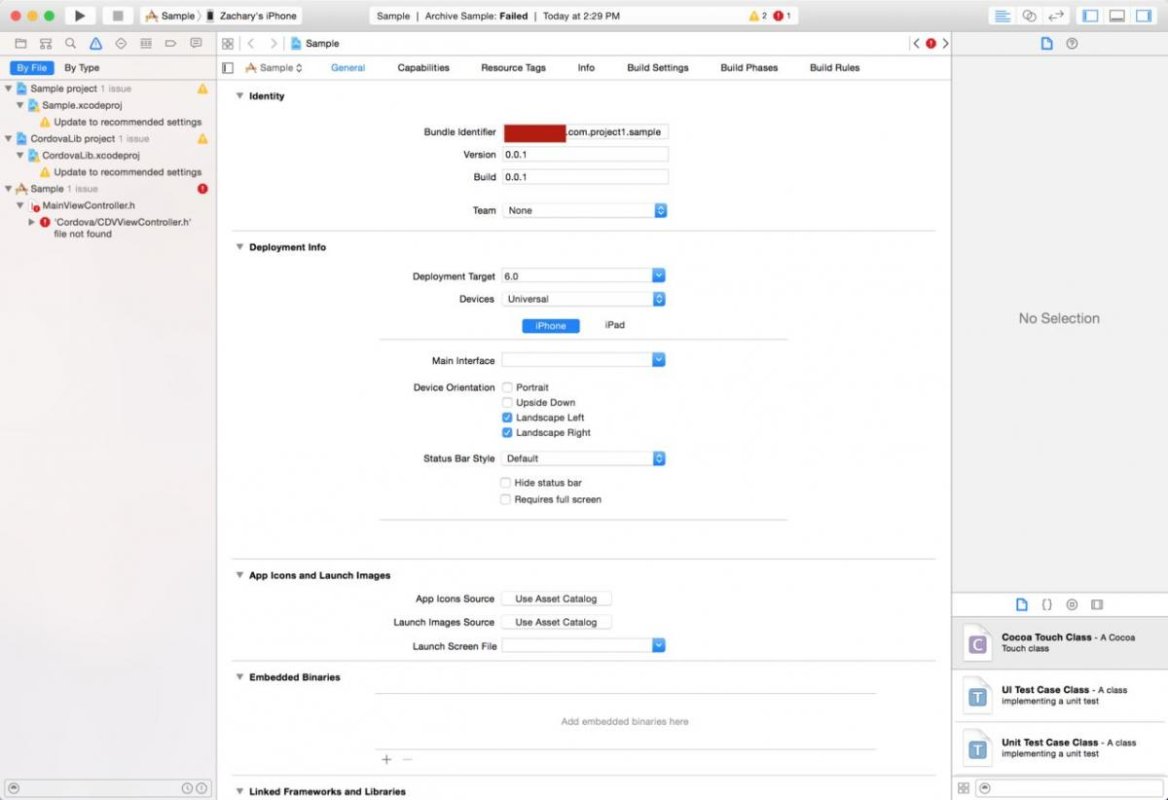
To fix this, you basically need to Clean your project, select the project, then ADD this (don't delete the other files there) to your Build Settings -> Header Search Paths item:
"$(OBJROOT)/UninstalledProducts/$(PLATFORM_NAME)/include"
This is a problem with Apple's Xcode latest update. It's possible it's not considered a bug, it's just a recent change they made, so it may never be "fixed".
(Thanks to this link for that solution http://forum.ionicframework.com/t/cordova-cdvviewcontroller-h-file-not-found-in-xcode-7-1-beta/32232/3)
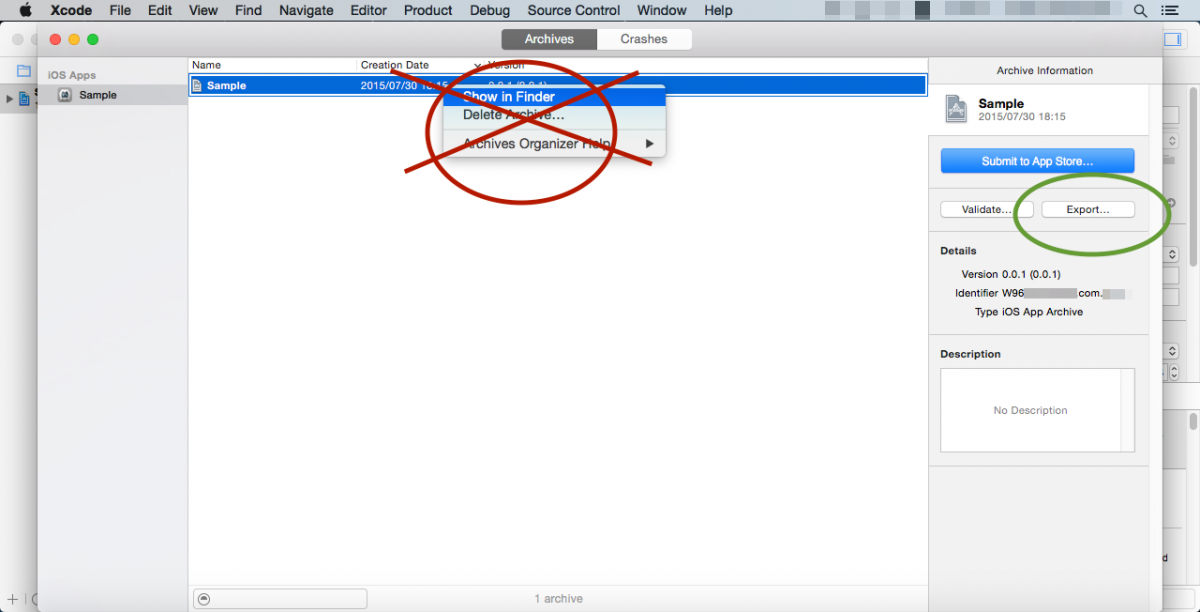
2) Instead of the "Show in Finder" step, and then using the terminal command to build the App, I just went to the right bar and selected "Export..." and followed the instructions to create my app. I had success with this.
That's what I've figured out so far. Hopefully it helps someone out.
Thanks!
1) I was getting an error in 4-3-1 when I attempted to Archive.
To fix this, you basically need to Clean your project, select the project, then ADD this (don't delete the other files there) to your Build Settings -> Header Search Paths item:
"$(OBJROOT)/UninstalledProducts/$(PLATFORM_NAME)/include"
This is a problem with Apple's Xcode latest update. It's possible it's not considered a bug, it's just a recent change they made, so it may never be "fixed".
(Thanks to this link for that solution http://forum.ionicframework.com/t/cordova-cdvviewcontroller-h-file-not-found-in-xcode-7-1-beta/32232/3)
2) Instead of the "Show in Finder" step, and then using the terminal command to build the App, I just went to the right bar and selected "Export..." and followed the instructions to create my app. I had success with this.
That's what I've figured out so far. Hopefully it helps someone out.
Thanks!
Downloads / Referenced Files
RPG Maker Web attachments are mirrored locally when available. Other external links remain hosted by their original creator or third-party service.
- Local mirror: 13518-635c2e86aa1abbd7e0bab47e78af4c26.jpg
SHA-256:62770bd9205bbc698b15c35f5a4235a4caa92098fe17ad990f4919bb466db284
Original attachment URL: https://forums.rpgmakerweb.com/attachments/screen_shot_2015_10_23_at_2_36_39_pm-jpg.24432/ - Local mirror: 13519-6f5441e93ac9da8ae63e94676d096d2d.png
SHA-256:432be32393d8c17cdb5cef927aec8416b2b8e84dec27e203c33269416be70140
Original attachment URL: https://forums.rpgmakerweb.com/attachments/4-1-42-png.24433/
Referenced Images / Attachments
Creator Claims / Removal
If you are the original creator and want this listing reassigned, edited, or removed, join BMMPlay and contact the moderators with proof that matches the original RPG Maker Web profile, linked GitHub, itch.io page, or another public creator identity.
Replies (0)
No replies yet.
0
replies
34
views
Topic Summary
Loading summary...