

Undertale Battle System (Beta 1.20)
BMM_Archive · July 15, 2026

Original Source
- Original title: Undertale Battle System (Beta 1.20)
- Original author: SumRndmDde
- Original date: May 7, 2016
- Source thread: https://forums.rpgmakerweb.com/threads/undertale-battle-system-beta-1-20.61546/
- Source forum path: Game Development Engines > RPG Maker Javascript Plugins > JS Plugins In Development
Summary
Undertale Battle System Beta 1.20 SumRndmDde
Archived First Post
Undertale Battle System
Beta 1.20
SumRndmDde
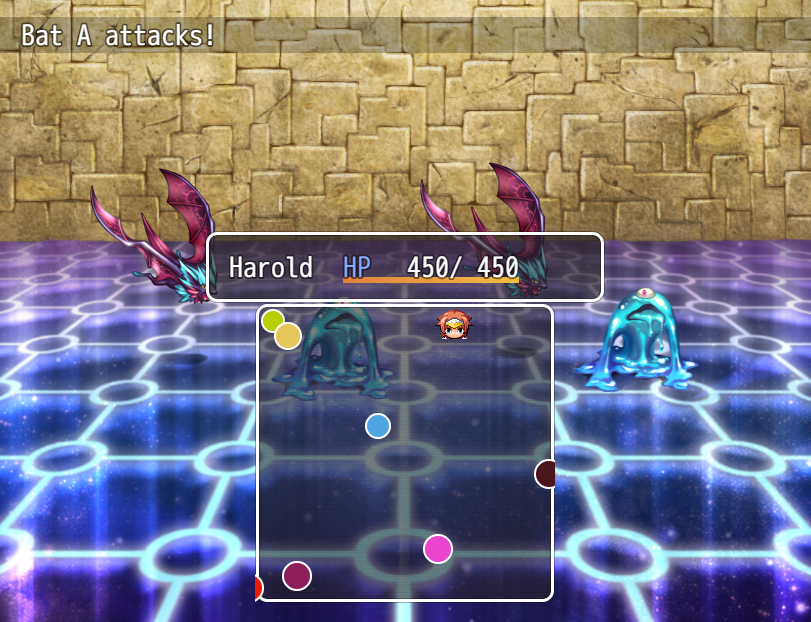
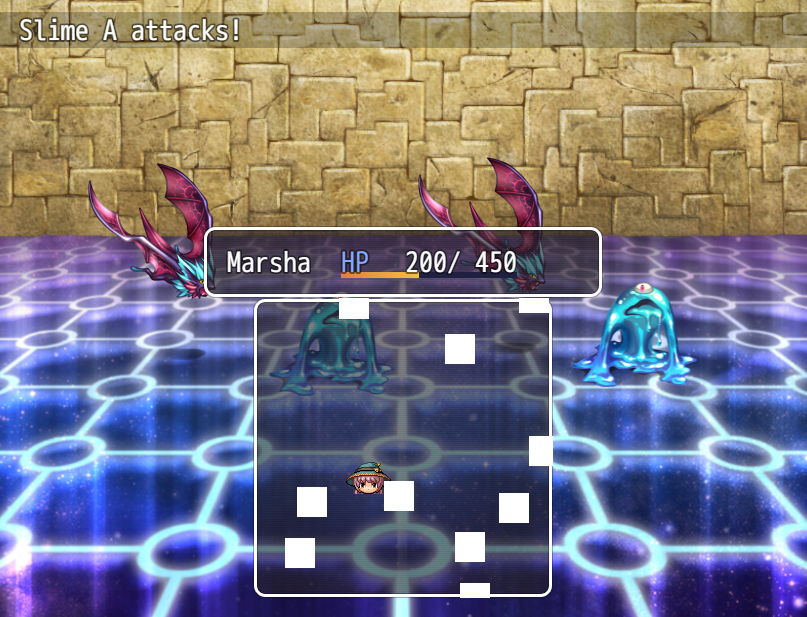
To start off, let me just say that the "Undertale Battle System" at least in terms of this Plugin refers to the "bullet-hell" style dodging system that Undertale contained. I will hopefully add the other aspects of Undertale Battle System such as the timed attacking system and stuff like that, but for the time being, the goal is to recreate the most difficult, and most famous part of Undertale's battle system, which is the bullet-hell dodging thingy.
Old Video Demonstrations:
BETA DOWNLOAD
Currently the Plugin is in Beta.
You can download it here!
https://sumrndmdde.wordpress.com/undertale-battle-system/
Furthermore, you can find the online Attack Creator Tool here:
http://sumrndmdde.github.io/UTB-Attack-Creator/
GOALS
The goal of the Plugin is as follows:
- Recreate the ability to dodge enemy attacks
- Give the Player the ability to customize the attacks based off of the "Skill" used by the Enemy
- Add the ability to give the "Player Icon" different abilities like shown in Undertale
- Have the abilities based on the Actor currently dodging the attack and their status, equips, class, etc...
- Have some sort of way to customize the image of the attacks
- Have the horizontal and vertical speeds be based off of a formula the user inputs
- Hopefully have some sort of way to make different "playing fields"
KNOWN BUGS
None Currently
(Find dem for me!)
SUGGESTIONS AND COMMENTS
If you have any good ideas on how the attacks can be customized or how anything else in the Plugin should be done in terms of user interaction, comment below and let me know!
TERMS OF USE (for Beta Plugins)
– This Plugin may be used in free or commercial games.
– If used in a publicly released game, an easily accessible link to a forum post/video where the Beta Plugin can be found is mandatory.
– You are allowed to edit for personal usage.
– You may NOT steal code for your own released Plugins without credit.
– If used in any publicly released game, then “SumRndmDde” must be given credited.
Detailed Changelog
– Damage is now based on the damage a Skill would normally do as opposed to consistently doing 50 damage.
– “Delete Distance” can be used to specify a specific distance outside the box an attack may go before it is deleted.
Ex: <UTB Attack 1>
...
Delete Distance: 250
</UTB Attack 1>
– Added <span style="color: #DAA520">YELLOW mode. It let’s you shoot bullets when pushing “Z”. Use
<UTB Mode: 4> to set the Skill to have <span style="color: #DAA520">YELLOW mode.
Version Beta 1.10
– Added “message” function to be used in UTB Code
this.message(“message”);
– Added “createAttack” function to be used in UTB Code
this.createAttack(id);
– Added JavaScript Code Notetag for Code that will
be called every frame the Skill is Active
<UTB Code>…</UTB Code>
– Fixed Compatbility Issue with YEP Battle Engine Core
– Upgraded the Attack Deletion System
– Preload Face Images
Version Beta 1.00
- Added Parameters for various customization
- Fixed various bugs
- Created an individual class for the Player
<span style="color: #ff0000">- Beta Plugin Released at this version
Version Alpha 1.40
- Added the ability to give objects custom images
- Added "modes" to the Player
- Added the ability to customize "mode" per attack
- Added "blue mode" aka. gravity game
<span style="color: #FF0000"> - Demo Created at this version
Version Alpha 1.30
- Added Custom Spawn Rates
- Added Spawn Delay
- Custom Color
- Added the ability to have 9 desperate UTB objects per attack
- Further improved upon collision system
Version Alpha 1.20
- Improved upon collision system
- Made collisions cusomizable per UTB attack object
- Added the ability to view collision masks of objects
Version Alpha 1.10
- Build UTB Attacks based on Skills used by Enemy
- Added Notetag system for customizing UTB attacks
- Added customizable durations for the UTB attacks
- Added "Dynamic" and "Static" movement
Version Alpha 1.00
- Initial reveal version
- Created the basic system with hard-coded attacks for each enemy
- Demo Created at this version
SCREEN SHOTS
Thanks for reading!
If you wish to support this Plugin's development, please leave a comment!
Downloads / Referenced Files
RPG Maker Web attachments are mirrored locally when available. Other external links remain hosted by their original creator or third-party service.
- Local mirror: 22432-b90c525480faec5b95aab36c89517d94.png
SHA-256:3f47bb34228110538fa594d6dcc2ae671f2cabab2e4e41e5c21e69761c547455
Original attachment URL: https://forums.rpgmakerweb.com/attachments/utb-pic-2-png.37684/ - Local mirror: 22433-58f2f84a8f96c302e1a0ab5c6cfc3b10.png
SHA-256:32bcefd8818c42fc327d9e827d5acfe9181962e2314b5e9c3424da0dbab1bc84
Original attachment URL: https://forums.rpgmakerweb.com/attachments/utb-pic-3-png.37685/
License / Terms Note
If you have any good ideas on how the attacks can be customized or how anything else in the Plugin should be done in terms of user interaction, comment below and let me know! TERMS OF USE (for Beta Plugins) – This Plugin may be used in free or commercial games. – If used in a publicly released game, an easily accessible link to a forum post/video where the Beta Plugin can be found is mandatory.
Referenced Images / Attachments
Creator Claims / Removal
If you are the original creator and want this listing reassigned, edited, or removed, join BMMPlay and contact the moderators with proof that matches the original RPG Maker Web profile, linked GitHub, itch.io page, or another public creator identity.
Replies (0)
No replies yet.
Topic Summary
Loading summary...