

MV Grid Battle System (early access test: tile states)
BMM_Archive · July 15, 2026

Original Source
- Original title: MV Grid Battle System (early access test: tile states)
- Original author: Tsukihime
- Original date: July 29, 2020
- Source thread: https://forums.rpgmakerweb.com/threads/grid-battle-system-early-access-test-tile-states.124706/
- Source forum path: Game Development Engines > RPG Maker Javascript Plugins > JS Plugins In Development
Summary
- https://itch.io/t/912596/public-testing-1 Very simple compatibility test to see if you can add it to your project. Feel free to try it out. Public Testing #2 - https://itch.io/t/929529/public-testing-2 Some extra plugins that let you try out one grid or two grid battles, skill ranges (for two grid), and a basic "move" command.
Archived First Post
If you want to follow the development.
Public Testing #1 - https://itch.io/t/912596/public-testing-1
Very simple compatibility test to see if you can add it to your project. Feel free to try it out.
Public Testing #2 - https://itch.io/t/929529/public-testing-2
Some extra plugins that let you try out one grid or two grid battles, skill ranges (for two grid), and a basic "move" command.
There's also an online demo version http://game.himeworks.com/grid/
Note that mouse may not have been fixed in this version depending on when you're playing it, because the plugins didn't have proper mouse support at the time.
Dev Logs
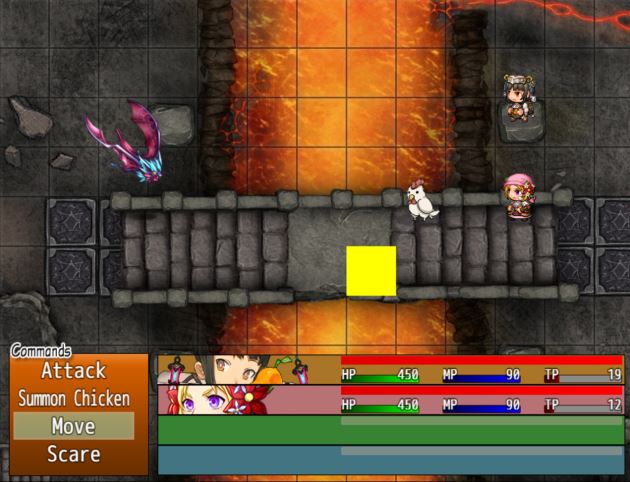
Devlog #1: Added a grid! - Grid Battle System for RPGMaker by HimeWorks
 himeworks.itch.io
Devlog #2: Movement and Summons - Grid Battle System for RPGMaker by HimeWorks
himeworks.itch.io
Devlog #3: Basic Skill Range - Grid Battle System for RPGMaker by HimeWorks
himeworks.itch.io
Devlog #4: Multi-Target Selection - Grid Battle System for RPGMaker by HimeWorks
himeworks.itch.io
Devlog #5: Grid Configuration Management - Grid Battle System for RPGMaker by HimeWorks
himeworks.itch.io
Devlog #6: Area of Effect + Region Painting - Grid Battle System for RPGMaker by HimeWorks
himeworks.itch.io
==================
I've been doing some grid-related work and one thing that seemed useful was to add the concept of "positions" into the default battle system. I did some quick tests to see if I can display sideview actor sprites on a grid, and it seems to work. Here's a video example of what I mean, assuming we have a battlefield shaped in a 3x6 grid (3 rows of 6 spaces, assuming vertical rows)
This topic will mostly be to discuss ideas that could be built into a battle system that has positions.
Battle Formations
We can start with the idea of a "battle formation" which is a pre-determined set of positions for each battler. So for example, maybe they all stand in a straight line at the front of the grid. Formation can simply be for visual purposes. You might have some sort of formation bonus like extra attack or extra defense. You can manage "formation bonuses" via states, which might make set up a bit easier.
Battle Rows
Given that we have positions, we can then define what a "battle row" is. You could have a "back row" and a "front row" in a 2-row system. This is basically what older final fantasy games had. You could define a state "back row" and another state "front row", and each state basically controls what kind of bonuses you might have. Maybe backrow takes less damage from attacks but also deals less damage when attacking.
Battler Direction
With positions, you can now define what "direction" means. For example, you can have two battlers "facing each other", or "facing away from each other", or "facing from the side". You could potentially have damage bonuses based on the directions the targets are facing, relative to where the attack is coming from.
This can lend itself to "back attacks" like the ones in final fantasy, where your characters are all facing away from the monsters and therefore take additional damage.
You can also implement "pincer attacks" where enemies appear on the left and the right side, and of course your battlers can only face one direction at a time so one side will always be vulnerable.
Movement System
With positions, you could potentially add movement to your game.
This is different from a simple "back row, front row" system where you just move back or move forward. With a movement system, you could actually move to a completely different position on the field.
Area of Effect
A skill could have a custom "area of effect". Maybe it targets one square. Maybe it targets an entire row or column. Maybe it targets a cross shape. Or it targets the entire field. Lots of options here.
Grid Selection
Basically, if you want to select tiles on the grid. This can be used for various things like picking a square to move to, choosing an empty square as the "center" of an AoE attack, and so on.
Attack Range
By default, we don't have a concept of "attack range". If you want to attack a monster, you just select it and then the attack will go through. However, with positions, you now have a way to describe the "distance" between two battlers, and therefore the "attack range" determines how far the target must be.
Depending on your game, you might have different implementations of range. For example, maybe "1 square" means you must stand in the front row, and you will only be able to target enemies that are also on the front row.
Single Grid vs Separate Grid
In the video above, all of the actors are confined to their own grid.
The enemies would presumably be on a separate grid, and they can't cross over to each other.
But this isn't completely necessary. You could combine the grids together so that the battlers can freely move anywhere, like this:
Combine things like "attack range" and "area of effect skills" and movement system, and now we have enhanced the default battle system by simply having positions.
What are some other features that might be cool?
Note that every feature will be developed separately. You would be able to mix-and-match features that you want. This would give you more flexibility over how you want to build your battle system.
Downloads / Referenced Files
RPG Maker Web attachments are mirrored locally when available. Other external links remain hosted by their original creator or third-party service.
- Download: https://himeworks.itch.io/grid-battle-system
- Download: https://itch.io/t/912596/public-testing-1
- Download: https://itch.io/t/929529/public-testing-2
- Download: Devlog #1: Added a grid! - Grid Battle System for RPGMaker by HimeWorks
- Download: Devlog #2: Movement and Summons - Grid Battle System for RPGMaker by HimeWorks
- Download: Devlog #3: Basic Skill Range - Grid Battle System for RPGMaker by HimeWorks
- Download: Devlog #4: Multi-Target Selection - Grid Battle System for RPGMaker by HimeWorks
- Download: Devlog #5: Grid Configuration Management - Grid Battle System for RPGMaker by HimeWorks
- Download: Devlog #6: Area of Effect + Region Painting - Grid Battle System for RPGMaker by HimeWorks
Referenced Images / Attachments
Creator Claims / Removal
If you are the original creator and want this listing reassigned, edited, or removed, join BMMPlay and contact the moderators with proof that matches the original RPG Maker Web profile, linked GitHub, itch.io page, or another public creator identity.
Replies (0)
No replies yet.
Topic Summary
Loading summary...