

RPG Maker MV small font size
BMM_Archive · July 15, 2026

Original Source
- Original title: RPG Maker MV small font size
- Original author: mharvey64
- Original date: November 30, 2015
- Source thread: https://forums.rpgmakerweb.com/threads/rpg-maker-mv-small-font-size.51845/
- Source forum path: Game Development Engines > Activation Issues
Summary
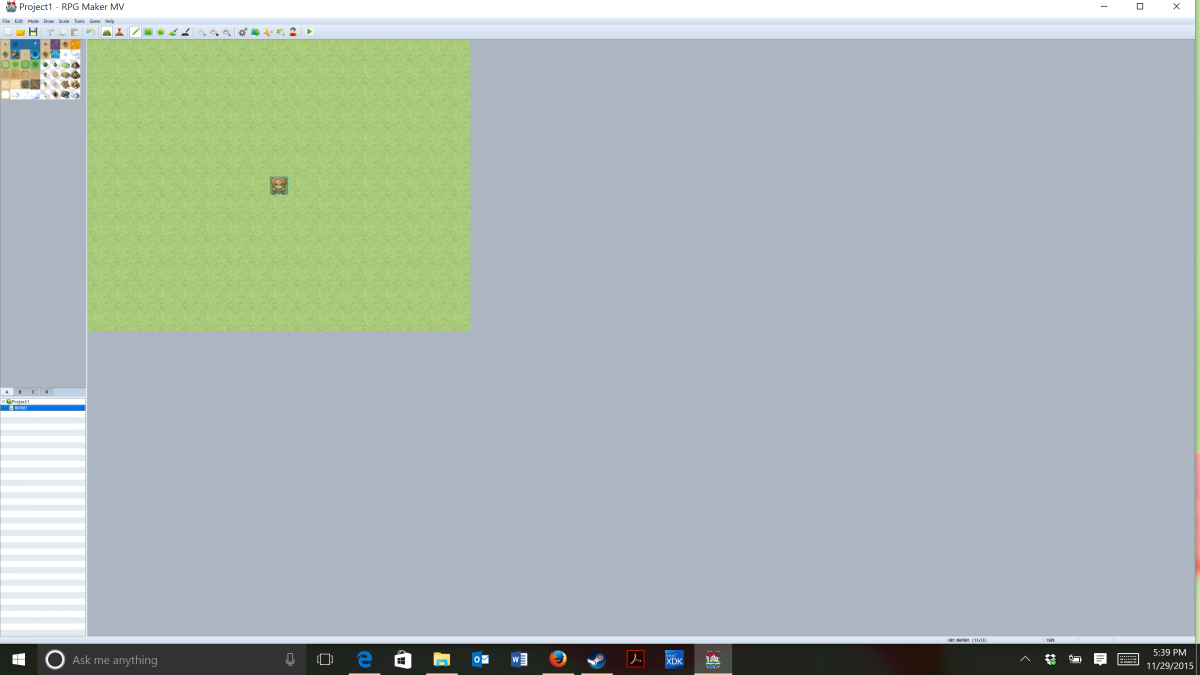
Hello! I am brand new to this and I am very excited for RPG Maker MV. When I open the RPG Maker Mv, the font size is very very small. How do I increase it? I have tried going to settings and display on my Windows 10. I also tried re-installing RGP Maker. The font size is almost too small to read. Could someone please tell me how I can make the program appear on my screen at a normal size? I tried installing the Yanglfy core engine and messed...
Archived First Post
I am brand new to this and I am very excited for RPG Maker MV. When I open the RPG Maker Mv, the font size is very very small. How do I increase it? I have tried going to settings and display on my Windows 10. I also tried re-installing RGP Maker. The font size is almost too small to read. Could someone please tell me how I can make the program appear on my screen at a normal size? I tried installing the Yanglfy core engine and messed with the resolution, but that did not help increase the font size of the program while I developing the game.
This is my first crack at MV. I used ACE, and it appears normal on my screen when I use it. What is going on with MV?
Thanks everyone for the help,
mharvey64
Downloads / Referenced Files
RPG Maker Web attachments are mirrored locally when available. Other external links remain hosted by their original creator or third-party service.
- Local mirror: 15141-8289d99dd584c3a6d389f677075a2f30.png
SHA-256:ba669f742cb6e21b5a9c932359349fbd906533602df6a09f82bb0318bcc0cdd7
Original attachment URL: https://forums.rpgmakerweb.com/attachments/screenshot-5-png.26751/
Referenced Images / Attachments
Creator Claims / Removal
If you are the original creator and want this listing reassigned, edited, or removed, join BMMPlay and contact the moderators with proof that matches the original RPG Maker Web profile, linked GitHub, itch.io page, or another public creator identity.
Replies (0)
No replies yet.
Topic Summary
Loading summary...