

Quick SpellCheck
BMM_Archive · July 15, 2026

Original Source
- Original title: Quick SpellCheck
- Original author: mogwai
- Original date: January 28, 2017
- Source thread: https://forums.rpgmakerweb.com/threads/quick-spellcheck.74204/
- Source forum path: Game Development Engines > RPG Maker Javascript Plugins > JS Plugins In Development
Summary
I was excited when I thought of this, but after I made a quick plugin to my dismay, the RMMV Chromium game wrapper does not have built-in spellcheck like other Chromium. Or maybe just mine is buggy; does your spell check work? I know I'm having other problems with my game wrapper lately. So this only works for me when I run the game in a browser through the game project index.html, which voids the purpose of easy spell check in that if you have to spellcheck in something else...
Archived First Post
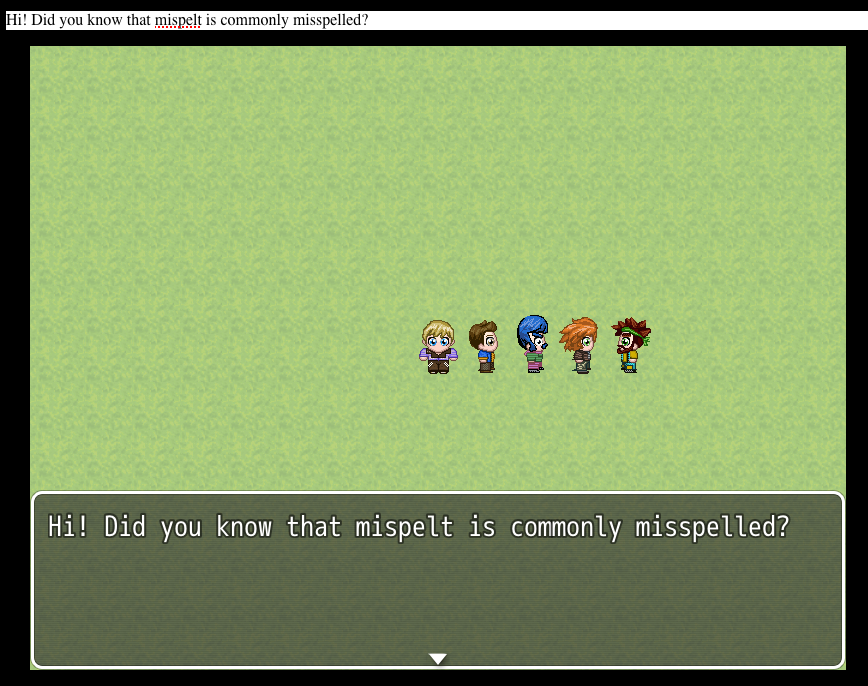
What this does is creates a tag with contentEditable and spellcheck outside the game wrapper and all message text shows up in it, and if your Chromium has spellcheck or if you run this in the browser it puts the red underline on the misspelled words. You have to resize the game window to see the tag if not in a browser. I didn't think it would work in the game wrapper anyway (for me it doesn't), so I didn't add anything to resize the window automatically. I will do that if you test this and it does in fact work for you. Probably won't.
Of course you would take this plugin out, before distributing your game.
Screenshot: misspelled word underlined in the tag (above the game window)
version 0.2 (possibly browser-only, so it's pointless... take it or leave it...)
/*
 * Spell-check Window
 *
 * @plugindesc Shows text in an outside window for spell-checking.
 * @author Mogwai "Jake Jilg"
 *
 */
window.addEventListener("load", function(e){
	var p = document.createElement("p");
	p.contentEditable = true;
	p.spellcheck = true;
	p.id = "spellCheckBox";
	p.style.color = "#000";
	p.style.backgroundColor = "#fff";
	p.appendChild(document.createTextNode("Spell Check Box"));
	document.body.appendChild(p);
});
Game_Message.prototype.addCached = Game_Message.prototype.add;
Game_Message.prototype.add = function(text) {
	var p = document.getElementById("spellCheckBox");
	p.innerHTML = '';
	var text_node = document.createTextNode(text);
	p.appendChild(text_node);
    return Game_Message.prototype.addCached.apply(this, arguments);
};
Downloads / Referenced Files
RPG Maker Web attachments are mirrored locally when available. Other external links remain hosted by their original creator or third-party service.
- Local mirror: 35818-6809f731648acc9149989d18dc22203d.png
SHA-256:6957530299c754f61173230d51eb1ad0a9a10616ff21fdeafe63456df223be65
Original attachment URL: https://forums.rpgmakerweb.com/attachments/screen-shot-2017-01-27-at-10-07-07-pm-png.57257/
Referenced Images / Attachments
Creator Claims / Removal
If you are the original creator and want this listing reassigned, edited, or removed, join BMMPlay and contact the moderators with proof that matches the original RPG Maker Web profile, linked GitHub, itch.io page, or another public creator identity.
Replies (0)
No replies yet.
Topic Summary
Loading summary...