

DK Core Localization Demo
BMM_Archive · July 15, 2026

BMM_Archive
Preserved forum archive. This topic stores the original first post and locally mirrored RPG Maker Web attachments when available. It is posted by the BMMPlay archive account, not by the original creator.
Original Source
- Original title: DK Core Localization Demo
- Original author: DK
- Original date: September 26, 2016
- Source thread: https://forums.rpgmakerweb.com/threads/dk-core-localization-demo.68865/
- Source forum path: Game Development Engines > RPG Maker Javascript Plugins > JS Plugins In Development
Summary
Title: DK Core Localization Version: 0.4 BETA Author: DK Supported languages: Russian, English
Archived First Post
Title: DK Core Localization
Version: 0.4 <span style="color: #FF0000">BETA
Author: DK
Supported languages: Russian, English
Requirement for plugin
Availability of working plugin DKCore version 1.81 or above
Features:
+Each language uses its own Database
+Changing the language settings in the game
+The ability to use common files in folders:audio, data, img, movies
-Each language uses its own Database
Instruction:
The files in the data folder in the game will not be used any more! (Unless you have set up sharing folders in plugin parameters). They are used in the program. When you changing something in the database in the Maker do not forget to copy the changes to the locale folder!
Other:
DKCore_Plugin_Translation plugin is used for the translation of texts in other plugins.
For example, use DK_Continue_In_Menu plugin that adds a command to continue in the game menu, but only in one language. If you change the language DK_Plugin_Translation plugin changes the text according to their settings within the file.
DKCore_Plugin_Translation plugin does not work with all the texts in the other plugins. Also, I try to fix it.
Videos:
Download Demo from DropBox: DropBox
Version: 0.4 <span style="color: #FF0000">BETA
Author: DK
Supported languages: Russian, English
Requirement for plugin
Availability of working plugin DKCore version 1.81 or above
Features:
+Each language uses its own Database
+Changing the language settings in the game
+The ability to use common files in folders:audio, data, img, movies
-Each language uses its own Database
Instruction:
- Copy the plugins folder js / plugins demo folder in your project. Installation Priority: DKCore, DKCore_Localization, DKCore_Plugin_Translation (optional). Customize them.
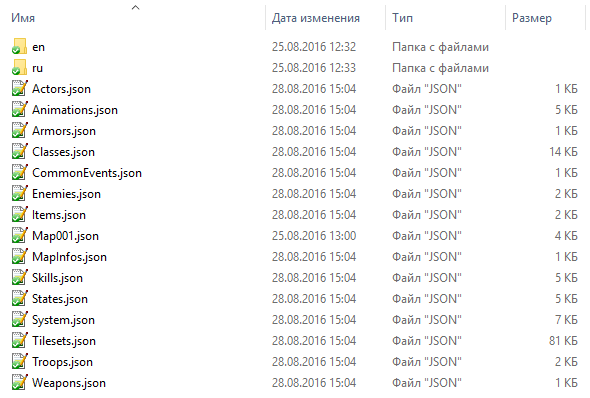
- Create a folders in the data folder, as in the screenshot (the names correspond with the names of locales)
The files in the data folder in the game will not be used any more! (Unless you have set up sharing folders in plugin parameters). They are used in the program. When you changing something in the database in the Maker do not forget to copy the changes to the locale folder!
Other:
DKCore_Plugin_Translation plugin is used for the translation of texts in other plugins.
For example, use DK_Continue_In_Menu plugin that adds a command to continue in the game menu, but only in one language. If you change the language DK_Plugin_Translation plugin changes the text according to their settings within the file.
DKCore_Plugin_Translation plugin does not work with all the texts in the other plugins. Also, I try to fix it.
Videos:
Download Demo from DropBox: DropBox
Features Mentioned
- +Each language uses its own Database
- +Changing the language settings in the game
- +The ability to use common files in folders:audio, data, img, movies
- Each language uses its own Database
- Instruction:
- Copy the plugins folder js / plugins demo folder in your project. Installation Priority: DKCore, DKCore_Localization, DKCore_Plugin_Translation (optional). Customize them.
- Create a folders in the data folder, as in the screenshot (the names correspond with the names of locales)
- Spoiler
- "lightbox_close": "Close",
- "lightbox_next": "Next",
- "lightbox_previous": "Previous",
- "lightbox_error": "The requested content cannot be loaded. Please try again later.",
- "lightbox_start_slideshow": "Start slideshow",
- "lightbox_stop_slideshow": "Stop slideshow",
- "lightbox_full_screen": "Full screen",
- "lightbox_thumbnails": "Thumbnails",
- "lightbox_download": "Download",
- "lightbox_share": "Share",
Downloads / Referenced Files
RPG Maker Web attachments are mirrored locally when available. Other external links remain hosted by their original creator or third-party service.
- Download: DropBox
Referenced Images / Attachments
Creator Claims / Removal
If you are the original creator and want this listing reassigned, edited, or removed, join BMMPlay and contact the moderators with proof that matches the original RPG Maker Web profile, linked GitHub, itch.io page, or another public creator identity.
Replies (0)
No replies yet.
0
replies
30
views
Topic Summary
Loading summary...