Hello everyone!
I'm excited to share a plugin I've created for RPG Maker MZ. It's called
VarToStat, and it's a complete system for managing custom stats (like Strength, Dexterity, Charisma, etc.) entirely through in-game variables.
If you've ever wanted an attribute system that is separate from the engine's default parameters and that your players can customize, this plugin is for you.
The plugin creates two distinct scenes: one for
character selection and one for
point allocation.
Features
The plugin is packed with features for full control:
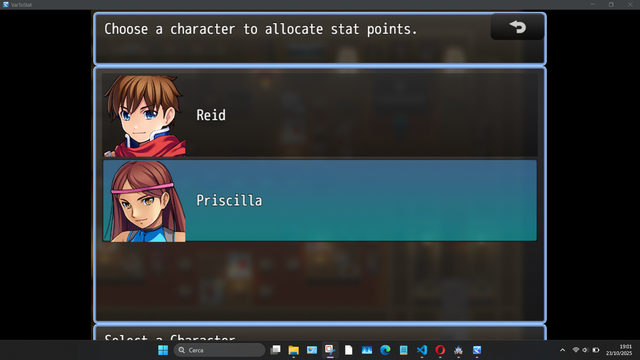
Character Selection Scene:
- Scrollable Vertical List: A clean list of all configured characters.
- Full Portrait Support: Use default facesets (with an index from 0-7) OR custom 144x144 face images for each actor.
- Progressive Unlock System: You can "hide" characters at the start of the game and make them visible in the list only when they join the party (via a plugin command).
- Customizable Windows: Fully editable title and description text.
Stat Allocation Scene:
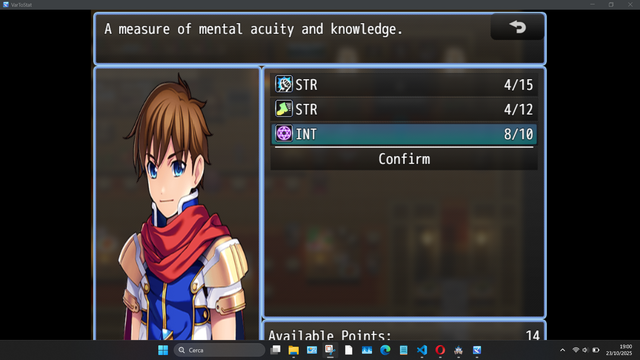
- Variable-Based Stats: The core of the plugin. Each stat (e.g., "Strength") is tied to a variable. The "Available Points" are also read from a variable.
- Simple Allocation: Increase stats with RIGHT/OK, decrease them with LEFT.
- Maximum Value (Caps): Set a max value for every single stat (e.g., "Strength" cannot exceed 99). The plugin will show a custom warning message if the player tries to go over it.
- "Current/Max" Display: The plugin displays the value as 25/99 (if a cap is set) or just 25 (if there is no limit).
- Confirm/Cancel System: Changes are NOT permanent until the player selects "Confirm". If they exit with 'ESC', a warning window will ask for confirmation to cancel all changes made in that session.
- Custom Sound Effects: Set unique SEs for increasing, decreasing, confirming, and canceling.
- Persistence: All changes are saved to the game's save file.
How to Use
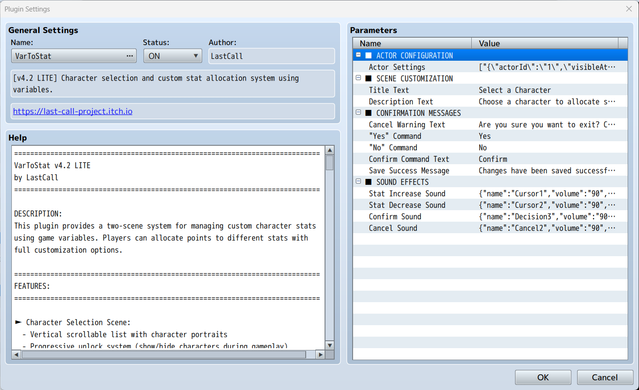
Setting up the plugin is very simple and is done entirely from the Plugin Parameters:
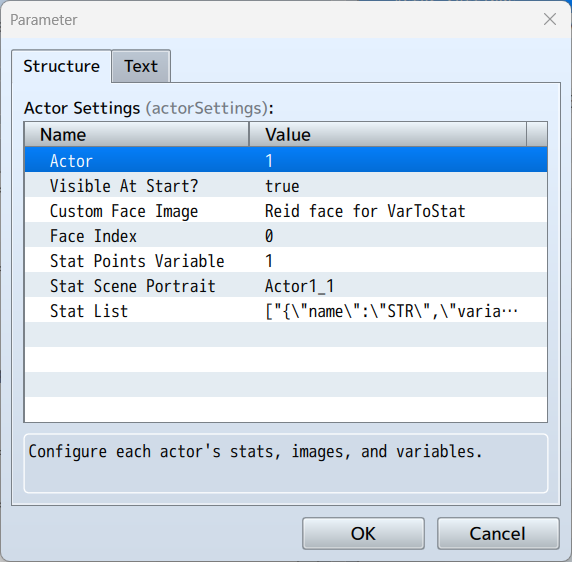
- Configure Actors:Go to Actor Settings. For each character, set their ID, if they are visible at the start, their image (custom or face index), and their Stat Points Variable (e.g., Variable #50). Also, assign a portrait image for the allocation scene.
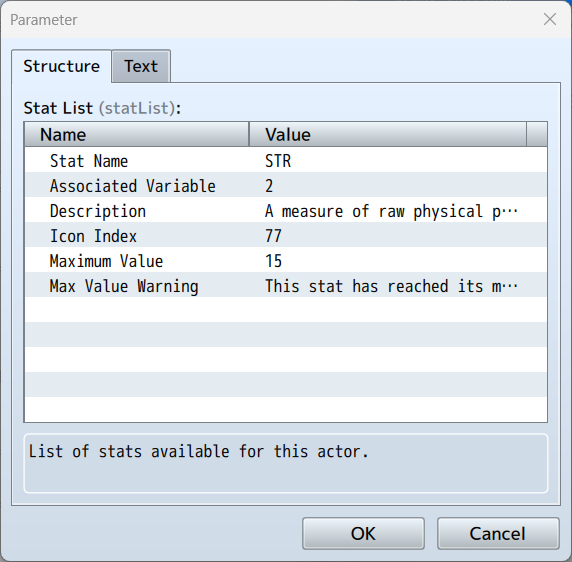
- Configure Stats:Inside each actor, open the Stat List. This is where you create your custom stats. For each one, set:
- Name: (e.g., "Strength", "Fire Magic")
- Associated Variable: (e.g., Variable #51)
- Description: (The help text)
- Icon:
- Maximum Value: (0 = no limit)
- Max Value Warning:
- Open the Scene:Use the Plugin Command Open Actor Selection in an event (for example, a Level Up event or a "Training Master" NPC).
- Unlock Characters (Optional):If a character is not visible at the start, use the Plugin Command Unlock Character when they join the party to show them in the list.
Plugin Commands
- Open Actor Selection
- Opens the character selection scene.
- Unlock Character
- Makes a hidden character visible in the selection list.
Download
You can download the plugin for free from my itch.io page!
DOWNLOAD
Terms of Use
- Free for commercial and non-commercial use.
- Credit "LastCall" is appreciated but not required.
- Do not redistribute or resell this plugin.
I hope this can be useful for your projects! Let me know if you have any feedback.
Terms of Use Free for commercial and non-commercial use. Credit "LastCall" is appreciated but not required. Do not redistribute or resell this plugin.




 Keychron K2 QMK Wireless Mechanical Gaming Keyboard
Compact wireless mechanical keyboard for office work, gaming, and desk upgrades.
View on Amazon
Keychron K2 QMK Wireless Mechanical Gaming Keyboard
Compact wireless mechanical keyboard for office work, gaming, and desk upgrades.
View on Amazon