






public

Rpg Maker Developers Group

Simple enough for a child, powerful enough for a developer

2 Followers

MZEli Help Windows - Add help windows to the default scenes/windows!

BMM Archive · July 15, 2026

Preserved forum archive. This topic stores the original first post and locally mirrored RPG Maker Web attachments when available. It is posted by the BMMPlay archive account, not by the original creator.

Original Source

  • Original title: Eli Help Windows - Add help windows to the default scenes/windows!
  • Original author: Eliaquim
  • Original date: October 6, 2020
  • Source thread: https://forums.rpgmakerweb.com/threads/eli-help-windows-add-help-windows-to-the-default-scenes-windows.128362/
  • Source forum path: Game Development Engines > RPG Maker Javascript Plugins > JS Plugin Releases (RMMZ)

Summary

{ "lightbox_close": "Close", "lightbox_next": "Next", "lightbox_previous": "Previous",

Archived First Post

MqQVYeO.png

Author: Hakuen Studio

Introduction

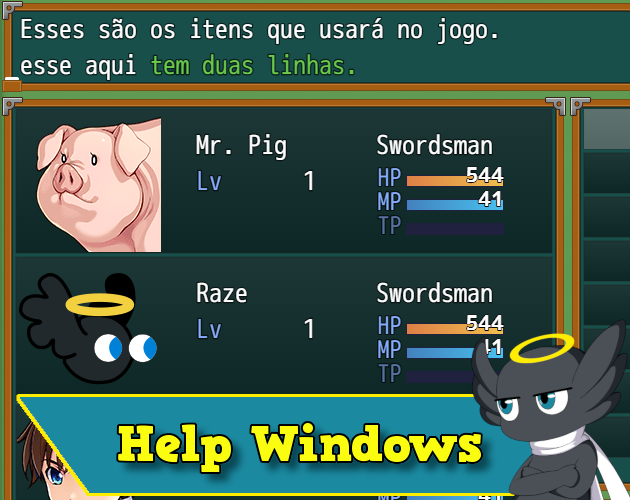
• By default, only some Rpg Maker Mz scenes have a help window. And yet, they are not always saying something.
This plugin adds help windows in scenes that did not have them (Options for example), as well as provides the possibility of inserting content in each one.

Features

Adds and makes it possible to edit help window content in the following scenes/menus:
• Main menu.
• Item Category
• Skills.
• Equipment.
• Options.
• Save / Load.
• End Game.
• Title Screen.
• Name window.
• Shop.
• Battle.

In addition to the texts, you can also decide on the bottom or top position and the number of lines.

Screenshots
w9nUFYD.png

0z9K8AZ.png

NG4Ze5h.png

vz0MdvT.jpg

lKFyLlO.jpg


View attachment 187918
View attachment 187919
View attachment 187920

If you have any custom scene/command of another plugin that you want to add a help window feature, just let me know and I will do my best to add it.

Terms of Use
Update Log

Features Mentioned

  • Adds and makes it possible to edit help window content in the following scenes/menus:
  • Main menu.
  • Item Category
  • Skills.
  • Equipment.
  • Options.
  • Save / Load.
  • End Game.
  • Title Screen.
  • Name window.
  • Shop.
  • Battle.
  • In addition to the texts, you can also decide on the bottom or top position and the number of lines.

Downloads / Referenced Files

Log in to download

Log in, then follow the RPG Maker Developers Group to see these download links.

Log in to download

License / Terms Note

Terms of Use Update Log Hakuen Studio Help Windows for RPG Maker MZ by Hakuen Studio Let's you choose to add Help Windows to all scenes in RPG Maker MZ/MV!

Referenced Images / Attachments

hakuenstudio.itch.io
Creator Claims / Removal

If you are the original creator and want this listing reassigned, edited, or removed, join BMMPlay and contact the moderators with proof that matches the original RPG Maker Web profile, linked GitHub, itch.io page, or another public creator identity.

#039#rmmz#plugin-archive

Replies (0)

No replies yet.

0 replies 1 view

Log in to reply.

User Avatar