Please notice this plugin is about adding canvas 2D based blend modes and filters to MV/MZ. If you are looking for a way to upgrade PixiJS to have more options on blend modes and filters, you can search for a guide. This plugin is not for that. Current version of PixiJS: MZ v5.3.12, MV v4.5.4, when this plugin was made. { "lightbox_close": "Close",
Please notice this plugin is about adding canvas 2D based blend modes and filters to MV/MZ. If you are looking for a way to upgrade PixiJS to have more options on blend modes and filters, you can search for a guide. This plugin is not for that.
Current version of PixiJS: MZ v5.3.12, MV v4.5.4, when this plugin was made.
Introduction:
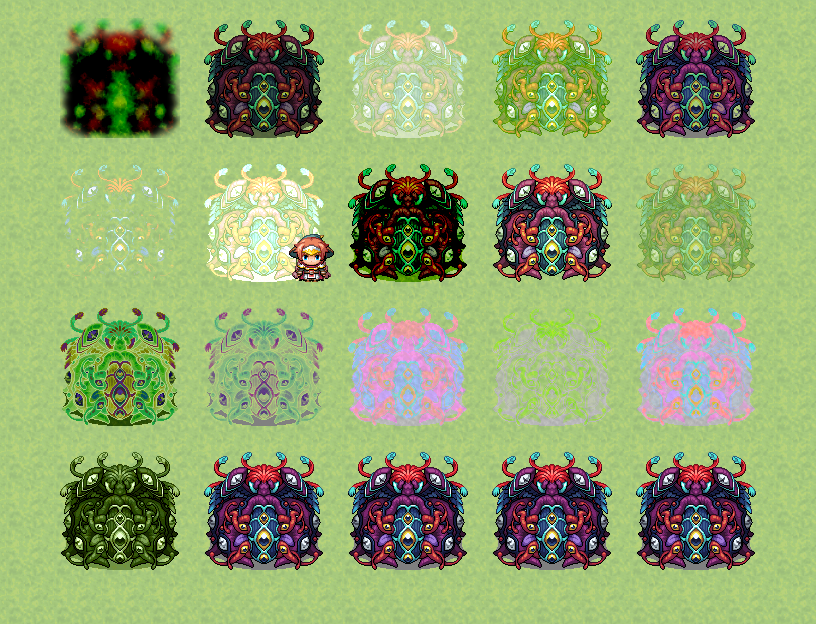
Restore 13 missing blend modes('overlay', 'darken', 'lighten', 'color-dodge', 'color-burn', 'hard-light', 'soft-light', 'difference', 'exclusion', 'hue', 'saturation', 'color', 'luminosity') once available in canvas mode of RMMV. Also adde css filters such and blur, hue-rotate, brightness, etc.
How to use:
This plugin is plug-and-play, so there's no parameter. It work in both MV and MZ.
There are some changes to event code:
1. event.setBlendMode now allow string parameter such as 'color-dodge', 'exclusion', 'overlay', etc.
All possible values and be found here:
https://developer.mozilla.org/en-US/docs/Web/API/CanvasRenderingContext2D/globalCompositeOperation
2. Add new method event.setCssFilter(filter), and event.cssFilter() to set and get css filter of the event.
The filters can be found here:
https://developer.mozilla.org/en-US/docs/Web/API/CanvasRenderingContext2D/filter
Known issues:
Now only works on sprites and display objects inherit from sprite.
Can conflict with bush, the event may loss filters or blend effects when standing on a bush tile.
Some filters(drop shadow, blur) requires bigger display area than the sprite itself so they may get cropped.
The plugin uses canvas 2d methods so it is a bit slow if you display lots of special effects on screen.
Terms of use:
You can use the plugin in any projects, credits is not required but appreciated.
Download:
Blend modes for MV/MZ

utstudio.itch.io
Terms of use: You can use the plugin in any projects, credits is not required but appreciated. Download: Restore lost canvas blend modes and filters (MV/MZ) by utunnels




 Amazon Fire TV 50-Inch 4-Series 4K UHD Smart TV
4K smart TV with Fire TV built in for streaming, games, and living room viewing.
View on Amazon
Amazon Fire TV 50-Inch 4-Series 4K UHD Smart TV
4K smart TV with Fire TV built in for streaming, games, and living room viewing.
View on Amazon