

public

Rpg Maker Developers Group

Simple enough for a child, powerful enough for a developer

2 Followers

MZMinecart Ride – Automatic minecart movement using Region ID

BMM Archive · July 15, 2026

Preserved forum archive. This topic stores the original first post and locally mirrored RPG Maker Web attachments when available. It is posted by the BMMPlay archive account, not by the original creator.

Original Source

  • Original title: Minecart Ride – Automatic minecart movement using Region ID
  • Original author: Axgin96
  • Original date: June 1, 2025
  • Source thread: https://forums.rpgmakerweb.com/threads/minecart-ride-automatic-minecart-movement-using-region-id.178070/
  • Source forum path: Game Development Engines > RPG Maker Javascript Plugins > JS Plugin Releases (RMMZ)

Summary

MINECART RIDE v1.0 by axgin96​ Hi everyone! I’m axgin96 — not a professional developer, just a passionate RPG Maker user who enjoys building little tools to make development easier and more fun.

Archived First Post

MINECART RIDE v1.0
by axgin96


Hi everyone!
I’m axgin96 — not a professional developer, just a passionate RPG Maker user who enjoys building little tools to make development easier and more fun.
Minecart Ride (KartRide.js) is my first plugin for RPG Maker MZ, created to simplify minecart sequences and minigames.
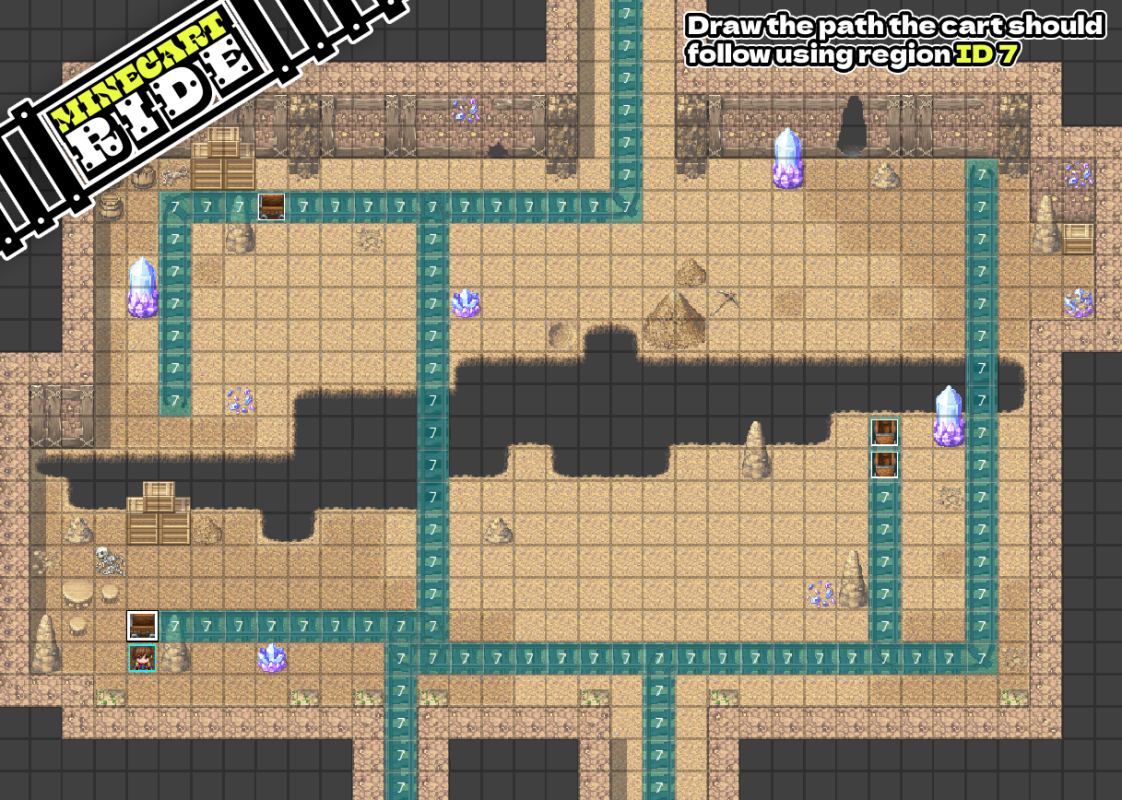
Instead of writing movement commands manually, this plugin allows you to draw a track using Region IDs and lets the minecart move automatically between two points.


Features
  • Define minecart routes using Region ID 7 tiles
  • Automatic movement between two endpoints with a single event call
  • Player switches to a vehicle graphic (index 6 in Vehicle.png) during the ride
  • The minecart event is repositioned and rotated correctly at the destination
  • Uses Self Switch A to hide/show the cart event
  • Smooth, automatic pathing
  • Works out of the box, no external plugins required

Screenshots
Protected downloadProtected download
pcO6z+.png


How to Use
  1. Place KartRide.js in your project's js/plugins folder
  2. Enable it in the Plugin Manager
  3. On your map, draw a continuous track using Region ID 7
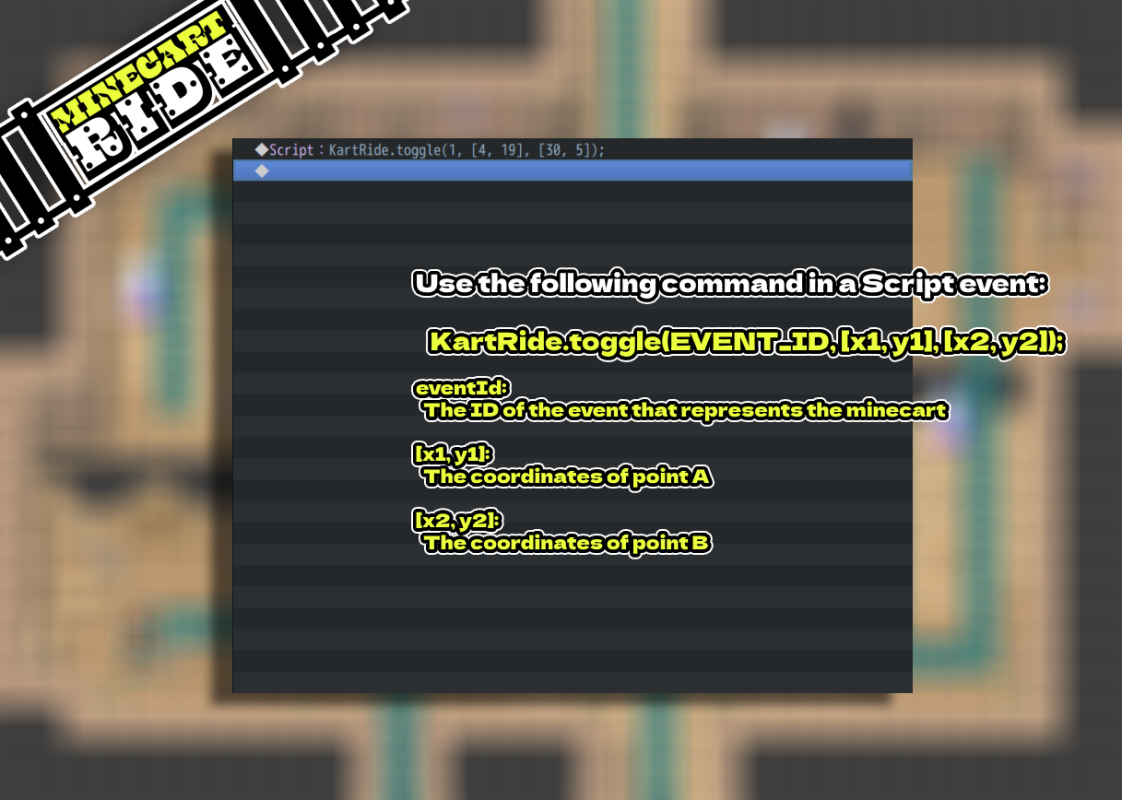
  4. Use the following script call in an event:

javascript
KartRide.toggle(eventId, [x1, y1], [x2, y2]);


Example:


javascript
KartRide.toggle(3, [10, 5], [20, 12]);


The cart will automatically move from point A to B, or B to A, depending on its current position.


Plugin Commands / Script Calls

KartRide.toggle(eventId, [x1, y1], [x2, y2]);


  • eventId: The event ID of the minecart. Only one cart event is needed; it disappears at departure and reappears at arrival.
  • [x1, y1]: Coordinates of the first endpoint
  • [x2, y2]: Coordinates of the second endpoint

Demo
A working demo is included in the Itch.io download.
It showcases the minecart in action, with map setup, events, and configuration ready to test.


Download
  • Itch.io – Minecart Ride (with demo included)


Terms and Credits

  • Allowed in adult-themed games
  • Credit required: Axgin96
  • Do not resell or redistribute the plugin as your own
  • Feedback and suggestions are welcome through Itch.io

Features Mentioned

  • Define minecart routes using Region ID 7 tiles
  • Automatic movement between two endpoints with a single event call
  • Player switches to a vehicle graphic (index 6 in Vehicle.png) during the ride
  • The minecart event is repositioned and rotated correctly at the destination
  • Uses Self Switch A to hide/show the cart event
  • Smooth, automatic pathing
  • Works out of the box, no external plugins required

Downloads / Referenced Files

Log in to download

Log in, then follow the RPG Maker Developers Group to see these download links.

Log in to download

License / Terms Note

Terms and Credits Allowed in adult-themed games Credit required: Axgin96 Do not resell or redistribute the plugin as your own
Referenced Images / Attachments

S9aMGO.png
S9aMGO.png
JJTwiv.png
JJTwiv.png
Creator Claims / Removal

If you are the original creator and want this listing reassigned, edited, or removed, join BMMPlay and contact the moderators with proof that matches the original RPG Maker Web profile, linked GitHub, itch.io page, or another public creator identity.

#rmmz#plugin-archive

Replies (0)

No replies yet.

0 replies 1 view

Log in to reply.

User Avatar


