


MZSharp Text [MZ + MV]
BMM_Archive · July 15, 2026

Preserved forum archive. This topic stores the original first post and locally mirrored RPG Maker Web attachments when available. It is posted by the BMMPlay archive account, not by the original creator.
Original Source
- Original title: Sharp Text [MZ + MV]
- Original author: MechPen
- Original date: January 24, 2021
- Source thread: https://forums.rpgmakerweb.com/threads/sharp-text-mz-mv.132598/
- Source forum path: Game Development Engines > RPG Maker Javascript Plugins > JS Plugin Releases (RMMZ)
Summary
utunnels was able to solve this with a plugin utilizing opentype.js Go and use that one. The Sharp Text plugin will still be maintained for people who are using it but I highly recommend OpenType Pixel Font Renderer instead. Sharp Text v0.94 beta MechPen Introduction
Archived First Post
utunnels was able to solve this with a plugin utilizing opentype.js Go and use that one. The Sharp Text plugin will still be maintained for people who are using it but I highly recommend OpenType Pixel Font Renderer instead.
Sharp Text v0.94 beta
MechPen
Introduction
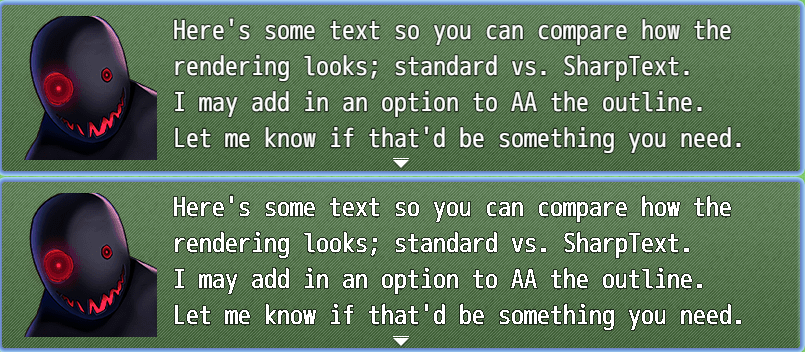
I'm working on a bleep-bloop retro style game, and was annoyed at how blurry the text looked. Any size, any resolution, any CSS options; the UI Text just looked sad. It's not really an engine flaw either; just a symptom of how HTML5 canvas renders text. This attempts to fix that, mostly though the magic of ImageData.
Features
Removes the Anti-aliasing on all text in the game.
Screenshots
Protected download
How to Use
Simply install to your plugins folder and turn it on in the Plugin Manager. This plugin should almost certainly go at the top of the list; we are changing how the base engine performs a DrawText function.
This is a beta so things might lag, look terrible, or generally not work! To improve visuals it may be necessary to change the Font Size up or down slightly from the System 2 tab, Advanced Settings block.
Development
Please use this thread to notify me of any issues, or to make a feature request.
It's now (more) compatible with MV! It seems to misbehave at smaller text sizes though.
There are now options to adjust how many pixels are trimmed off the text (something like font thickness) as well as an option to leave the text outline as standard.
Centering text will now attempt to draw on the nearest pixel, to make the text as sharp as possible.
Download
Github
License
This plugin is released under the MIT License.
Sharp Text v0.94 beta
MechPen
Introduction
I'm working on a bleep-bloop retro style game, and was annoyed at how blurry the text looked. Any size, any resolution, any CSS options; the UI Text just looked sad. It's not really an engine flaw either; just a symptom of how HTML5 canvas renders text. This attempts to fix that, mostly though the magic of ImageData.
Features
Removes the Anti-aliasing on all text in the game.
Screenshots
Protected download
How to Use
Simply install to your plugins folder and turn it on in the Plugin Manager. This plugin should almost certainly go at the top of the list; we are changing how the base engine performs a DrawText function.
This is a beta so things might lag, look terrible, or generally not work! To improve visuals it may be necessary to change the Font Size up or down slightly from the System 2 tab, Advanced Settings block.
Development
Please use this thread to notify me of any issues, or to make a feature request.
It's now (more) compatible with MV! It seems to misbehave at smaller text sizes though.
There are now options to adjust how many pixels are trimmed off the text (something like font thickness) as well as an option to leave the text outline as standard.
Centering text will now attempt to draw on the nearest pixel, to make the text as sharp as possible.
Download
Github
License
This plugin is released under the MIT License.
Features Mentioned
- Removes the Anti-aliasing on all text in the game.
Downloads / Referenced Files
Log in to download
Log in, then follow the RPG Maker Developers Group to see these download links.
Log in to downloadLicense / Terms Note
License This plugin is released under the MIT License.
Referenced Images / Attachments
Creator Claims / Removal
If you are the original creator and want this listing reassigned, edited, or removed, join BMMPlay and contact the moderators with proof that matches the original RPG Maker Web profile, linked GitHub, itch.io page, or another public creator identity.


Replies (0)
No replies yet.
0
replies
9
views
Topic Summary
Loading summary...
