


MVSRD Character Creator
BMM_Archive · July 3, 2026

Preserved forum archive. This topic stores the original first post and locally mirrored RPG Maker Web attachments when available. It is posted by the BMMPlay archive account, not by the original creator.
Original Source
- Original title: SRD Character Creator
- Original author: SumRndmDde
- Original date: December 30, 2016
- Source thread: https://forums.rpgmakerweb.com/threads/srd-character-creator.72880/
- Source forum path: Game Development Engines > RPG Maker Javascript Plugins > JS Plugin Releases (RMMV)
Summary
Character Creator by SumRndmDde Version 1.00
Archived First Post
Character Creator
by SumRndmDde
Version 1.00
by SumRndmDde
Version 1.00
What This Plugin Does:
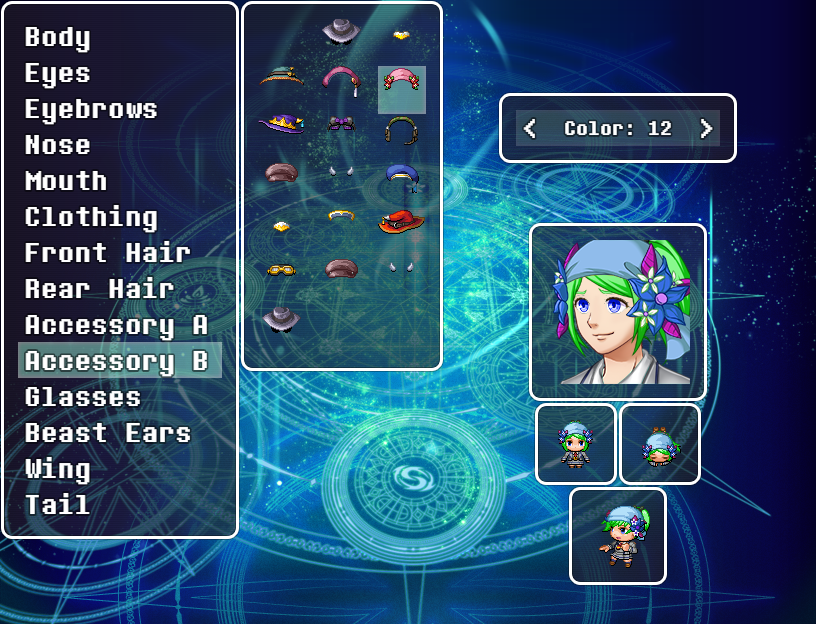
Essentially, this plugin adds an in-game character generator.
It allows players to create a character by selecting various pieces from various categories and they can be assigned to certain Actors to be used as Face Images, Walking Characters, Dead Characters, and Side-View Battlers.
Installing Necessary Files:
First, download the Character Pieces here.
This will be a ZIP file containing a folder called "character-creator".
Create a folder called "SumRndmDde" within your img directory if one does not already exist, and place the "character-creator" folder in there.
The entire directory should look like:
/img/SumRndmDde/character-creator/[all files for character creator]
Watch the video for a more clear installation process.
Basic Setup:
First, install the plugin.
Then simply use the following Plugin Command:
OpenCharacterCreator [actor-id]
Example:
OpenCharacterCreator 4
When that Plugin Command is run in game, it will bring up the Character Creation screen. The Actor whose ID is placed next to the plugin command will be the one that is customized. Once complete, all of that Actor's images will be overwritten.
Show Text Stuff:
If you wish to show a Custom Character's face in a Show Text event, use the notetag within the Show Text input:
<CC Face: [id]>
Example:
<CC Face: 10>
ALSO BE SURE TO HAVE A RANDOM FACE PLACED IN THE SHOW TEXT EVENT.
It doesn't matter what face it is, just something to be overwritten to begin with.
Temporary Disable:
If you wish to disable or enable the sprites made on an Actor from a Custom Character, simply use the Plugin Commands:
DisableCharacterCreatorImages [actorId]
EnableCharacterCreatorImages [actorId]
Screenshot:
Protected download
Download:
You can download the Plugin here:
http://sumrndm.site/character-creator
Terms of Use:
Terms of Use for my Plugins can be found here:
http://sumrndm.site/terms-of-use/
Change Log:
Version: 1.00 - 1.05:
Plugin was created, fixed some bugs, also ate a pancake.
(also on an unrelated note, to whoever reads this, how does one make capitalized tags for forum topics? sumrndmdde looks weird without capitals T-T)
Downloads / Referenced Files
Log in to download
Log in, then follow the RPG Maker Developers Group to see these download links.
Log in to downloadLicense / Terms Note
Terms of Use: Terms of Use for my Plugins can be found here: http://sumrndm.site/terms-of-use/ Change Log:
Referenced Images / Attachments
Creator Claims / Removal
If you are the original creator and want this listing reassigned, edited, or removed, join BMMPlay and contact the moderators with proof that matches the original RPG Maker Web profile, linked GitHub, itch.io page, or another public creator identity.


Replies (0)
No replies yet.
0
replies
14
views
Topic Summary
Loading summary...
