Screen Animation + Parallax Animation (1.0) FORNEXT (Rodrigo Reis) Introduction I´d like you to know the Screen Animation and Parallax Animation plugins.
Screen Animation + Parallax Animation (1.0)
FORNEXT (Rodrigo Reis)
Introduction
I´d like you to know the Screen Animation and Parallax Animation plugins.
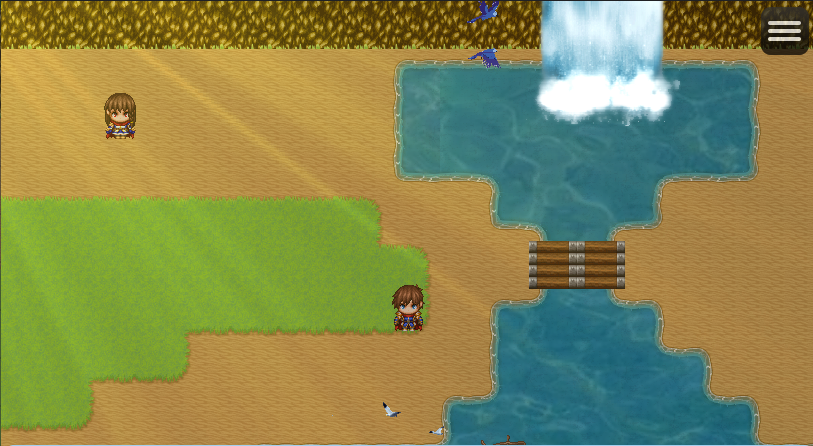
The Screen Animation plugin aims (and succeed) to display any animation in game screen, in 3 different layers if needed. There can be multiple animations in the same map to enrich the ambience.
The Parallax Animation is a bonus plugin delivered within the FULL version package of the Screen Animation and have same goal, but it is focused on the parallax (meaning you can now have animated parallaxes in your game).
Please check the video below:
Features
For both plugins, there can be ANY KIND of animatiton (effects, weather, sun beams, animals, etc). You can even use a GIF image or a video as the source of the animation, and all you have to do is to convert it to a series of .PNG images, put them in the same folder with images numbered from 1 to the number of images existent in the animation.
Summary of your plugin’s functionality.
You have total control over the animations through javascript commands inserted into events.
With the Screen Animation you can:
* set the animation coordinates
* set animation to be locked with the map coordinates, horizontal or vertically or both, or make it follow player movement
* set animation opacity
* fade the animation in or out
* change the speed the animation is displayed
* set the animation layer (below map-above parallax, above map layer 1 and above map layer 2
* rotate and scale (resize) the animation
With the Parallax Animation you can:
* change the parallax at any time
* lock the parallax to the map
* scroll the parallax vertically, horizontally or both
How to Use
All you have to do is to copy the files to the plugin's folder and add to the project.
Plugin Commands / Script Calls
There is a plugin's reference on all commands in both Free (demo) and the FULL packages.
Demo
There is a FREE version of the Screen Animation plugin, limited to 3 animations per project with some functions disabled like scaling and rotation. There is a sample project for both engines (MV and MZ), in both FREE and FULL version.
Download
RPG MAKER MV AND MZ ANIMATIONS PLUGINS

fornext.itch.io
Terms and Credits
The FREE version of the Screen Animation plugin can be used and distributed freely, since the credits are given to the author along with a link for the download.
The FULL version of both Screen Animation and Parallax Animation plugins can be distributed only as part of a RPG MAKER project developed by the person/entity that acquired it from the official link/store/media.
For both versions it is prohibited to change the source code or claim it's copyright.
Terms and Credits The FREE version of the Screen Animation plugin can be used and distributed freely, since the credits are given to the author along with a link for the download. The FULL version of both Screen Animation and Parallax Animation plugins can be distributed only as part of a RPG MAKER project developed by the person/entity that acquired it from the official link/store/media. For both versions it is prohibited to change the source code or claim it's copyright.






 UGREEN Nexode 200W GaN USB-C Wall Charger
High-output four-port USB-C charger for laptops, tablets, phones, and travel kits.
View on Amazon
UGREEN Nexode 200W GaN USB-C Wall Charger
High-output four-port USB-C charger for laptops, tablets, phones, and travel kits.
View on Amazon