


MZiframe plugin for RpgMakerMZ
BMM_Archive · July 15, 2026

Preserved forum archive. This topic stores the original first post and locally mirrored RPG Maker Web attachments when available. It is posted by the BMMPlay archive account, not by the original creator.
Original Source
- Original title: iframe plugin for RpgMakerMZ
- Original author: jakubiszon
- Original date: February 17, 2025
- Source thread: https://forums.rpgmakerweb.com/threads/iframe-plugin-for-rpgmakermz.175548/
- Source forum path: Game Development Engines > RPG Maker Javascript Plugins > JS Plugin Releases (RMMZ)
Summary
iframe v1.0 by jakubiszon Introduction I have created a little plugin which allows launching extra pages in an iframe.
Archived First Post
iframe v1.0
by jakubiszon
by jakubiszon
Introduction
I have created a little plugin which allows launching extra pages in an iframe.
The plugin does not do much itself but it makes it easy to integrate other HTML pages with your RPG Maker game.
These pages can in turn return data into your game opening endless possibilities.
Features
- showing pages built with any tool that can output HTML
- reacting to events emitted by the pages
- observing data inside the pages
- calling a common event when events occur or data is changed
- resizing the iframe to match window size
Screenshots
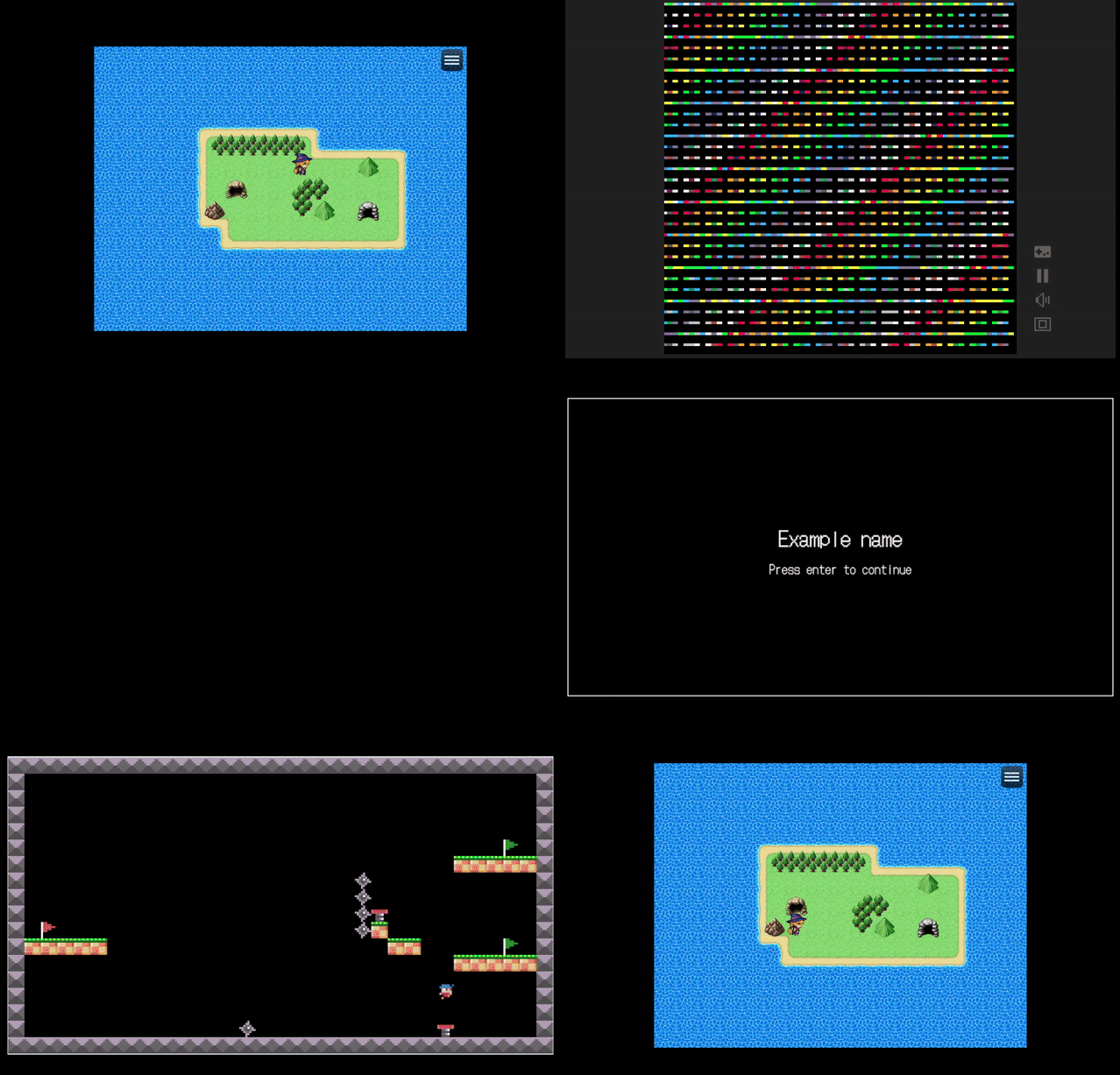
An example integration with pages built containing simple games built with PICO8 and Pocket Platformer.
How to Use
You need to include the pages in your ptoject files. Then you can reference them in the pageUrl param when calling the show command. Some extra parameters are needed to tell the plugin how the page will communicate its data back to the game.
Plugin Commands / Script Calls
- show - displays an iframe
- hide - hides the current iframe
The show method takes following parameters:
- pageUrl - Address of the page to show, relative to the index page e.g. "./page1.html".
- commonEvent - (optional) Event called when the page sends a callback or its data is changed.
- outputVariable - (optional) Variable which assigned data received from the page right before the common event is launched.
- callbackPath - (optional) The path of a callback to assign inside the embedded page.
- watchPath - (optional) The path to data inside the iframe which is tracked for changes.
Demo
A very simple demo with PICO-8 and Pocket Platformer used as "traveling systems".
The demo server as a "proof of concept" for using callbackPath and watchPath to return data into the game.
Download
- https://github.com/jakubiszon/rpg-maker-mz-iframe
Terms and Credits
The plugin can be used with any games including commercial and adult-themed.
Crediting me is not required but would be appreciated. If you wished to give credit, please link to my github:

jakubiszon - Overview
I sometimes work on side projects. As we all know every side project requires another side project to be finished. - jakubiszon
 github.com
Features Mentioned
- showing pages built with any tool that can output HTML
- reacting to events emitted by the pages
- observing data inside the pages
- calling a common event when events occur or data is changed
- resizing the iframe to match window size
Downloads / Referenced Files
Log in to download
Log in, then follow the RPG Maker Developers Group to see these download links.
Log in to downloadLicense / Terms Note
Terms and Credits The plugin can be used with any games including commercial and adult-themed. Crediting me is not required but would be appreciated. If you wished to give credit, please link to my github: jakubiszon - Overview
Referenced Images / Attachments
Creator Claims / Removal
If you are the original creator and want this listing reassigned, edited, or removed, join BMMPlay and contact the moderators with proof that matches the original RPG Maker Web profile, linked GitHub, itch.io page, or another public creator identity.
Replies (0)
No replies yet.
0
replies
14
views
Topic Summary
Loading summary...

