


MZRegionCollisionEx - Extend map regions and passages functionality [MZ & MV]
BMM_Archive · July 15, 2026

Preserved forum archive. This topic stores the original first post and locally mirrored RPG Maker Web attachments when available. It is posted by the BMMPlay archive account, not by the original creator.
Original Source
- Original title: RegionCollisionEx - Extend map regions and passages functionality [MZ & MV]
- Original author: Awayamatana
- Original date: January 28, 2024
- Source thread: https://forums.rpgmakerweb.com/threads/regioncollisionex-extend-map-regions-and-passages-functionality-mz-mv.165220/
- Source forum path: Game Development Engines > RPG Maker Javascript Plugins > JS Plugin Releases (RMMZ)
Summary
I'm using Google Translate, so it may be a strange translation. Please point it out. Make Region and Passage more manageable. Add More Tilesets
Archived First Post
I'm using Google Translate, so it may be a strange translation.
Please point it out.
Make Region and Passage more manageable.
Add More Tilesets
Tiles` Color Filter
This video uses it in combination with OverpassTile.
"草 (Kusa)" means grass.
"橋 (Hashi)" means bridge.
"端 (Hashi)" means the edge.
Download
Base Plugin
RegionCollisionEx.js Ver.1.1.0
MIT License
Additional Plugins
The following two will work independently without the base plugin.
MapLayerEx.js Ver.1.1.1
MIT License
EventUsesTileCollision.js Ver.1.0.0
MIT License
Tileset

Region
These are processed screenshots of the editor, so please edit them to suit your tile size.
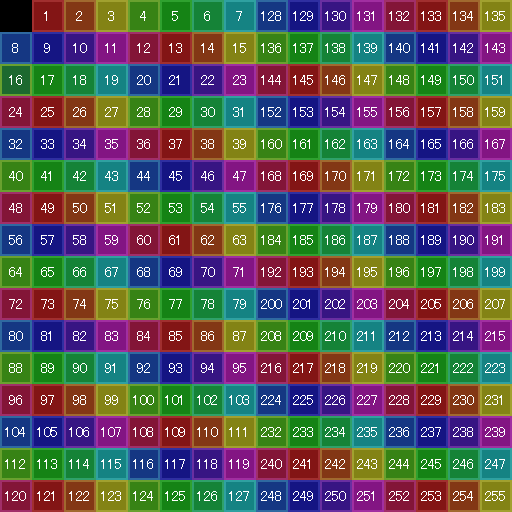
Extra Region
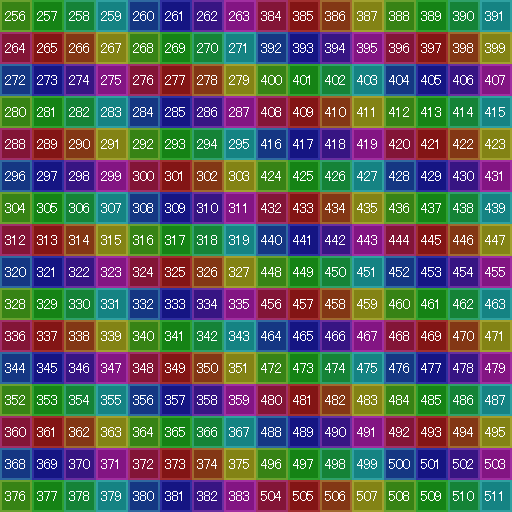
Layer Marker

How to Use
【Expansion Map】
1. Create a map that will be a child element of the map you want to extend, make the width and height the same, and make sure the name contains the string specified by the parameter.
2. Places flags and regions using the tileset specified by the parameter.
【Expansion Tileset】
When used in an Expansion Map:
・Tileset B
Replaced by region.
・Others
C to E and A5 can be used to add flags for passage, etc.
A1-A4 cannot be used.
When used with a normal map:
・Tileset B
Replaced by region.
・Others
It behaves the same as standard.
Only images that are set to be hidden will be hidden.
Specification
Please set the flag for the expansion tileset yourself.
By using an expansion tileset on a regular map, it can also be used as a single-picture map.
It is also possible to expand the region to 512 types and terrain tag to 16 types!
Please point it out.
Make Region and Passage more manageable.
Add More Tilesets
Tiles` Color Filter
This video uses it in combination with OverpassTile.
"草 (Kusa)" means grass.
"橋 (Hashi)" means bridge.
"端 (Hashi)" means the edge.
Download
Base Plugin
RegionCollisionEx.js Ver.1.1.0
MIT License
Additional Plugins
The following two will work independently without the base plugin.
MapLayerEx.js Ver.1.1.1
MIT License
EventUsesTileCollision.js Ver.1.0.0
MIT License
Tileset
Region
These are processed screenshots of the editor, so please edit them to suit your tile size.
Extra Region
Layer Marker
How to Use
【Expansion Map】
1. Create a map that will be a child element of the map you want to extend, make the width and height the same, and make sure the name contains the string specified by the parameter.
2. Places flags and regions using the tileset specified by the parameter.
【Expansion Tileset】
When used in an Expansion Map:
・Tileset B
Replaced by region.
・Others
C to E and A5 can be used to add flags for passage, etc.
A1-A4 cannot be used.
When used with a normal map:
・Tileset B
Replaced by region.
・Others
It behaves the same as standard.
Only images that are set to be hidden will be hidden.
Specification
Please set the flag for the expansion tileset yourself.
By using an expansion tileset on a regular map, it can also be used as a single-picture map.
It is also possible to expand the region to 512 types and terrain tag to 16 types!
Downloads / Referenced Files
Log in to download
Log in, then follow the RPG Maker Developers Group to see these download links.
Log in to downloadLicense / Terms Note
MIT License Additional Plugins The following two will work independently without the base plugin. MapLayerEx.js Ver.1.1.1


Referenced Images / Attachments
Creator Claims / Removal
If you are the original creator and want this listing reassigned, edited, or removed, join BMMPlay and contact the moderators with proof that matches the original RPG Maker Web profile, linked GitHub, itch.io page, or another public creator identity.
Replies (0)
No replies yet.
0
replies
9
views
Topic Summary
Loading summary...
