






public

Rpg Maker Developers Group

Simple enough for a child, powerful enough for a developer

2 Followers

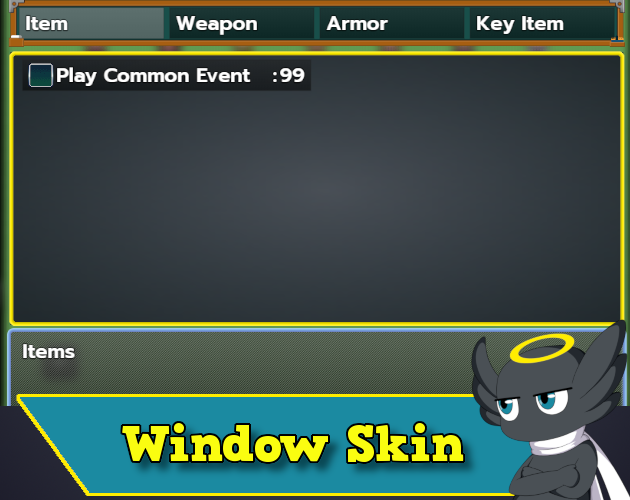
MZEli Change Window Skin - Set them individually, per scene or for all windows in game!

BMM Archive · July 15, 2026

Preserved forum archive. This topic stores the original first post and locally mirrored RPG Maker Web attachments when available. It is posted by the BMMPlay archive account, not by the original creator.

Original Source

  • Original title: Eli Change Window Skin - Set them individually, per scene or for all windows in game!
  • Original author: Eliaquim
  • Original date: March 8, 2021
  • Source thread: https://forums.rpgmakerweb.com/threads/eli-change-window-skin-set-them-individually-per-scene-or-for-all-windows-in-game.134211/
  • Source forum path: Game Development Engines > RPG Maker Javascript Plugins > JS Plugin Releases (RMMZ)

Summary

{ "lightbox_close": "Close", "lightbox_next": "Next", "lightbox_previous": "Previous",

Archived First Post

6vOPVmr.png

Author: Hakuen Studio

Introduction

• Sometimes you will need to use a different window skin for windows. It can be a different menu, or even when changing the party leader.
This plugin is for you! You can change the window skin for all windows or individual ones.

Features

● Set different window skin for any window.
● Set window skin for all windows.
● Set window skin according to the scene.

How to use

● In the "Window Skin" parameter you will be able to set different skins for each window.
If you don't choose one, it will take the one chosen for Window_Base, on the first parameter.
You can't remove this one from the plugin, the Window_Base has to be the first always.
To set a different window skin, you just have to put the name of the window(See the bottom of the help file) and select the file you want.
there is also a boolean parameter called "use scene skin". If you set this to true, it will take the window skin from the scene, instead of the one chosen here.
This is useful for help windows for example since it can be in different scenes.

● To choose a window skin for a scene, you have to set up the plugin parameter "Scene Skins".
Put the name of the scene(See the bottom of the help file) and choose the window skin.

● You can optionally set the plugin to save the changes you made, so it will be on the save file. Like if you add a party member them change the window skin, these changes will remain on a load of a save file.

● The plugin commands work the same as the plugin parameters. Except one that can change all the window's skins.
This will erase all your plugin parameter configurations and leave only the one chosen by the plugin command.

● Here is a list of the default windows and scene names. Be careful, both window and scene names are case sensitive.

● Windows:
  • Window_BattleActor
    Window_BattleEnemy
    Window_BattleItem
    Window_BattleSkill
    Window_PartyCommand
    Window_ActorCommand
    Window_BattleLog
    Window_BattleStatus
    Window_EquipCommand
    Window_EquipItem
    Window_EquipSlot
    Window_EquipStatus
    Window_Gold
    Window_Help
    Window_ItemCategory
    Window_ItemList
    Window_MapName
    Window_Message
    Window_NameEdit
    Window_NameInput
    Window_NumberInput
    Window_MenuActor
    Window_MenuCommand
    Window_MenuStatus
    Window_Options
    Window_SkillList
    Window_SkillStatus
    Window_SkillType
    Window_Status
    Window_SavefileList
    Window_EventItem
    Window_GameEnd
    Window_ShopBuy
    Window_ShopCommand
    Window_ShopNumber
    Window_ShopSell
    Window_ShopStatus
    Window_ScrollText
    Window_ChoiceList
    Window_TitleCommand
    Window_DebugEdit
    Window_DebugRange

● Scenes:
  • Scene_Menu
    Scene_Item
    Scene_Skill
    Scene_Equip
    Scene_Battle
    Scene_Name
    Scene_Map
    Scene_Title
    Scene_Options
    Scene_GameEnd
    Scene_GameOver
    Scene_Shop
    Scene_Status
    Scene_Save
    Scene_Load
    Scene_Debug

Terms of Use
Update Log

Features Mentioned

Downloads / Referenced Files

Log in to download

Log in, then follow the RPG Maker Developers Group to see these download links.

Log in to download

License / Terms Note

Terms of Use Update Log Hakuen Studio Window Skin Manager for RPG Maker MZ by Hakuen Studio Change the window skin of any window(or all windows)!

Referenced Images / Attachments

hakuenstudio.itch.io
Creator Claims / Removal

If you are the original creator and want this listing reassigned, edited, or removed, join BMMPlay and contact the moderators with proof that matches the original RPG Maker Web profile, linked GitHub, itch.io page, or another public creator identity.

#rmmz#plugin-archive

Replies (0)

No replies yet.

0 replies 1 view

Log in to reply.

User Avatar