


*Last Update - 8/8/14* Day and Night cycle using a common event!
BMM_Archive · July 15, 2026

Preserved forum archive. This topic stores the original first post and locally mirrored RPG Maker Web attachments when available. It is posted by the BMMPlay archive account, not by the original creator.
Original Source
- Original title: *Last Update - 8/8/14* Day and Night cycle using a common event!
- Original author: Zane
- Original date: October 12, 2013
- Source thread: https://forums.rpgmakerweb.com/threads/last-update-8-8-14-day-and-night-cycle-using-a-common-event.18990/
- Source forum path: Game Development Engines > RPG Maker Tutorials > RMVXAce Tutorials
Summary
This is the old tutorial from October 12, 2013 - August 7, 2014. You may continue to read it if you wish, however most if not all of the information is old and is not qualified enough to be a decent working tutorial. Spoiler Day and Night Cycle Tutorial Introduction:
Archived First Post
#b22222">This is the old tutorial from October 12, 2013 - August 7, 2014. You may continue to read it if you wish, however most if not all of the information is old#b22222"> and is not qualified enough to be a decent working tutorial.
Day and Night Cycle Tutorial
Introduction:
Have you ever wanted to use a day and night system inside your game?
Maybe have it effect when you can enter shops, or even how your story line goes.
If you are a RPG Maker user then you know scripts should always be a last resort.
Why stuff your game with someone's script when you can easily do this yourself!
This tutorial is good for VXA and VX.
Time of Day:
Everybody knows there are at least 4 Major time of day cycles
Dawn,Day,Dusk,Night So you need 4 different tint tones.
Now, you can use VXA's preset tints or make your own.
What will be needed:
#a52a2a">1 variable
#a52a2a">1 common event
#a52a2a">4 switches (optional)
4 tint settings
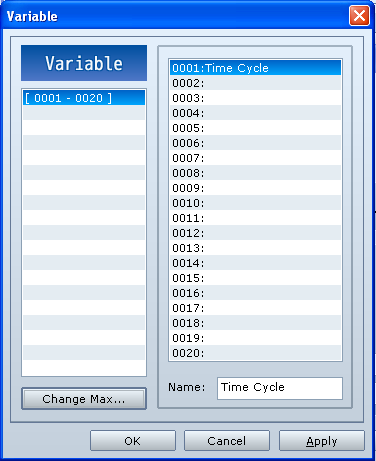
Setting up your variable:
You may name this to whatever you like!
But for the tutorial lets call it time cycle.
Set this to 0
Protected download
Introduction:
Have you ever wanted to use a day and night system inside your game?
Maybe have it effect when you can enter shops, or even how your story line goes.
If you are a RPG Maker user then you know scripts should always be a last resort.
Why stuff your game with someone's script when you can easily do this yourself!
This tutorial is good for VXA and VX.
Time of Day:
Everybody knows there are at least 4 Major time of day cycles
Dawn,Day,Dusk,Night So you need 4 different tint tones.
Now, you can use VXA's preset tints or make your own.
What will be needed:
#a52a2a">1 variable
#a52a2a">1 common event
#a52a2a">4 switches (optional)
4 tint settings
Setting up your variable:
You may name this to whatever you like!
But for the tutorial lets call it time cycle.
Set this to 0
Protected download
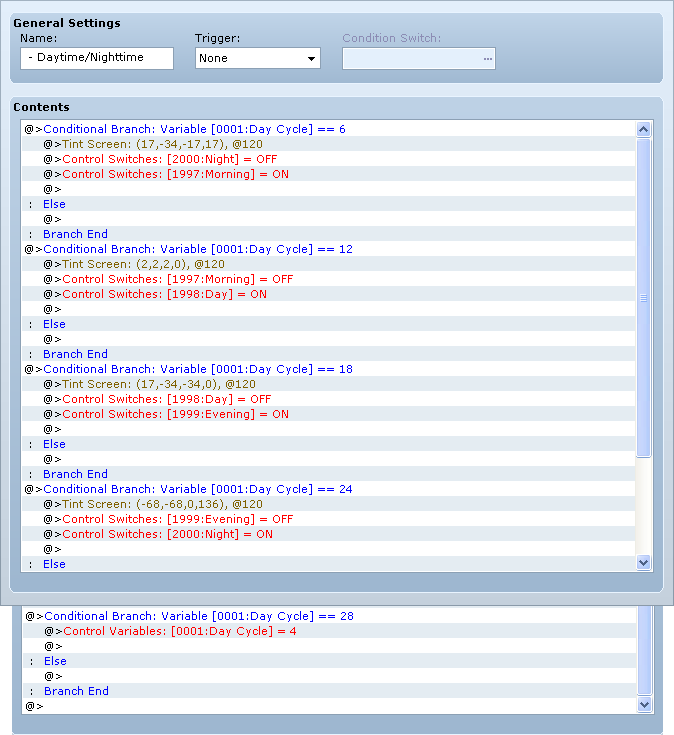
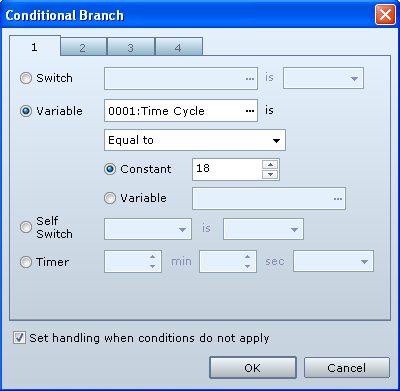
This is the longest part. But it should only take 1min and 30sec to set up.
Here set up all your separate conditional branches with your tints and variable instants.
Remember the switches are optional and I will explain why. Also make sure to un-check
Wait for completion when setting up your tints.
Setup the cycle starters with the numbers 6, 12, 18 ,24 (28 is the cycle reset)
#a52a2a">Remember after the variable has increased 28 times make sure you reset it to 4
#a52a2a">to keep the pattern even.
Ignore that it says day cycle it supposed to be time cycle
Protected download
Protected download
Protected download
Protected download
Switches (Optional Feature):
Though not required I do recommend it.
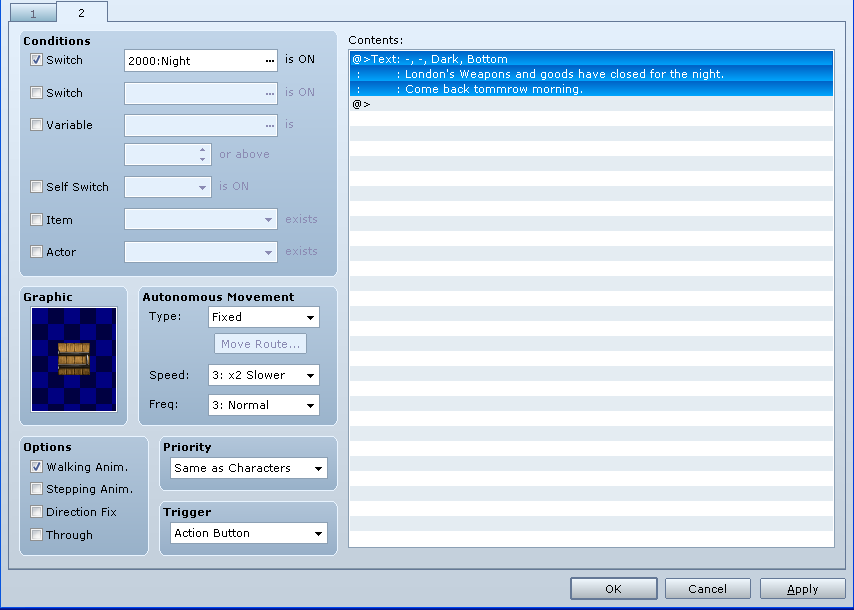
Lets say you have a weapon shop.
you can set up event pages when certain
switches are on. Like when the shop is
closed. Nobody works a 24/7 shift.
Here is an example.
Protected download
If the night switch is on then you will get a message saying its closed.
How to get the actual cycle to work:
So everything on the list is checked off we have all our branches set up etc.
Now how do we get the cycle going?
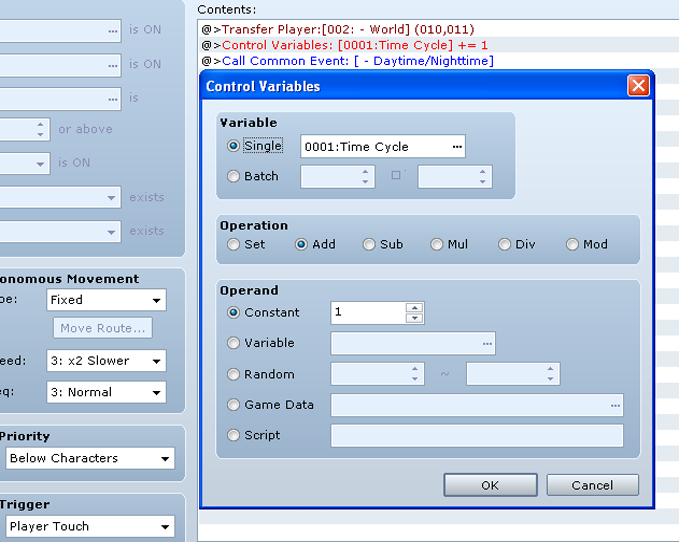
Simple. When moving maps we can add +1 to the variable and then call the
Common Event.
Protected download
Moving to maps that go inside houses or dungeons:
Just about every RPG has at least 1 House and/or 1 Dungeon.
Sometimes it may look silly to have a sunset tint inside your House and/or
Dungeon. We need to make the cycle continue but not change the effect
inside the house because we still want the simulation of day and night.
So this is how we implement it.
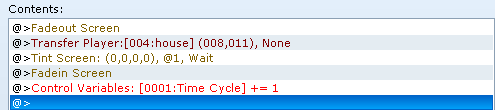
When entering a home, add the variable like before but do not call the common event.
Also make sure you use the fade out screen and change your tint back to normal or
(0, 0, 0, 0)
and then fade in the screen otherwise it will look very weird.
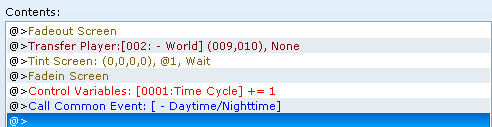
Protected download
common event again.
Protected download
You don't have to start the cycle at morning. You may
begin your story at anytime of the day or night.
This part may sound a bit tricky but it isn't.
Do you recall those numbers you made?
6 , 12 , 18 , 24?
Those are your cycle starters
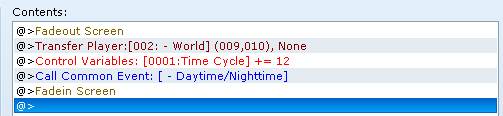
all you have to do is start on a blank map. (all black)
Set your variable to one of those numbers. Then call
your common event. And transfer your player. For
best results do it in this order shown here.
Protected download
Almost anything is possible with eventing. This is a good starting structure for new players or experienced players. Feel free to like this post if the tutorial was helpful! Comment if you any
questions or want to share your thoughts about the tutorial. See you later!
#b22222">This tutorial is the new one from August 8, 2014 - Now. It's a demo with all the proper information that works fully using 1 variable only. It is advised that you follow and study this demo as the old tutorial is no longer supported and anyone following it will not receive help or feedback.
Download - Day and Night Cycle Demo #a9a9a9">- Size 1.43mb
Downloads / Referenced Files
Log in to download
Log in, then follow the RPG Maker Developers Group to see these download links.
Log in to downloadReferenced Images / Attachments
Creator Claims / Removal
If you are the original creator and want this listing reassigned, edited, or removed, join BMMPlay and contact the moderators with proof that matches the original RPG Maker Web profile, linked GitHub, itch.io page, or another public creator identity.
Replies (0)
No replies yet.
0
replies
10
views
Topic Summary
Loading summary...

