Original Source
- Original title: Customize Maps and Battles using Weather (MZ Plugin Collection)
- Original author: BurningOrca
- Original date: September 12, 2022
- Source thread: https://forums.rpgmakerweb.com/threads/customize-maps-and-battles-using-weather-mz-plugin-collection.151248/
- Source forum path: Game Development Engines > RPG Maker Javascript Plugins > JS Plugin Releases (RMMZ)
Summary
About this plugin collection: This collection adds a bunch of new mechanics to the weather within RPG Maker. The plugins might function in any order except that the core plugin must be the first, but they at least function in the order I decribe them here. Terms of use:
Archived First Post
This collection adds a bunch of new mechanics to the weather within RPG Maker.
The plugins might function in any order except that the core plugin must be the first, but they at least function in the order I decribe them here.
Terms of use:
1. These plugins may be used and redistributed with both free and commercial games.
2. These plugins may be redistributed only for free otherwise, but I would appreciate linking back to this thread instead.
3. You may take code from these plugins for your own free plugins, but not for commercial plugins.
4. You may alter these plugins, but BurningOrca has still to be mentioned in the author section. You may not rename this plugin.
5. You may not use these plugins in the development of a game containing any ripped content, including ripped trademarks etc.
About compatibility:
I haven't really tested these plugins with a lot of plugins from other creators, but most of them should be compatible with all plugins that also use the usual $gameScreen.weatherType for their weather extensions, which means e.g. if MogHunter has a MZ Weather Engine it is highly possible, that my plugins won't work with it.
Also only some of them might not be compatible with OcRam's Weather plugins.
I have not bought Visustella's Weather Effects and can't tell you anyhting about this one.
Requirements:
My base plugin is required which can be downloaded from the same link.
The plugins in this collection:
BoMZ_TitleCustomizer
This is an additional plugin provided with this collection as I originally planned to release these plugins together with a demo game and I wanted to have a nice title screen with weather on it, but I'm just too lazy and rather take free spot on the meme thread's bingo board.
Features of this plugin:
- Adds a spriteset to the title screen to make screen effects such as weather, tint, shake, show picture etc. possible on the title screen
- Can run non-parallel common events on the title screen
- Can randomize the title screen background picture or show a background picture based on a variable from the last save file
- Can randomize the weather effect shown on the title screen or show a weather effect based on a variable from the last save file
- Makes it possible to use the filters from FilterControllerMZ by @Tsukimi-neko
- Some properties of the title screen text and command window can be adjusted
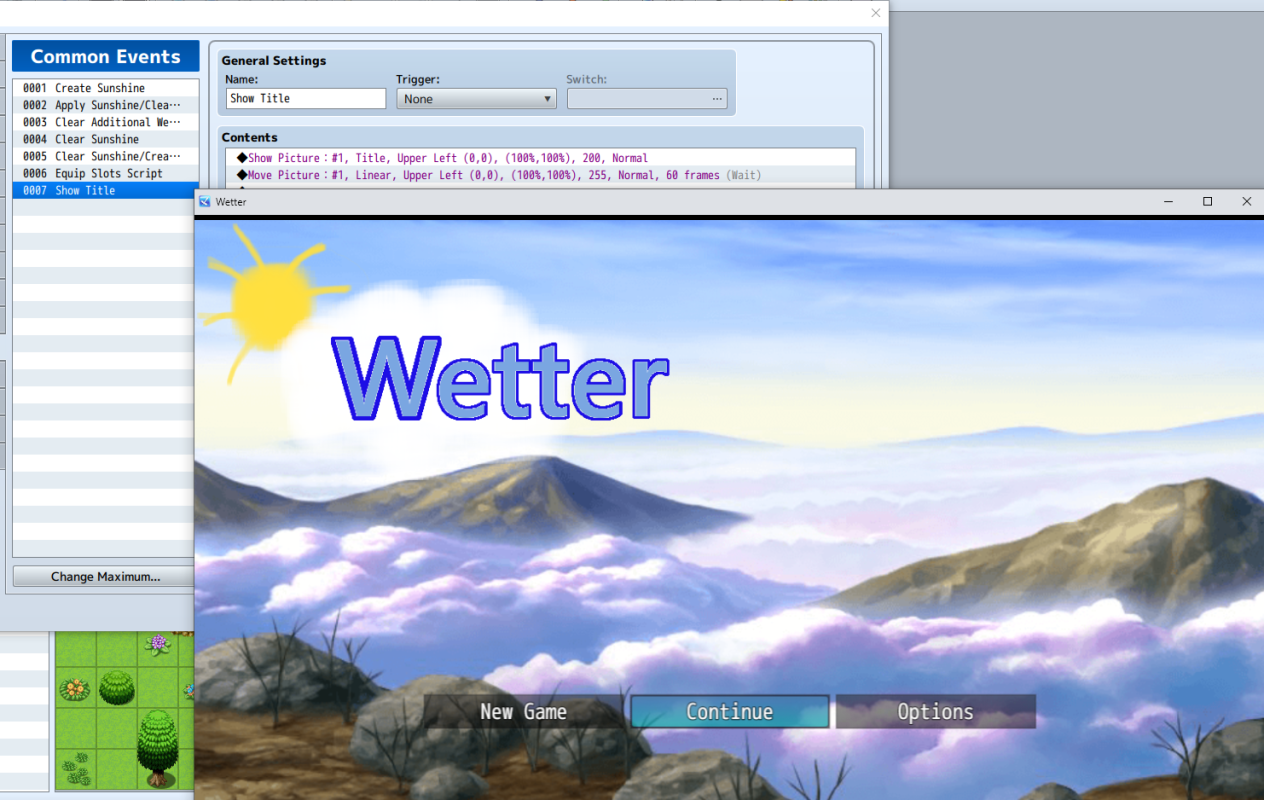
Here is a picture of my unreleased title screen, which is very basic and not really amazing. The picture shows also the common event used to display the image showing the games name (Wetter is german for weather) as I've deactivated "Show Game Title".
BoMZ_Weather_Core
This plugin provides some base functionality for the other plugins in this collection. It also introduces two variables in the BoMZ namespace called wtype and wpow which will always be equal to $gameScreen.weatherType() and $gameScreen._weatherPowerTarget. They serve as short names for these two expressions in my other plugins of this collection, but I also meant for the two variables to be used e.g. in damage formulas (BoMZ.wpow * a.atk - b.def).
BoMZ_Weather_CustomWeather
This plugin is meant to be used as a bridge between the following plugins and plugins with which they are not compatible by allowing to run scripts and common events when the weather changes.
This plugin also allows to fully customize the appearance of existing weathers and even add new weathers but only a single weather layer, with the following customization options:
- The formulas for sprite positions, sprite rotation, sprite movement of every sprite that belongs to the active weather. The sprites still run on 60 FPS at least on my hardware.
- Add a background sound played on a seperate channel then the regular background sound during the active weather
- Add screen flash effects with customizable color and sound effects played during the active weather with timing based on the power level of the weather
- Run common events and scripts whenever the weather changes
- No: The weather effect is not visible in the battle scene, however the effects of the following plugins in the collection might still be active. Use this option if you already have a plugin that adds weather to the battle screen.
- No, clear before battle: Active weather effect is cleared before battle, so that the none effect is active during the battle. After the battle the weather which was active is reapplied.
- Yes, reset after battle: The weather effect is visible in the battle scene and any changes made to the weather during battle are reset when the battle ends.
- Yes: The weather effect is visible in the battle scene and any changes made to the weather during the battle are kept after the battle ends.
This plugin is compatible with N_WeatherFog V1.4.2 and higher by @Nolonar
Even though this plugin was meant as a bridge it might cause troubles when used together OcRam's weather plugin(s).
Images used within the plugin parameters of this plugin must be stored in the img/system folder or a newly created subfolder so they stay loaded until the game is closed.
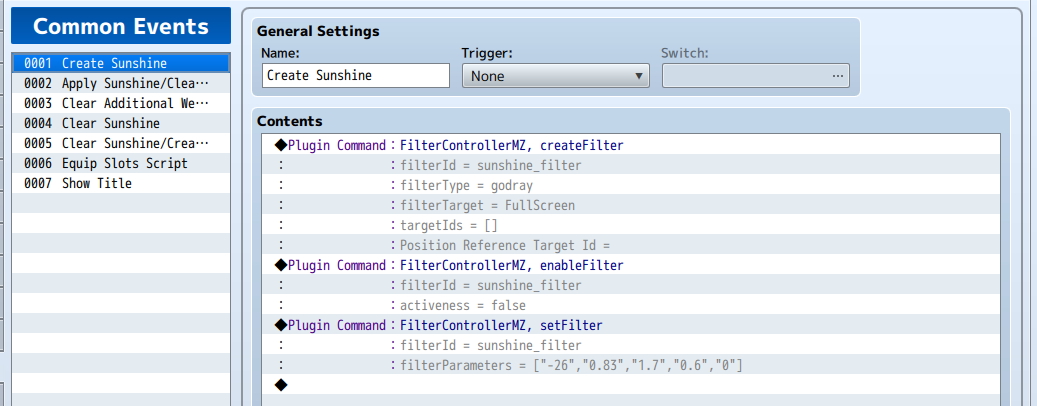
This common event I run on the title screen and also at the very start of my unreleased game.
Protected download
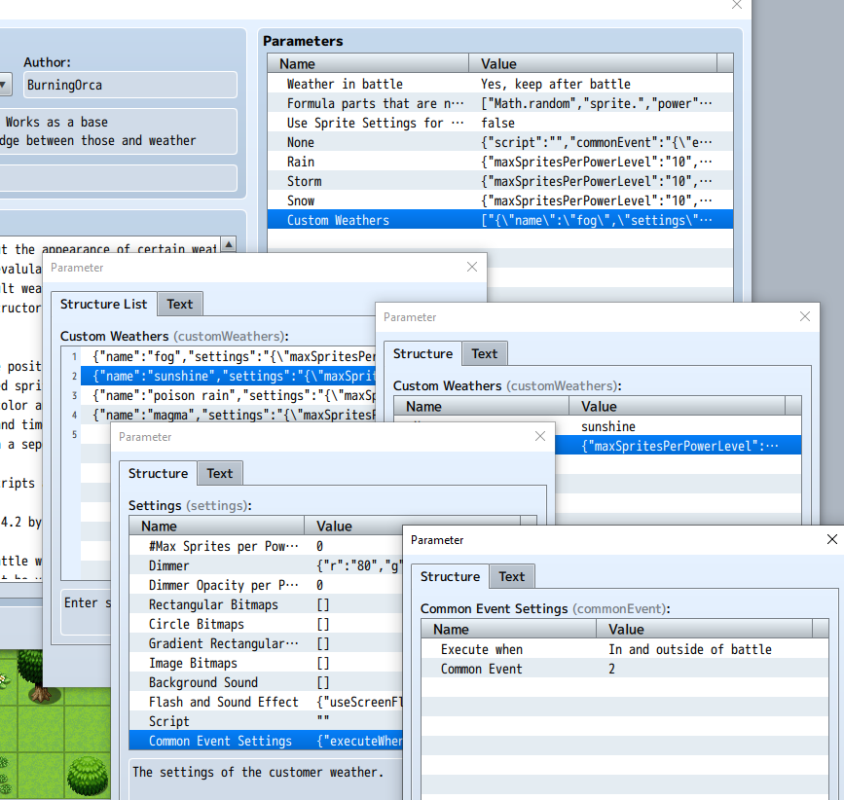
Plugin parameter for sun shine weather.
Protected download
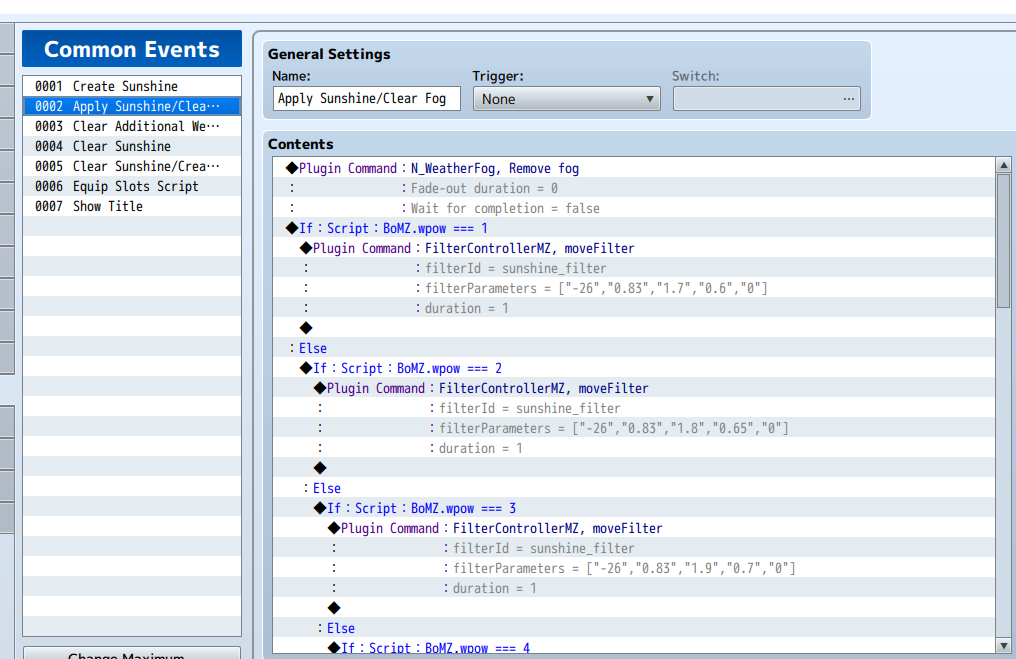
Part of the common event that shows the sunshine on the screen.
BoMZ_Weather_RestrictedUsage
Within the plugin parameters of this plugin you can either setup skill and/or items that can only be used during certain weathers or not be used during certain weathers. You can also setup a required weather power level for skills/items to become active/inactive.
These restrictions can also be set for elements, e.g. make skills or items that inflict fire element damage not be usable during rain.
BoMZ_Weather_BattleManipulation
Within the plugin parameters of this plugin you can setup actors, enemies, skills and items to have weather changing abilities with turn limits including:
- Changing the entire effect
- Changing the power of the weather effect
- Changing the turn limit
Weather changing abilities of actors and enemies are triggered at the start of the battle with the battler having the lowest agility winning or when they appear mid battle.
The plugin has the option to add a new window to the battle scene showing the remaining turns of weather with customization abilities for the window. Images shown on the window must be stored in img/system folder or a newly created subfolder so they stay loaded until the game is closed.
You can add notetags to equip items to enhance the turn limit of weather changing abilities, e.g.
<snow_turns:3>: When a weather changing abilities is triggered that creates snow weather for 4 turns, it will instead create snow weather for 7 turns.
However the turn limit counter does not work very well with the time progress systems.
BoMZ_Weather_SkillItemCustomization
This plugin can change various properties of skills and items when a certain weather effect is active:
BoMZ_Weather_TraitsAndEffects
Within the parameters of this plugin you can add various traits and effects to various database entities (e.g. actors, states, items, skills, ...) which they will only have during certain weathers, but these won't overwrite there normal traits and effects, instead they will be added to the normal traits and effects of the database entity.
BoMZ_Weather_Encounters
Restrict random encounters via map note tags to certain weathers including the ability to set a required power level for the troop to appear,
e.g.
<Weather Encounters>
rain5:"[1,2,3,5]"
snow:"[4,6]"
</Weather Encounters>
On this map the troops with the database id 1,2,3 and 5 will only be encountered during rain with a target power of at least 5.
Troops 4 and 6 will only be encounter during snow.
Syntax is
<Weather Encounters>
weathertype(minimumPowerLevel):"[(troop ids)]"
</Weather Encounters>
You have to use the square brackets also when you want to use only a single troop id.
BoMZ_Weather_CharacterStyles
This plugin allows to customize the appearance of actors, enemies and events in battle and on the map based on the active weather effect.
However for events the BoMZ_EnhancedEventPages plugin for which this plugin is an extension plugin is required. The base plugin can be found under the same link.
BoMZ_Weather_Damage
Define various damage factors depending on the active weather that are applied when actors wear equipment of certain types or the skill/item has a certain element or is of a certain type. Some elements might event always damage or heal an actor/enemy during certain weather effects.
Download Link:
MZ - Google Drive
Features Mentioned
- Adds a spriteset to the title screen to make screen effects such as weather, tint, shake, show picture etc. possible on the title screen
- Can run non-parallel common events on the title screen
- Can randomize the title screen background picture or show a background picture based on a variable from the last save file
- Can randomize the weather effect shown on the title screen or show a weather effect based on a variable from the last save file
- Makes it possible to use the filters from FilterControllerMZ by @Tsukimi-neko
- Some properties of the title screen text and command window can be adjusted
- This plugin is not compatible with OcRam's Weather plugin(s).
- Here is a picture of my unreleased title screen, which is very basic and not really amazing. The picture shows also the common event used to display the image showing the games name (Wetter is german for weather) as I've deactivated "Show Game Title".
- Spoiler: Picture
- "lightbox_close": "Close",
- "lightbox_next": "Next",
- "lightbox_previous": "Previous",
- "lightbox_error": "The requested content cannot be loaded. Please try again later.",
- "lightbox_start_slideshow": "Start slideshow",
- "lightbox_stop_slideshow": "Stop slideshow",
- "lightbox_full_screen": "Full screen",
- "lightbox_thumbnails": "Thumbnails",
- "lightbox_download": "Download",
Downloads / Referenced Files
Log in, then follow the RPG Maker Developers Group to see these download links.
Log in to downloadLicense / Terms Note
Terms of use: 1. These plugins may be used and redistributed with both free and commercial games. 2. These plugins may be redistributed only for free otherwise, but I would appreciate linking back to this thread instead. 3. You may take code from these plugins for your own free plugins, but not for commercial plugins.
Referenced Images / Attachments
Creator Claims / Removal
If you are the original creator and want this listing reassigned, edited, or removed, join BMMPlay and contact the moderators with proof that matches the original RPG Maker Web profile, linked GitHub, itch.io page, or another public creator identity.
Replies (0)
No replies yet.
Topic Summary
Loading summary...