public

Rpg Maker Developers Group

Simple enough for a child, powerful enough for a developer

2 Followers

MZ[MZ] Keyboard Rebind - v1.0

BMM Archive · July 15, 2026

Preserved forum archive. This topic stores the original first post and locally mirrored RPG Maker Web attachments when available. It is posted by the BMMPlay archive account, not by the original creator.

Original Source

  • Original title: [MZ] Keyboard Rebind - v1.0
  • Original author: Nowis-337
  • Original date: September 5, 2022
  • Source thread: https://forums.rpgmakerweb.com/threads/mz-keyboard-rebind-v1-0.151098/
  • Source forum path: Game Development Engines > RPG Maker Javascript Plugins > JS Plugin Releases (RMMZ)

Summary

{ "lightbox_close": "Close", "lightbox_next": "Next", "lightbox_previous": "Previous",

Archived First Post

Protected download
Keyboard Rebind - Version 1.0
Nowis-337

Introduction
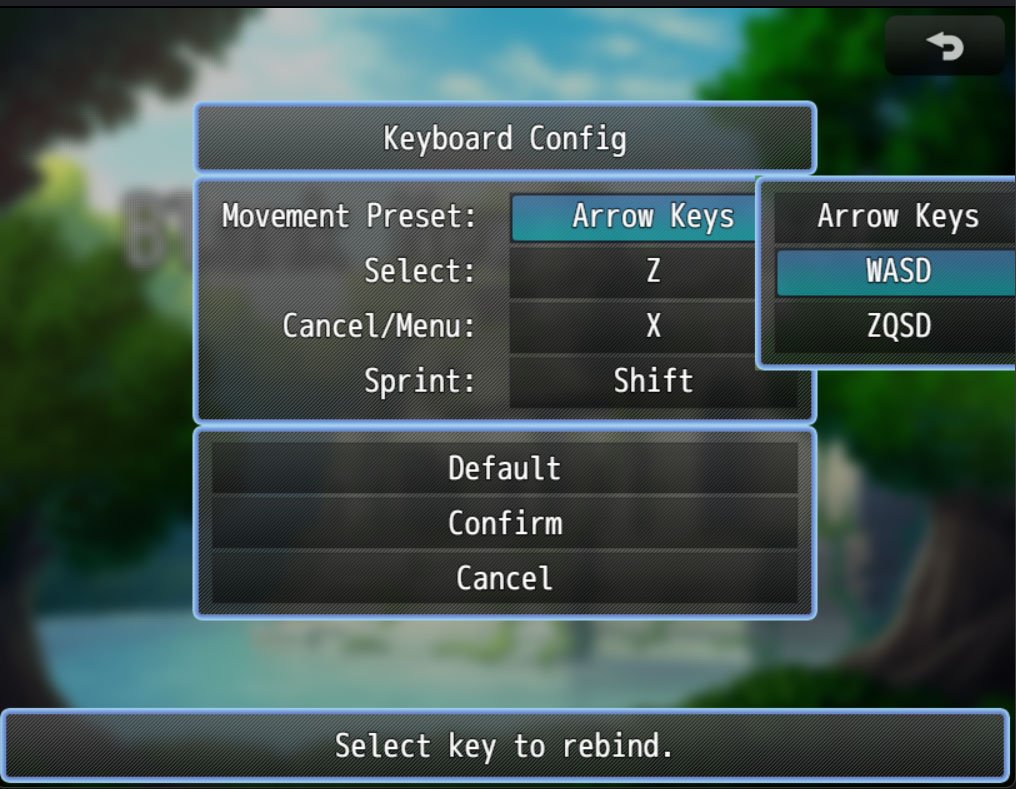
This plugin adds a menu rebind keyboard keys to the options menu. The player will select the keybind from a list, then pressing the new key on your keyboard to register as the new keybind. I wanted to make something that is a little simpler than Yanfly's approach of mapping out a whole keyboard visually in his MV Keyboard Config plugin.


Features
  • Movement presets: Arrow Keys, WASD, ZQSD, Customise your own!
  • Rebind to most keys on the keyboard (except for F1 - F12).
  • Make your own custom keynames to use (eg via scriptcalls).
  • Probably not compatible with other plugins that assign common events to certain keys.
  • Limitions: Cannot set more than one keys to the same function like default RPG Maker.

Screenshots
Protected download

How to Use
Place in plugins folder and activated it in the plugins manager. Set the plugin parameters as desired.

Script Calls
If you are customising your own options menu, or using other plugins to modify the options menu, you can access this menu by using the scriptcall: SceneManager.push(Scene_KeyboardRebind);

Download
Download it here: https://nowis-337.itch.io/mz-keyboard-config

Terms and Credits
Free to use for non-commercial and commercial projects.
Please credit: Nowis-337


Version 1.0 - 5/09/2022 - Finished plugin! Hope it works.

Features Mentioned

  • Movement presets: Arrow Keys, WASD, ZQSD, Customise your own!
  • Rebind to most keys on the keyboard (except for F1 - F12).
  • Make your own custom keynames to use (eg via scriptcalls).
  • Probably not compatible with other plugins that assign common events to certain keys.
  • Limitions: Cannot set more than one keys to the same function like default RPG Maker.

Downloads / Referenced Files

Log in to download

Log in, then follow the RPG Maker Developers Group to see these download links.

Log in to download

License / Terms Note

Terms and Credits Free to use for non-commercial and commercial projects. Please credit: Nowis-337 Version 1.0 - 5/09/2022 - Finished plugin! Hope it works.

Referenced Images / Attachments

keyboardcover.jpg
keyboardcover.jpg
screenshokeyboard.jpeg
Creator Claims / Removal

If you are the original creator and want this listing reassigned, edited, or removed, join BMMPlay and contact the moderators with proof that matches the original RPG Maker Web profile, linked GitHub, itch.io page, or another public creator identity.

#rmmz#plugin-archive

Replies (0)

No replies yet.

0 replies 1 view

Log in to reply.

User Avatar