


MZCustomize the Optimize Equipment Function [v1.2.0]
BMM_Archive · July 15, 2026

Preserved forum archive. This topic stores the original first post and locally mirrored RPG Maker Web attachments when available. It is posted by the BMMPlay archive account, not by the original creator.
Original Source
- Original title: Customize the Optimize Equipment Function [v1.2.0]
- Original author: Woschtbrot
- Original date: October 16, 2022
- Source thread: https://forums.rpgmakerweb.com/threads/customize-the-optimize-equipment-function-v1-2-0.152008/
- Source forum path: Game Development Engines > RPG Maker Javascript Plugins > JS Plugin Releases (RMMZ)
Summary
Custom Optimize Equipment Version 1.2.0 Woschtbrot {
Archived First Post
Custom Optimize Equipment
Version 1.2.0
Woschtbrot


IntroductionVersion 1.2.0
Woschtbrot
This plugin will give your characters the items you want them to get via the optimize button in the equip menu, not just an overall good item with the wrong stats.
Features- Choosable actor or class as the deciding factor
- Actor/Class dropdown menu
- Every default parameter with its default name
- Ex-Params and Sp-Params also supported
- Choose your own default Priority, you just need to edit other values
- Not explicit actors/classes use the default Optimize Equipment Function of RMMZ
- Debug Console Outputs to look into behavior (Please disable for releases! Only use for clarification while developing)
- Simple Multi Attack Priority (Still WIP, cause actually multi Attacks should scale with damage, but you currently just get item performance points per "Attack Times +" value)
- One-Slot-Sealing-Equipment support, i.e., two-handed Weapons
- Being a standalone plugin/ no Core Package needed
It's configured through the plugin parameter using the plugin manager.
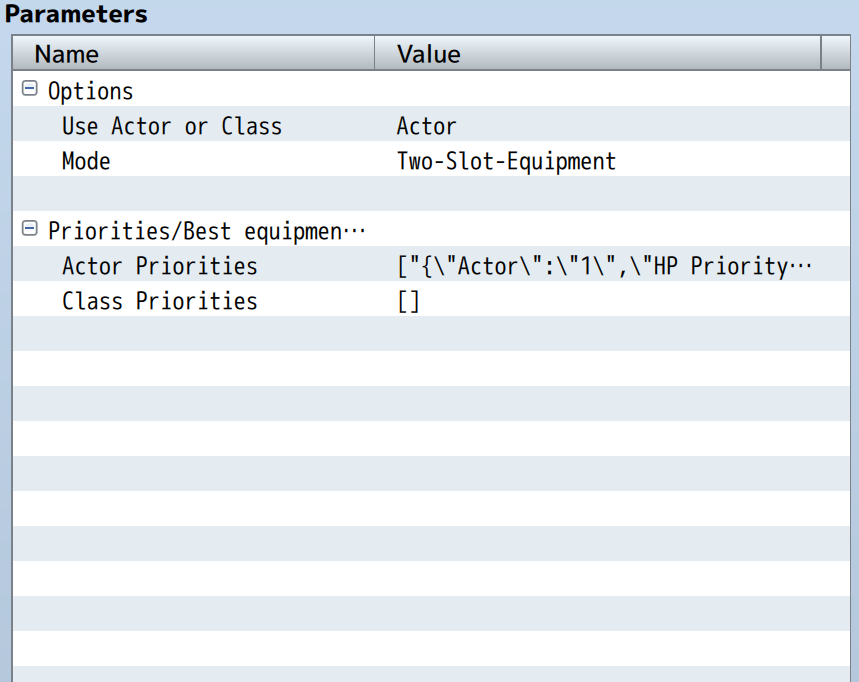
- Select If you want to set via actor or class
- When Select your actor/class, the other selection will be ignored
- Give the attributes/parameters you want higher values, it's multiplicative to the item value in this parameter (meaning 0 equals ignoring parameter and the higher the number, the more important the stat becomes)
- Negative values are possible, but I don't see any use for it.(Could cause a character to dislike an item, even if it would be his best equipment, just because it's great somewhere else?)
- If you haven't given the actor/class a custom priority set, the RMMZ default will be used (which is simply adding the standard parameter stats like HP, MP, ATK)
Update 1.1.0 -> 1.2.0 Advice
Be aware that your settings might get deleted while loading the new Version into Plugin Manager, to get the new options. Copying the old parameter inside the “Actor/Class Priorities” and Pasting them in “Custom Optimize” after should work. You might need to double-click each Parameter to add the sub Parameters.
Download Page
RPG Maker MZ - Custom Optimize Equipment Plugin by Woschtbrot
Custom Optimize Equipment
 woschtbrot.itch.io
Terms of Use
You may use this plugin in your projects both commercial and non-commercial for free.
Bugs/Issues/Feedback
I might not be the most active developer concerning RPG Maker, but I will visit the forum from time to time. But I'm probably more active on itch.
V 1.2.0:
Changes:
- Plugin Parameters are now newly ordered, no 2 separated Lists for Actor/Class
Just Select Actor or Class like before and the other Param will be ignored. - Default Priority Setting
You may leave Priorities blank to use your selected Default Priority
New Features:
- XParams
- SParams
- Attack Times (not yet optimal, but working)
- Errors will be given as Console Outputs (no possible game crashes, except at plugin initialization)
and default "Optimize Equipment" will be used in case of a crash - Debug Information can be turned on, showing console outputs, which items scores which performance
V 1.1.0:
New Features:
- Two Slot Item Support
Special Thanks
Fernyfer775
Customized Equipment "Optimization"
Customized Equipment "Optimization" Brief Description: In this tutorial, I teach you how to modify the code that is run when using the "optimize equipment" button in the Equip Scene. By default, MV's optimize feature equips a character with the item that has the highest stats on it...
 forums.rpgmakerweb.com
who gave me the idea, to actually do this plugin, but my code has nothing to do with his, so I don't think it's necessary to credit himCustomized Equipment "Optimization"
Customized Equipment "Optimization" Brief Description: In this tutorial, I teach you how to modify the code that is run when using the "optimize equipment" button in the Equip Scene. By default, MV's optimize feature equips a character with the item that has the highest stats on it...
forums.rpgmakerweb.com
Downloads / Referenced Files
Log in to download
Log in, then follow the RPG Maker Developers Group to see these download links.
Log in to downloadLicense / Terms Note
Terms of Use You may use this plugin in your projects both commercial and non-commercial for free. Bugs/Issues/Feedback I might not be the most active developer concerning RPG Maker, but I will visit the forum from time to time. But I'm probably more active on itch.


Referenced Images / Attachments
Creator Claims / Removal
If you are the original creator and want this listing reassigned, edited, or removed, join BMMPlay and contact the moderators with proof that matches the original RPG Maker Web profile, linked GitHub, itch.io page, or another public creator identity.
Replies (0)
No replies yet.
0
replies
13
views
Topic Summary
Loading summary...
