This plugin is no longer in development. I had to take a break from rmmz dev for an extended period (almost two years). During that time a number of minimap plugins have appeared on the MZ plugin landscape of varying feature sets and price: Eli Minimap
This plugin is no longer in development.
I had to take a break from rmmz dev for an extended period (almost two years).
During that time a number of minimap plugins have appeared on the MZ plugin landscape of varying feature sets and price:
I am, in fact, not using rabbitMap for my current project, and am using the Proximity Compass for my main project and KoTC for my procedural dungeon project.
rabbitMap - Version 1.04
poorrabbit
Introduction
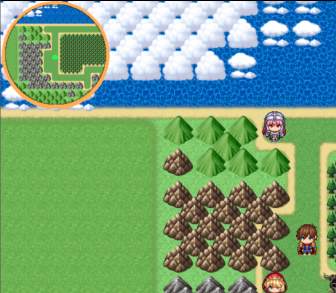
rabbitMap gives you a customizable mini map based on your images. By using a mask file it limits the viewable map to the shape of the mask. The mini map moves in it's little window as your character moves. By default the minimap will appear in the top left of your screen.
Features
- Detailed minimap based on the images of your chosing
- Works in MV too!
- Switch for turning on/off minimap (must turn on for minimap!)
- X/Y Location of minimap can be variable driven
- Map Notetags can be used to specify images and scaling
How to Use
Download the rabbitMap.js file, place it in your plugins directory.
Download the maps.zip file and place the images from it into a new directory in your "img" directory.
Specifically: "projectname\img\maps"
Make sure you set the showMiniMap switch ID in the plugin parameters.
From the map editor, save your map file using "Save as image", be sure to select the new "maps" directory.
Create an event to flip that switch on.
You might want to use notetags to scale the minimap image down (see instructions in plugin file)
Profit!
Plugin Commands / Script Calls
This plugin has
no plugin commands.
Demo
The script, assets and demos for both MZ and MV are available on itch.io
Download
Minimap plugin for RPG Maker MZ (and MV)

poorrabbit.itch.io
Terms of use:
Free for commercial and non commercial use.
You may not sell this plugin or modifications to this plugin as your own product.
If you make modifications or bugfixes to this plugin, you must share them
with poorrabbit in the spirit in which this plugin was shared with you.
If you use the rabbitMap plugin in your project you MUST give credit.
I would also LOVE to hear about it.
Credit: poorrabbit
Changelog:
- V 1.01 Fixed race condition where game would crash when no map notes were defined on first map with minimap enabled. Demo Projects and code downloads updated.
- V 1.02 MV compatibility fix
- rabbitMap would fail to draw the map on transfer, crashing the game.
- Have temporarily removed the MV demo.
- A new MV only demo will be put up in the next day or two
- For the updated code, grab the rabbitMap.js file.
- V 1.03 Better support for mini maps of other sizes
- Reworked how mask and background image sizes are handled.
- Minimaps of different sizes (smaller or larger) should behave better now.
- You will probably need to adjust your xBase, yBase and possibly your offsets
to account for the new (more accurate) handling.
- Also added sample larger rectangular mask and background files in the maps.zip
- New demos for both MV and MZ versions coming soon.
So, download the rabbitMap.js for the changes until the new demos are up.
- V1.04 Fix for situation when map is turned off and then back on without
moving to another map.
Terms of use: Free for commercial and non commercial use. You may not sell this plugin or modifications to this plugin as your own product. If you make modifications or bugfixes to this plugin, you must share them


 OXS 2.0 TV Sound Bar
Compact sound bar pick for boosting TV, movie, and console audio.
View on Amazon
OXS 2.0 TV Sound Bar
Compact sound bar pick for boosting TV, movie, and console audio.
View on Amazon