


MZEli Switches - Advanced switches operations!
BMM_Archive · July 15, 2026

Preserved forum archive. This topic stores the original first post and locally mirrored RPG Maker Web attachments when available. It is posted by the BMMPlay archive account, not by the original creator.
Original Source
- Original title: Eli Switches - Advanced switches operations!
- Original author: Eliaquim
- Original date: November 12, 2020
- Source thread: https://forums.rpgmakerweb.com/threads/eli-switches-advanced-switches-operations.129803/
- Source forum path: Game Development Engines > RPG Maker Javascript Plugins > JS Plugin Releases (RMMZ)
Summary
{ "lightbox_close": "Close", "lightbox_next": "Next", "lightbox_previous": "Previous",
Archived First Post

Author: Hakuen Studio
Introduction
Provides advanced switch operations.
There are many conditions that, by default, the event tabs do not have commands to check.
As an example, if the game is being played on an android device, iPhone, computer or check the current weather (rain, storm, or snow).
Instead of use the script calls:
$gameScreen.weatherType() === 'rain'
This plugin facilitates this and other processes by automatically activating a switch of your choice based on a predefined condition in plugin parameters.
Features
● Advanced plugin command to manage switches.
● Global switches that have his values working across save files.

● Optionally, automatically turns the specified switches on and off
according to the conditions below:
• Is in Test mode (Whether in battle, event, or normal).
• If the game is running on a mobile device.
• If the game is running from a Desktop.
• If the game is running on an android.
• If the game is running on an iPhone.
• If the player is in any vehicle.
• If the player is on an airship.
• If the player is in a boat.
• If the player is on a ship.
• If there is any change in the weather.
• If it is raining.
• If it is snowing.
• If it is raining heavily (storm).
• If the player is on a tile that inflicts damage.¹
• If the player is running.
• If the player is in a bush.¹
• If the player is on a ladder.¹
• If the player is in motion.
• If the message window is open.
• If the choice window is open.
• If the number entry window is open.
• If the item selection window is open (from the map).
• If the timer is active.²
¹ It is necessary to configure the tileset.
² When it reaches zero, the switch turns off.
How to use
♦ Global Switches ♦
• You can set regular switches to have their values persistent across save files.
To do that, you just need to insert "GD:", without quotes, not case-sensitive, on the switch name.
GD means GLOBAL DATA.
♦ Plugin parameters ♦
● Update Method → There are two ways for the plugin to work:
• Update as needed → The switches are turned on and off automatically only when something related to them happens. For example, when entering a vehicle the plugin will identify which vehicle it is and activate the switch for that vehicle. And when you leave it, the switch will turn off.
• Always update → At each time interval (frames) specified in the "Update interval" parameter, the plugin will check all switches and turn on or off each one depending on the condition of each one.
For example, regardless of whether the player enters or exits the vehicle, the plugin will be updating the corresponding switches at each time interval.
• None → It will do nothing. Will not auto-update the switches in any way.
If you happen to experience any incompatibility with other plugins, try switching between versions.
♦ Plugin Commands ♦
Operations → Let you manage switches in a more advanced way.
You can toggle values, change more than one switch, or even a range of switches ids.
Can set a delay to change the value of switches.
• You can set regular switches to have their values persistent across save files.
To do that, you just need to insert "GD:", without quotes, not case-sensitive, on the switch name.
GD means GLOBAL DATA.
♦ Plugin parameters ♦
● Update Method → There are two ways for the plugin to work:
• Update as needed → The switches are turned on and off automatically only when something related to them happens. For example, when entering a vehicle the plugin will identify which vehicle it is and activate the switch for that vehicle. And when you leave it, the switch will turn off.
• Always update → At each time interval (frames) specified in the "Update interval" parameter, the plugin will check all switches and turn on or off each one depending on the condition of each one.
For example, regardless of whether the player enters or exits the vehicle, the plugin will be updating the corresponding switches at each time interval.
• None → It will do nothing. Will not auto-update the switches in any way.
If you happen to experience any incompatibility with other plugins, try switching between versions.
♦ Plugin Commands ♦
Operations → Let you manage switches in a more advanced way.
You can toggle values, change more than one switch, or even a range of switches ids.
Can set a delay to change the value of switches.
Screenshots


Terms of Use
Update Log
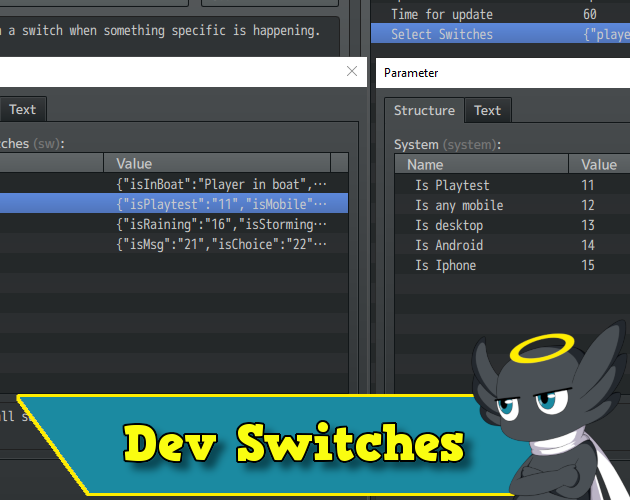
Hakuen Studio Switches for RPG Maker MZ by Hakuen Studio
Global Switches and advanced Switch operations!
 hakuenstudio.itch.io
Features Mentioned
- according to the conditions below:
- Is in Test mode (Whether in battle, event, or normal).
- If the game is running on a mobile device.
- If the game is running from a Desktop.
- If the game is running on an android.
- If the game is running on an iPhone.
- If the player is in any vehicle.
- If the player is on an airship.
- If the player is in a boat.
- If the player is on a ship.
- If there is any change in the weather.
- If it is raining.
- If it is snowing.
- If it is raining heavily (storm).
- If the player is on a tile that inflicts damage.¹
Downloads / Referenced Files
Log in to download
Log in, then follow the RPG Maker Developers Group to see these download links.
Log in to downloadLicense / Terms Note
Terms of Use Update Log Hakuen Studio Switches for RPG Maker MZ by Hakuen Studio Global Switches and advanced Switch operations!
Referenced Images / Attachments
Creator Claims / Removal
If you are the original creator and want this listing reassigned, edited, or removed, join BMMPlay and contact the moderators with proof that matches the original RPG Maker Web profile, linked GitHub, itch.io page, or another public creator identity.


Replies (0)
No replies yet.
0
replies
8
views
Topic Summary
Loading summary...
