

MZMUSH Sound Manager Module - Change System SE mid-game!
BMM_Archive · July 15, 2026

BMM_Archive
Preserved forum archive. This topic stores the original first post and locally mirrored RPG Maker Web attachments when available. It is posted by the BMMPlay archive account, not by the original creator.
Original Source
- Original title: MUSH Sound Manager Module - Change System SE mid-game!
- Original author: MushroomCake28
- Original date: May 2, 2021
- Source thread: https://forums.rpgmakerweb.com/threads/mush-sound-manager-module-change-system-se-mid-game.136111/
- Source forum path: Game Development Engines > RPG Maker Javascript Plugins > JS Plugin Releases (RMMZ)
Summary
MUSH Sound Manager Module [v.1.01] by MushroomCake28 Download Link: https://kamo-studio.itch.io/rpg-maker-mz-plugin-mush-sound-manager-module Introduction
Archived First Post
MUSH Sound Manager Module [v.1.01]
by MushroomCake28
by MushroomCake28
Download Link: https://kamo-studio.itch.io/rpg-maker-mz-plugin-mush-sound-manager-module
Introduction
This is a conversion of my MV plugin to MZ. I do take advantage of the new plugin command system in MZ, so it should make this plugin more user friendly.
Features
Usually, system sound effects (such cursor, confirm, cancel, buzzer, shop, etc.) are defined in the database (the system1 tab) and you can't change them in the middle of a playthrough. This plugin allows just that: with a simple plugin command, you can change how the cursor sounds in the middle of a playthrough! The plugin command is really simple:
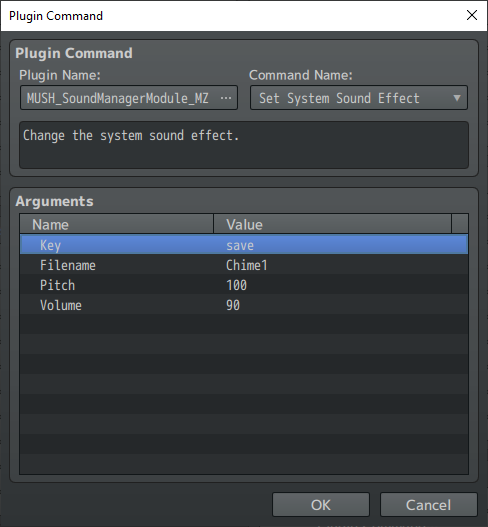
The key argument refers to the system sound effect (cursor, confirm, cancel, buzzer, etc.). The keys are the same as defined in the database, system1 tab. You can simply select the key of the system sound effect you'd like to change from the drop-down list that appears when you click on the key argument.
The rest of the arguments are pretty straightforward. It's the same as selecting any audio: filename, pitch and volume.
Terms of Use
- Free to use for commercial and non-commercial.
- Credit MushroomCake28 if you use this plugin.
- Edits allowed.
- No redistribution without permission.
MV Version
If you are using RPG Maker MV, please see the MV version of this plugin here:
https://forums.rpgmakerweb.com/index.php?threads/mush-sound-manager-module.103645/
If you're interested, I also have a short youtube video explaining this plugin, but it's for the MV version. The MZ version is the same, except for how the plugin command works (much better in MZ).
Features Mentioned
- Usually, system sound effects (such cursor, confirm, cancel, buzzer, shop, etc.) are defined in the database (the system1 tab) and you can't change them in the middle of a playthrough. This plugin allows just that: with a simple plugin command, you can change how the cursor sounds in the middle of a playthrough! The plugin command is really simple:
- "lightbox_close": "Close",
- "lightbox_next": "Next",
- "lightbox_previous": "Previous",
- "lightbox_error": "The requested content cannot be loaded. Please try again later.",
- "lightbox_start_slideshow": "Start slideshow",
- "lightbox_stop_slideshow": "Stop slideshow",
- "lightbox_full_screen": "Full screen",
- "lightbox_thumbnails": "Thumbnails",
- "lightbox_download": "Download",
- "lightbox_share": "Share",
- "lightbox_zoom": "Zoom",
- "lightbox_new_window": "New window",
- "lightbox_toggle_sidebar": "Toggle sidebar"
- The key argument refers to the system sound effect (cursor, confirm, cancel, buzzer, etc.). The keys are the same as defined in the database, system1 tab. You can simply select the key of the system sound effect you'd like to change from the drop-down list that appears when you click on the key argument.
- The rest of the arguments are pretty straightforward. It's the same as selecting any audio: filename, pitch and volume.
- Terms of Use
Downloads / Referenced Files
RPG Maker Web attachments are mirrored locally when available. Other external links remain hosted by their original creator or third-party service.
- Download: https://kamo-studio.itch.io/rpg-maker-mz-plugin-mush-sound-manager-module
- Local mirror: 167240-1ad9e4cff2fb11cc1a30d6c92f476702.png
SHA-256:4391a5f926eb7f2f2115fd3ee44feb89c37038a3b4493efcb1226dc1290fa5fa
Original attachment URL: https://forums.rpgmakerweb.com/attachments/rmmz_smm-png.188160/
License / Terms Note
Terms of Use Free to use for commercial and non-commercial. Credit MushroomCake28 if you use this plugin. Edits allowed.
Referenced Images / Attachments
Creator Claims / Removal
If you are the original creator and want this listing reassigned, edited, or removed, join BMMPlay and contact the moderators with proof that matches the original RPG Maker Web profile, linked GitHub, itch.io page, or another public creator identity.
Replies (0)
No replies yet.
0
replies
31
views
Topic Summary
Loading summary...