

RPG Maker MZ - v1.1.1 Update
BMM_Archive · July 15, 2026

Original Source
- Original title: RPG Maker MZ - v1.1.1 Update
- Original author: RPGMakerWeb
- Original date: December 16, 2020
- Source thread: https://forums.rpgmakerweb.com/threads/rpg-maker-mz-v1-1-1-update.131057/
- Source forum path: Game Development Engines > RPG Maker MZ Support > RPG Maker MZ Software Updates
Summary
The 1.1.1 RPG Maker MZ update is here, with fixes to several parts of the default graphics, English translations of many plugins, and various bug fixes! Read below for more detail. For Steam users, RPG Maker MZ updates automatically. For those who purchased through our store, you can download here. Bug Fixes Character Generator - Face - Fix to Male clothing 1
Archived First Post
For Steam users, RPG Maker MZ updates automatically. For those who purchased through our store, you can download here.
Bug Fixes
- Character Generator - Face - Fix to Male clothing 1
- Character Generator - Face - Fix to Ear 2 and Glasses
- Character Generator - SV - Fix to female clothing 25
- Enemies - Fix to missing dots on the side for the following:
- Machinerybee - enemies & SV
- Salamander - enemies & SV
- SF_Madclown - enemies & SV
- SF_Shadow - enemies & SV
- SF_Slaughterrobot - enemies & SV
- SF_Timebomb - enemies
- SF_Will-o-the-wisp - enemies & SV
- SF_Skullmask - SV
- Fix to the Evil2 2nd character walking sprite (adding the patch eye cord behind the head)
- Tileset - fix to blurry tiles in Outside_A1 and World_A2
- English translation to the following plugins
- AnimationMv
- EffekseerForRPGMakerMZ_Ex
- EventMovableLimitation
- EventReSpawn
- Levelupstate
- MessageWindowPopup
- Minimum_encount
- NoGameover
- NoGameover2
- PictureAnimation
- PluginBaseFunction
- ShakingChange
- StateAutoBattle
- TemplateEvent
- TouchMoveForSymbolEncount
- wasdKeyMZ
- Optimization to prevent jump to label to spend a frame
- Fix to the animation editor for the bug that prevented efkefc files including ' in the name to play correctly
- Fix to the bug that could prevent event command to run after playing multiple animations in parallel
- Fix to the bug that would freeze the game if trying to play an empty scrolling text
- Fix to the bug that would have the text or face blurred in UI when the size where screen size were bigger than default
- Create a backup of your project or only its data and js folders. Updating can sometimes cause your project to break so this is for the safety of your hard work!
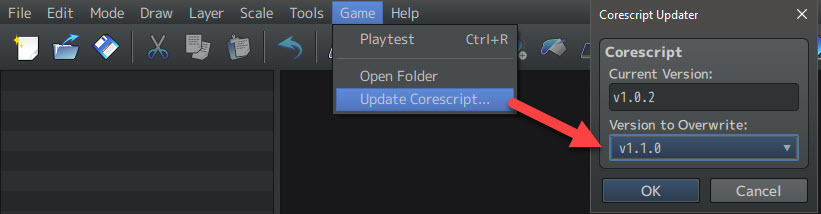
- Update your project by going to the Main Tool Bar -> Game -> Update Corescript option.
- To get the graphical updates, create a new project and copy the following files from the newly created project to your project folder:
- img/tilesets/Outside_B.png
Downloads / Referenced Files
RPG Maker Web attachments are mirrored locally when available. Other external links remain hosted by their original creator or third-party service.
- Download: download here
Referenced Images / Attachments
Creator Claims / Removal
If you are the original creator and want this listing reassigned, edited, or removed, join BMMPlay and contact the moderators with proof that matches the original RPG Maker Web profile, linked GitHub, itch.io page, or another public creator identity.
Replies (0)
No replies yet.
Topic Summary
Loading summary...