Preserved forum archive. This topic stores the original first post and locally mirrored RPG Maker Web attachments when available. It is posted by the BMMPlay archive account, not by the original creator.
Original Source
- Original title: How to fall in holes
- Original author: byBibo
- Original date: January 23, 2016
- Source thread: https://forums.rpgmakerweb.com/threads/how-to-fall-in-holes.55519/
- Source forum path: Game Development Engines > RPG Maker Tutorials > RMMV Tutorials
Summary
Hello Everyone! I have always wanted to make my actors fall in holes when exploring dangerous maps, and I came up with a way to do it! Here what you want to achieve: [Note: if you know a screen recorder free software better than Camstudio...]
Archived First Post
Hello Everyone!
I have always wanted to make my actors fall in holes when exploring dangerous maps, and I came up with a way to do it!
Here what you want to achieve:
[Note: if you know a screen recorder free software better than Camstudio...]
_______________________________________
How To:
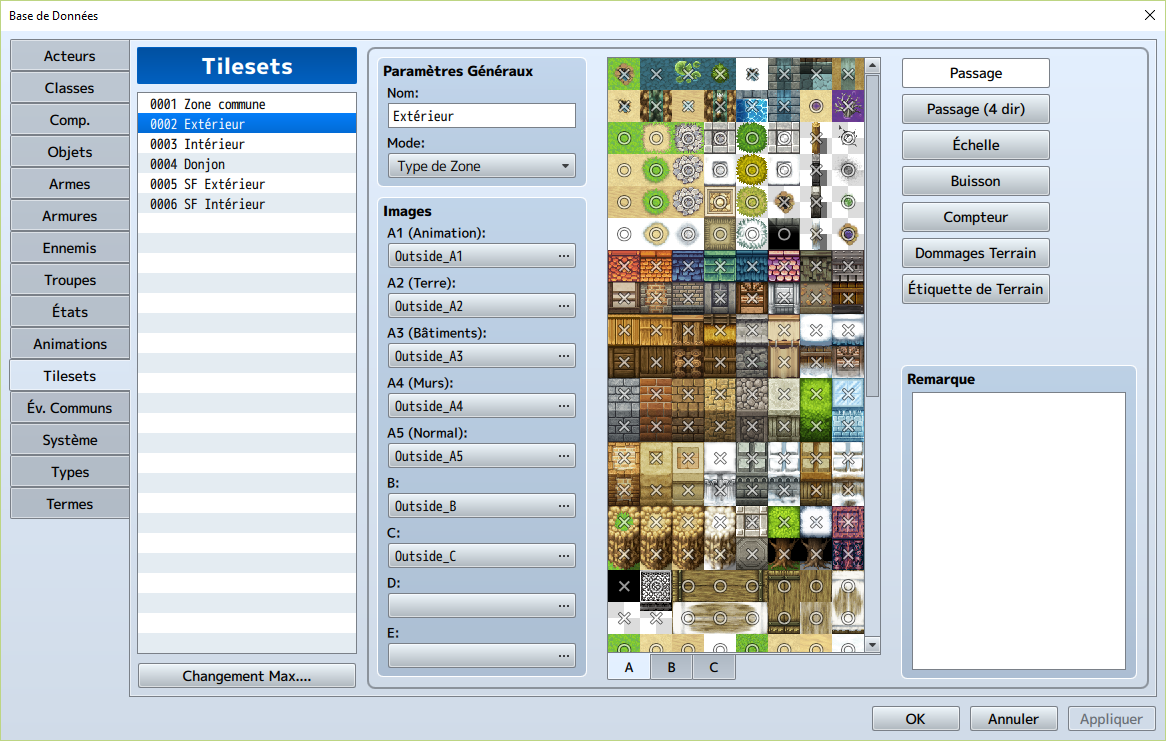
The first thing to do is to make the "hole" tiles passable. Go in your Database --> Tilesets --> "Whatever tileset concerned", and make sure your tile is passable (a O and not an X).
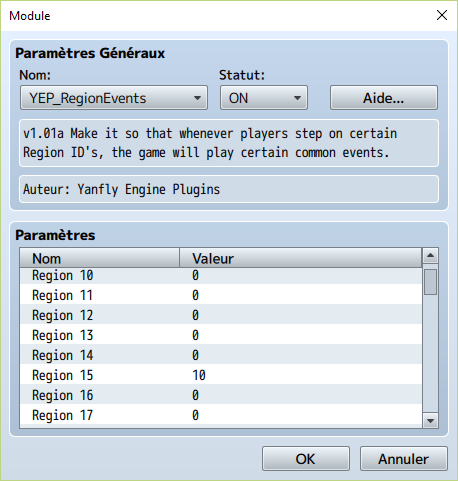
Now it's time to use a plug-in! We will need Yanfly's YEP_RegionEvents plug-in, that allows us to bind a region with a common event. We will use that Region on the hole tiles to trigger the "fall" common event.
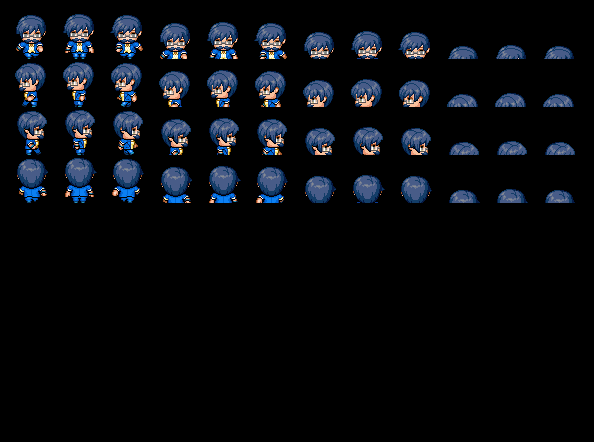
Because I want my fall to look better, I added more characters to my character sheet to mimic a fall movement.
Now let's create the common event!
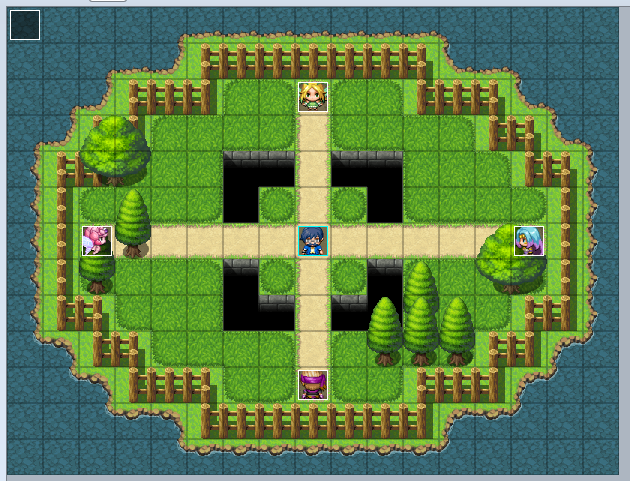
Now that our common event is done, we need to define our hero's position. So let's create an event (set in parallel) in our map:
And you're done!
Each time you walk on a hole tile, you will fall, lose HP and be sent back at the entry of the map (or wherever you choose). And when your player hasn't enough HP... He will simply die :/
________________________________________
Notes:
As I use an actor_Hud (using Moghunter's plug-in), I inserted the plug-in command "hide_actor_hud" so the actor-hud wouldn't show up during the fading (as shown in the video, recorded when the plug-in command wasn't added yet). Think about all the hud that might appear after your actor died.
My editor is in french, but the colors and the layout should guide you through whatsoever. Don't hesitate to ask if something remains unclear ^^.
________________________________________
That's all, folks!

I have always wanted to make my actors fall in holes when exploring dangerous maps, and I came up with a way to do it!
Here what you want to achieve:
[Note: if you know a screen recorder free software better than Camstudio...]
_______________________________________
How To:
The first thing to do is to make the "hole" tiles passable. Go in your Database --> Tilesets --> "Whatever tileset concerned", and make sure your tile is passable (a O and not an X).
Protected download
Protected download
Protected download
Now it's time to use a plug-in! We will need Yanfly's YEP_RegionEvents plug-in, that allows us to bind a region with a common event. We will use that Region on the hole tiles to trigger the "fall" common event.
Protected download
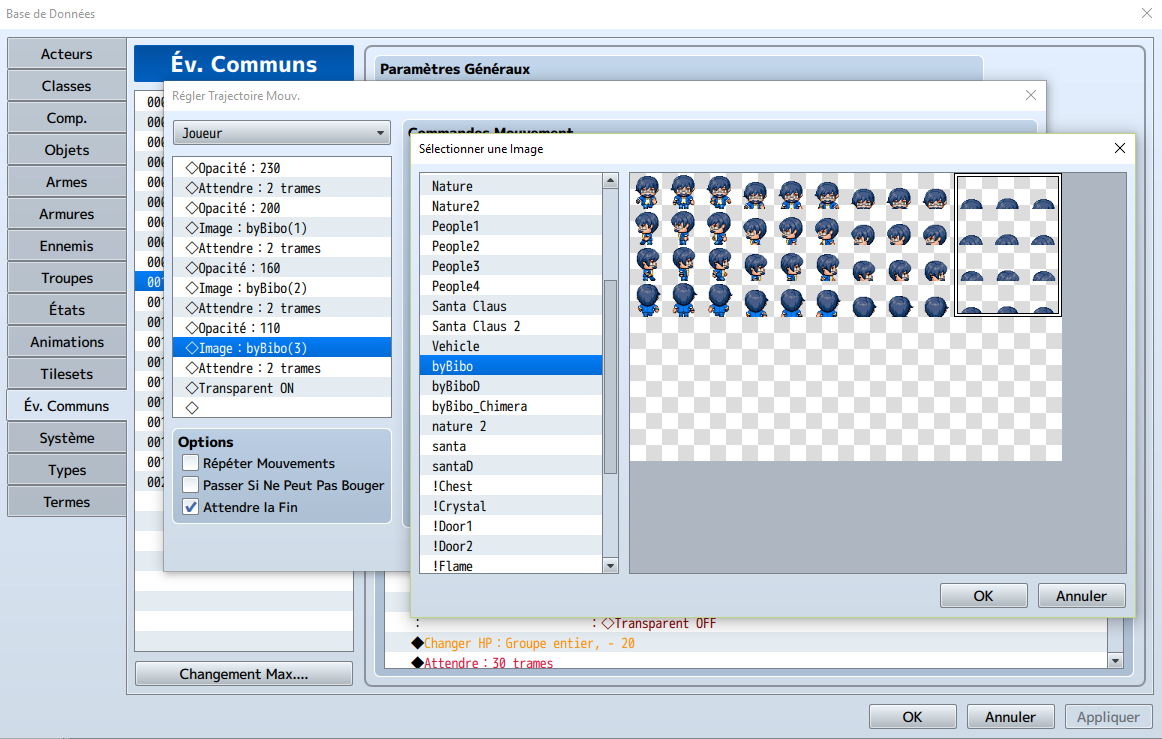
Because I want my fall to look better, I added more characters to my character sheet to mimic a fall movement.
Protected download
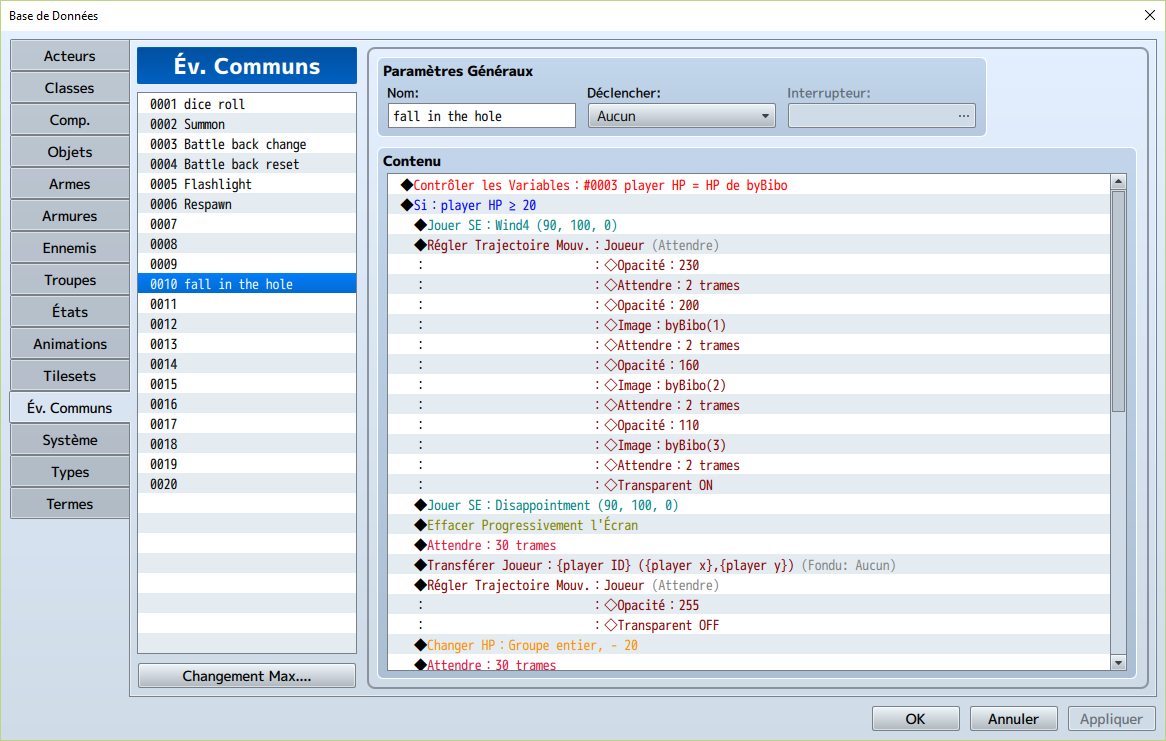
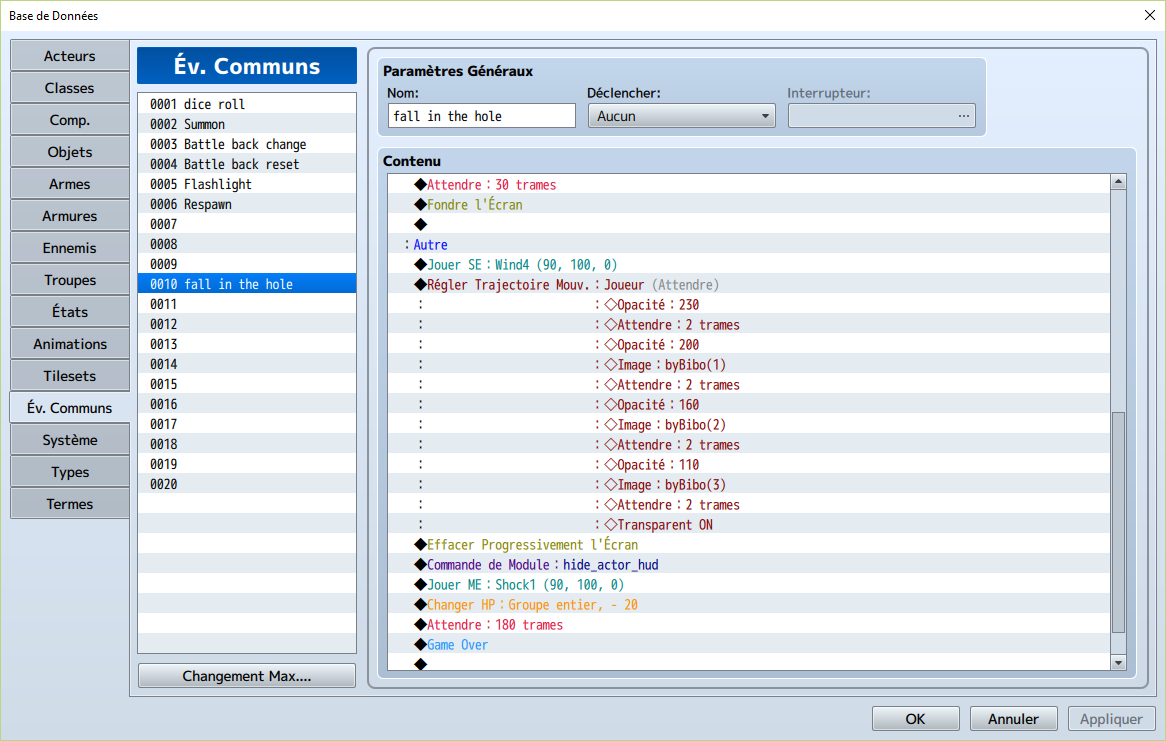
Now let's create the common event!
Protected downloadProtected downloadProtected download
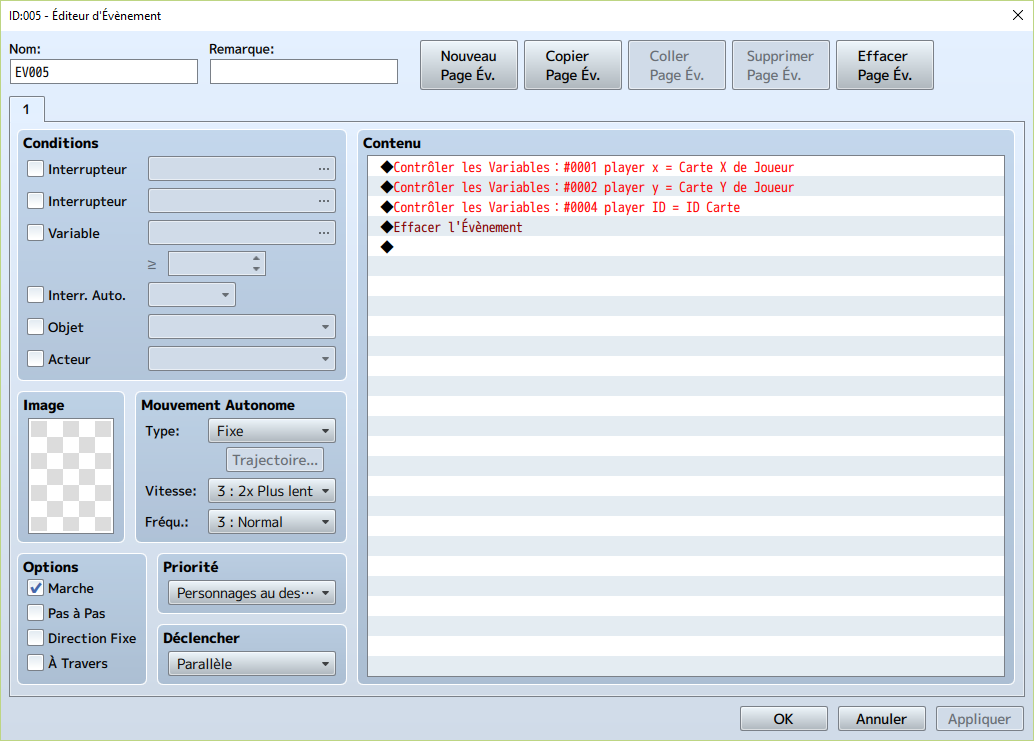
Now that our common event is done, we need to define our hero's position. So let's create an event (set in parallel) in our map:
Protected download
Protected download
Protected download
And you're done!
Each time you walk on a hole tile, you will fall, lose HP and be sent back at the entry of the map (or wherever you choose). And when your player hasn't enough HP... He will simply die :/
________________________________________
Notes:
As I use an actor_Hud (using Moghunter's plug-in), I inserted the plug-in command "hide_actor_hud" so the actor-hud wouldn't show up during the fading (as shown in the video, recorded when the plug-in command wasn't added yet). Think about all the hud that might appear after your actor died.
My editor is in french, but the colors and the layout should guide you through whatsoever. Don't hesitate to ask if something remains unclear ^^.
________________________________________
That's all, folks!

Downloads / Referenced Files
Log in to download
Log in, then follow the RPG Maker Developers Group to see these download links.
Log in to downloadReferenced Images / Attachments
Creator Claims / Removal
If you are the original creator and want this listing reassigned, edited, or removed, join BMMPlay and contact the moderators with proof that matches the original RPG Maker Web profile, linked GitHub, itch.io page, or another public creator identity.
Replies (0)
No replies yet.
0
replies
1
view
Topic Summary
Loading summary...