


XPKButtonsManager XP
BMM_Archive · July 16, 2026

Preserved forum archive. This topic stores the original first post and locally mirrored RPG Maker Web attachments when available. It is posted by the BMMPlay archive account, not by the original creator.
Original Source
- Original title: KButtonsManager XP
- Original author: kyonides
- Original date: November 22, 2022
- Source thread: https://forums.rpgmakerweb.com/threads/kbuttonsmanager-xp.152825/
- Source forum path: Game Development Engines > Ruby Game System (RGSS) Scripts > RGSS Scripts (RMXP)
Summary
KButtonsManager XP + VX + ACE by Kyonides Arkanthes Introduction
Archived First Post
KButtonsManager
XP + VX + ACE
by Kyonides Arkanthes
XP + VX + ACE
by Kyonides Arkanthes
Introduction
Are you bored of using the same boring menu window in your game projects?
Do you want your game to look way different than those thousands of Steam games floating around?
Now you have got a chance to be original!
A Brief Explanation
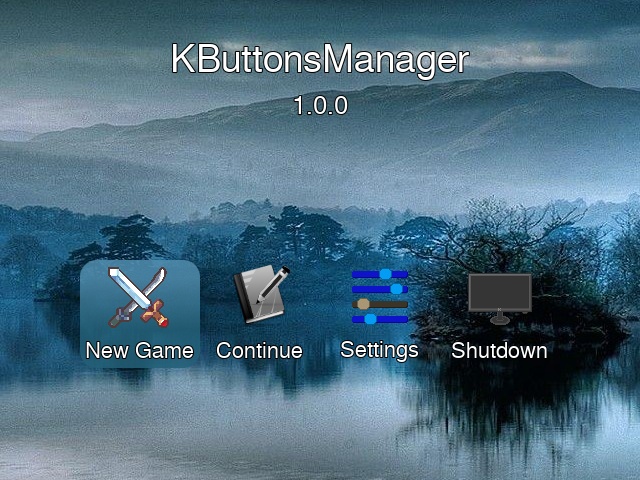
Let's take a look at the custom Scene_Title script included in the demo as an example of how to use it effectively.
Here we got the make_buttons method I defined there. It pretty much contains all you need to know about the script calls needed to make it work properly. (By the way, it is called from the scene's main method.)
Ruby:
  def make_buttons
    # Did the Game find Any Saved Games there?
    @continue = Dir['Save*.rxdata'].any?
    # Create Button Manager - Pass (Total Options, Cursor Filename)
    @manager = KButtons::Manager.new(OPTIONS.size, CURSOR_FILE)
    # Set the Buttons' Direction - Pass = :horizontal or :vertical
    @manager.direction = :horizontal
    # Set the Offsets - Pass (X, Y)
    @manager.set_offsets(0, 4)
    # Set the Coordinates - Pass (X, Y, Z)
    @manager.set_xyz(80, 260, 100)
    # Draw Name and Picture
    # - Pass (Name's Height, Font Size, Names Array, Symbols Array)
    @manager.draw_text_picture(26, 24, OPTIONS, SYMBOLS)
    # Define List of States
    # - [Booleans like true or false, Add, As, Many, As, Necessary]
    @manager.enabled = [true, @continue, true, true]
    # Set the Initial Position of the Cursor - Usually Number 0
    @manager.index = (@continue and @index == 0)? 1 : @index
  end
Later on you would only need to dispose the Button Manager like this:
Ruby:
@manager.disposeScreenshot
Downlod DEMO
Downlod DEMO
Terms & Conditions
Free for use in non commercial games.
Contact me if you are going commercial.
Mention my nickname in your game credits.
Downloads / Referenced Files
Log in to download
Log in, then follow the RPG Maker Developers Group to see these download links.
Log in to downloadLicense / Terms Note
Free for use in non commercial games. Contact me if you are going commercial. Mention my nickname in your game credits.
Referenced Images / Attachments
Creator Claims / Removal
If you are the original creator and want this listing reassigned, edited, or removed, join BMMPlay and contact the moderators with proof that matches the original RPG Maker Web profile, linked GitHub, itch.io page, or another public creator identity.


Replies (0)
No replies yet.
0
replies
8
views
Topic Summary
Loading summary...
