

Make Looping BGM in Vorbis format
BMM_Archive · July 16, 2026

Original Source
- Original title: Make Looping BGM in Vorbis format
- Original author: RyanBram
- Original date: October 13, 2015
- Source thread: https://forums.rpgmakerweb.com/threads/make-looping-bgm-in-vorbis-format.45857/
- Source forum path: Game Development Engines > RPG Maker Tutorials > Non-Maker Specific Tutorials
Summary
How to make a perfect looping BGM for RPG Maker VX ACE (OGG Vorbis)Credits : ShuIntroduction Have you ever wanted your battle music to play the intro once, and then loop only the main part, like most Final Fantasy battle music? That's exactly what this tutorial will teach you how to do. Required Program
Archived First Post
Have you ever wanted your battle music to play the intro once, and then loop only the main part, like most Final Fantasy battle music?
That's exactly what this tutorial will teach you how to do.
Required Program
Audacity 2.0, the free audio editing tool.
Editing the BGM
Open your desired BGM in Audacity. Find the portion that you want to loop by using the selection tool and zoom tool and carefully listening to where the song should begin looping, and where the song should restart to the beginning of the loop. These two points in the song MUST sound exactly the same! It is recommended that the loop point is loud, because trying to loop on a quiet, sensitive part of a song is more noticeable and harder to make it seamless.
Once you know where the points are, select the point where the loop should begin, and then go to Tracks -> Add Label at Selection. Enter "Loop Start." Do the same for where you want the loop to restart, and label it as "Loop End."
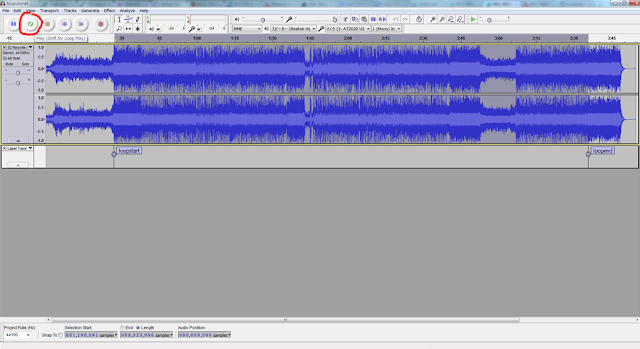
You can test to see if it loops seamlessly by highlighting the area inside these two labels and shift+clicking the play button.
Next, thou shall go to the bottom of the program, where you shall see some drop-down menus. Click a drop-down menu and set it to "samples" like shown in this image:
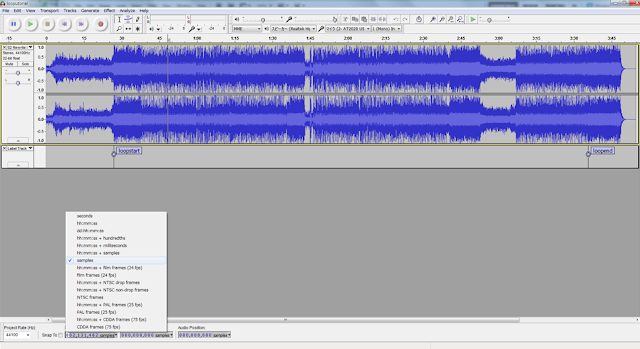
and then make sure that "Length" is checked instead of "End" like so:

Now, make sure that you have selected the area of the song from the Loop Start label to the Loop End label, and then go to File -> Export...
Name it, and make sure the File Type is set to Ogg Vorbis Files. Click Save.
This is the most important step! An Edit Metadata window should appear. At the bottom, click add until there are two blank tags. Double click the first blank tag and type in "LOOPSTART". In the second blank tag, type in "LOOPLENGTH". Look at the bottom of Audacity to see a number under Selection Start. Insert this number as the value for LOOPSTART without commas. Do the same for LOOPLENGTH using the number under Length.
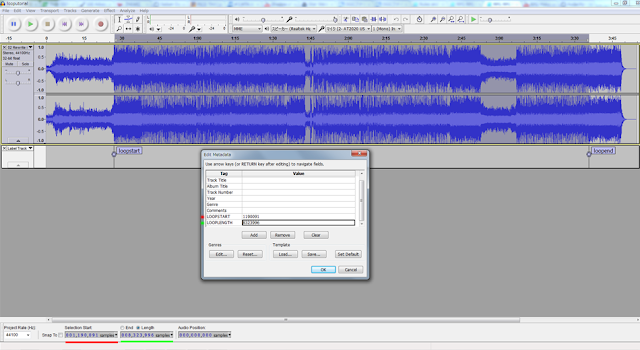
Click OK, import your new ogg file inside your RPG Maker VX, go to Sound Test, and click Play!
If it loops exactly where you wanted it to, then you have not failed.
Go forth, and make awesomeness.
Downloads / Referenced Files
RPG Maker Web attachments are mirrored locally when available. Other external links remain hosted by their original creator or third-party service.
- Download: Audacity 2.0
License / Terms Note
How to make a perfect looping BGM for RPG Maker VX ACE (OGG Vorbis)Credits : ShuIntroduction Have you ever wanted your battle music to play the intro once, and then loop only the main part, like most Final Fantasy battle music? That's exactly what this tutorial will teach you how to do. Required Program
Referenced Images / Attachments
Creator Claims / Removal
If you are the original creator and want this listing reassigned, edited, or removed, join BMMPlay and contact the moderators with proof that matches the original RPG Maker Web profile, linked GitHub, itch.io page, or another public creator identity.
Replies (0)
No replies yet.
Topic Summary
Loading summary...