

RPG_RT.exe - Fake FullScreen
BMM_Archive · July 16, 2026

BMM_Archive
Preserved forum archive. This topic stores the original first post and locally mirrored RPG Maker Web attachments when available. It is posted by the BMMPlay archive account, not by the original creator.
Original Source
- Original title: RPG_RT.exe - Fake FullScreen
- Original author: DevRPG2k
- Original date: February 5, 2023
- Source thread: https://forums.rpgmakerweb.com/threads/rpg_rt-exe-fake-fullscreen.154698/
- Source forum path: Game Development Engines > RPG Maker Tutorials > Rm2k/3 Tutorials
Summary
YOUTUBE: Version: 1.0 (Stable) Download: MEDIAFIRE Password:
Archived First Post
Version: 1.0 (Stable)
Download: MEDIAFIRE
Password:
Why this tool was created:
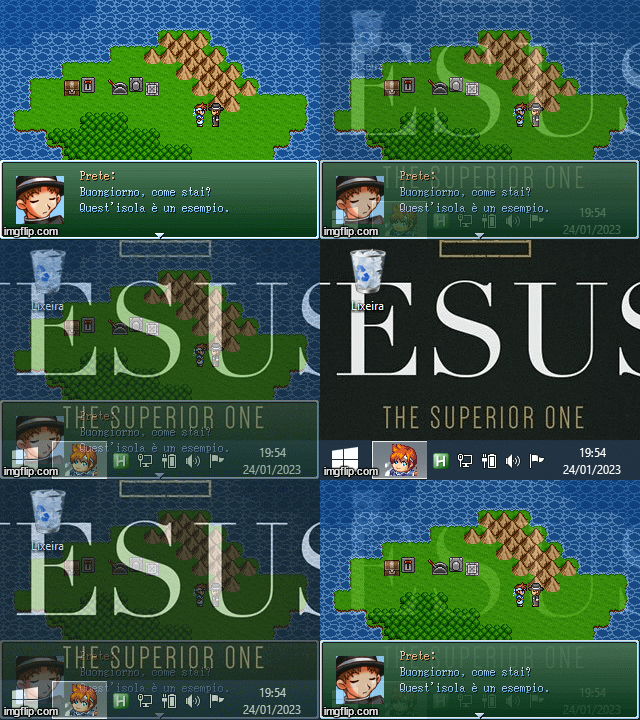
Games made with RPG Maker 2000 and RPG Maker 2003 (Before Steam) have the "exclusive" full screen function, but in this method we cannot:
This happens because RPG_RT.exe changes the monitor resolution to 320x240 when it is in focus , even if the monitor does not have this option, as this is how machines with operating systems prior to Windows 7 worked:
How to install in your game:
Just copy or move it to your project folder and run it.
To work with the editor:
Change the RPG_RT.exe extension to RPG_RT.run and rename Player.exe to RPG_RT.exe.
In this mode, when using the F4 and F5 key commands, the current state will not be saved in the RPG_RT.ini file because it is the "TestPlay" mode.
(The RPG_RT.exe icon will be updated when restarting the operating system)
Include the options you prefer in your project's RPG_RT.ini
Window mode:
Full screen (this is the default mode if not configured):
Enables the F4 key so that the player can switch between windowed and full screen mode:
(This option also activates the Alt+Enter combination)
Adjusted by screen height:
(This being the default and only in full screen)
Stretched image (Full screen only):
Enables the F5 key:
(So that the player can switch between fitted or stretched, it only works in full screen)
Soften Image (Bicubic):
Enables the key to change the interpolation mode:
Show GDI+ FPS on the game screen:
(This does not show the FPS of the game, but rather full screen mode)
Enables and defines a key that can generate screen captures:
(Options: F1, F2, F3, F8, F9, F10, F11)
Change the path where the folder for screenshots will be created:
(Result:
(Result:
(Result:
Change the name of the folder that will be generated:
Example:
A file name cannot contain any of the following characters:
Errors that can happen:
Error starting GDIP:
If this error occurs, it means that there is a problem with the player's operating system, probably gdiplus.dll is not installed or is corrupt.
RPG_RT.run not found! / RPG_RT.exe not found! / RPG_RT.exe or RPG_RT.run not found
Any of these errors can be generated when the player tries to change launch settings by moving or deleting files from the game folder.
RPG_RT.exe is not a working version
RPG_RT.exe is the same executable as Player.exe, this error is caused by the same situation as the previous error.
Failed to create screenshots folder
The folder cannot be created in the path due to lack of permission, this happens when defining paths outside the path
Problems with your anti-virus:
Some antiviruses can block the tool's internal functions without showing warning windows, if you notice this happening, include the executable in the trusted list.
Download: MEDIAFIRE
Password:
Code:
rpgmaker2kWhy this tool was created:
Games made with RPG Maker 2000 and RPG Maker 2003 (Before Steam) have the "exclusive" full screen function, but in this method we cannot:
- Opening other program windows from above, even if they have the "Alway On Top" option
- windows Quickly switch between Explorer (Windows Desktop) with Alt+Tab
This happens because RPG_RT.exe changes the monitor resolution to 320x240 when it is in focus , even if the monitor does not have this option, as this is how machines with operating systems prior to Windows 7 worked:
How to install in your game:
Just copy or move it to your project folder and run it.
To work with the editor:
Change the RPG_RT.exe extension to RPG_RT.run and rename Player.exe to RPG_RT.exe.
In this mode, when using the F4 and F5 key commands, the current state will not be saved in the RPG_RT.ini file because it is the "TestPlay" mode.
(The RPG_RT.exe icon will be updated when restarting the operating system)
Include the options you prefer in your project's RPG_RT.ini
Window mode:
INI:
Fullscreen=0Full screen (this is the default mode if not configured):
INI:
Fullscreen=1Enables the F4 key so that the player can switch between windowed and full screen mode:
INI:
ChangeFullscreen=1Adjusted by screen height:
INI:
Stretched=0Stretched image (Full screen only):
INI:
Stretched=1Enables the F5 key:
INI:
ChangeScale=1Soften Image (Bicubic):
INI:
Interpolation=1Enables the key to change the interpolation mode:
INI:
ChangeInterpolation=1Show GDI+ FPS on the game screen:
INI:
ShowFPS=1Enables and defines a key that can generate screen captures:
INI:
Screenshotkey=F11Change the path where the folder for screenshots will be created:
INI:
ScreenshotPath=%UserDocs%C:\Users\<username>\Documents\<GameTitle>\)
INI:
ScreenshotPath=%UserPics%C:\Users\<username>\Pictures\<GameTitle>\)
INI:
ScreenshotPath=%UserRoaming%C:\Users\<username>\AppData\Roaming\<GameTitle>\)Change the name of the folder that will be generated:
Example:
INI:
ScreenshotFolder=Captures\ / : * ? . < > | % ;Errors that can happen:
Error starting GDIP:
If this error occurs, it means that there is a problem with the player's operating system, probably gdiplus.dll is not installed or is corrupt.
RPG_RT.run not found! / RPG_RT.exe not found! / RPG_RT.exe or RPG_RT.run not found
Any of these errors can be generated when the player tries to change launch settings by moving or deleting files from the game folder.
RPG_RT.exe is not a working version
RPG_RT.exe is the same executable as Player.exe, this error is caused by the same situation as the previous error.
Failed to create screenshots folder
The folder cannot be created in the path due to lack of permission, this happens when defining paths outside the path
C:\Users\<username>Problems with your anti-virus:
Some antiviruses can block the tool's internal functions without showing warning windows, if you notice this happening, include the executable in the trusted list.
Downloads / Referenced Files
RPG Maker Web attachments are mirrored locally when available. Other external links remain hosted by their original creator or third-party service.
- Download: MEDIAFIRE
Referenced Images / Attachments
Creator Claims / Removal
If you are the original creator and want this listing reassigned, edited, or removed, join BMMPlay and contact the moderators with proof that matches the original RPG Maker Web profile, linked GitHub, itch.io page, or another public creator identity.
Replies (0)
No replies yet.
0
replies
38
views
Topic Summary
Loading summary...