

Treasure Chest Tutorial
BMM_Archive · July 16, 2026

Original Source
- Original title: Treasure Chest Tutorial
- Original author: RPGMakerFan
- Original date: March 9, 2015
- Source thread: https://forums.rpgmakerweb.com/threads/treasure-chest-tutorial.37608/
- Source forum path: Game Development Engines > RPG Maker Tutorials > RMXP Tutorials
Summary
Introduction To This Guide: The purpose of this guide will help you how to make a treasure chest that functions like in RPG Maker VX and VX Ace without using a switch, but a self switch. The guide won't be long, but it will be short enough to understand how to make one. Anyways, let's begin! Making The Trasure Chest: The first thing you will have to do is make an event. Name the event Treasure Chest if it helps. Next, change the event's graphic to a
Archived First Post
The purpose of this guide will help you how to make a treasure chest that functions like in RPG Maker VX and VX Ace without using a switch, but a self switch. The guide won't be long, but it will be short enough to understand how to make one. Anyways, let's begin!
Making The Trasure Chest:
The first thing you will have to do is make an event. Name the event Treasure Chest if it helps. Next, change the event's graphic to a
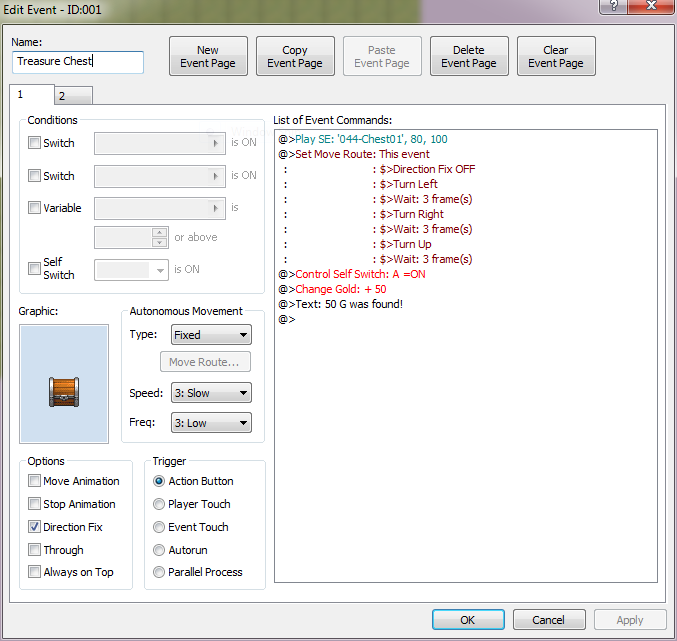
treasure chest that's closed. Have the event's options set to Direction Fix (so you can see the chest open without it facing you) and trigger set to Action Button (so you can open the chest while in front of it.). Now, we are going to edit the List of Event Commands section. The first command that you should put in is Play SE (Sound Effect), select 044-Chest as the sound effect. Next, put in the Set Move Route command after the sound effect. In Set Move Route, set it to This Event (instead of seeing the player move rather than the chest itself.). After that, set the route to this order:
1. Direction Fix Off
2. Turn Left
3. Wait: 3 frame(s)
4. Turn Right
5. Wait: 3 frame(s)
6. Turn Up
7. Wait: 3 frame(s)
Now, you have made the animation of the treasure chest opening. Now, insert the command Control Self Switch to A is on.
The next part you'll have to do is getting the item from the chest. What's in the treasure chest is totally up to you, it could be Gold, an Item, Weapon, or Armor. To do that, insert Change Gold (Item, Weapon, or Armor) and set it to increase. Next, create a message (from Show Text) saying what you got from the chest. For example, You found 50 G! After that, create a new event page and set the graphic of the treasure chest opened (on the new event page), then, set it's conditions to Self Switch A is on. And there you go! You have made a treasure chest.
Downloads / Referenced Files
RPG Maker Web attachments are mirrored locally when available. Other external links remain hosted by their original creator or third-party service.
- Local mirror: 10121-02dce66b1f722ed61d2493a6d3fd6156.png
SHA-256:b5e7a58d7489fcba6117f67779ab758edce993b0200ed24cebf84f762695ac22
Original attachment URL: https://forums.rpgmakerweb.com/attachments/steamtutorial1picture1-png.19755/
Referenced Images / Attachments
Creator Claims / Removal
If you are the original creator and want this listing reassigned, edited, or removed, join BMMPlay and contact the moderators with proof that matches the original RPG Maker Web profile, linked GitHub, itch.io page, or another public creator identity.
Replies (0)
No replies yet.
Topic Summary
Loading summary...