

VN Maker - Steam Achievements (Electron 18.2.0 Included)
BMM_Archive · July 16, 2026

BMM_Archive
Preserved forum archive. This topic stores the original first post and locally mirrored RPG Maker Web attachments when available. It is posted by the BMMPlay archive account, not by the original creator.
Original Source
- Original title: VN Maker - Steam Achievements (Electron 18.2.0 Included)
- Original author: kory_toombs
- Original date: June 15, 2019
- Source thread: https://forums.rpgmakerweb.com/threads/vn-maker-steam-achievements-electron-18-2-0-included.110030/
- Source forum path: Game Development Engines > Visual Novel Maker Directory > Visual Novel Maker Tutorials
Summary
This tutorial is outdated, go here instead: Visual Novel Maker (Electron) - Steam Achievements by Sunflower Games Steam Achievements for VN Maker sunflower-games.itch.io
Archived First Post
This tutorial is outdated, go here instead:
 sunflower-games.itch.io
Visual Novel Maker Achievements for NWJS version.
Do Not Use if you're using Electron Version.
This is a tutorial on how to add Steam Achievements to your Visual Novel Maker Game.
This tutorial will mostly deal with the SDK / File requirements needed for a Windows 64-bit version of your game.
You should already have a Steam Direct Account and an App ID
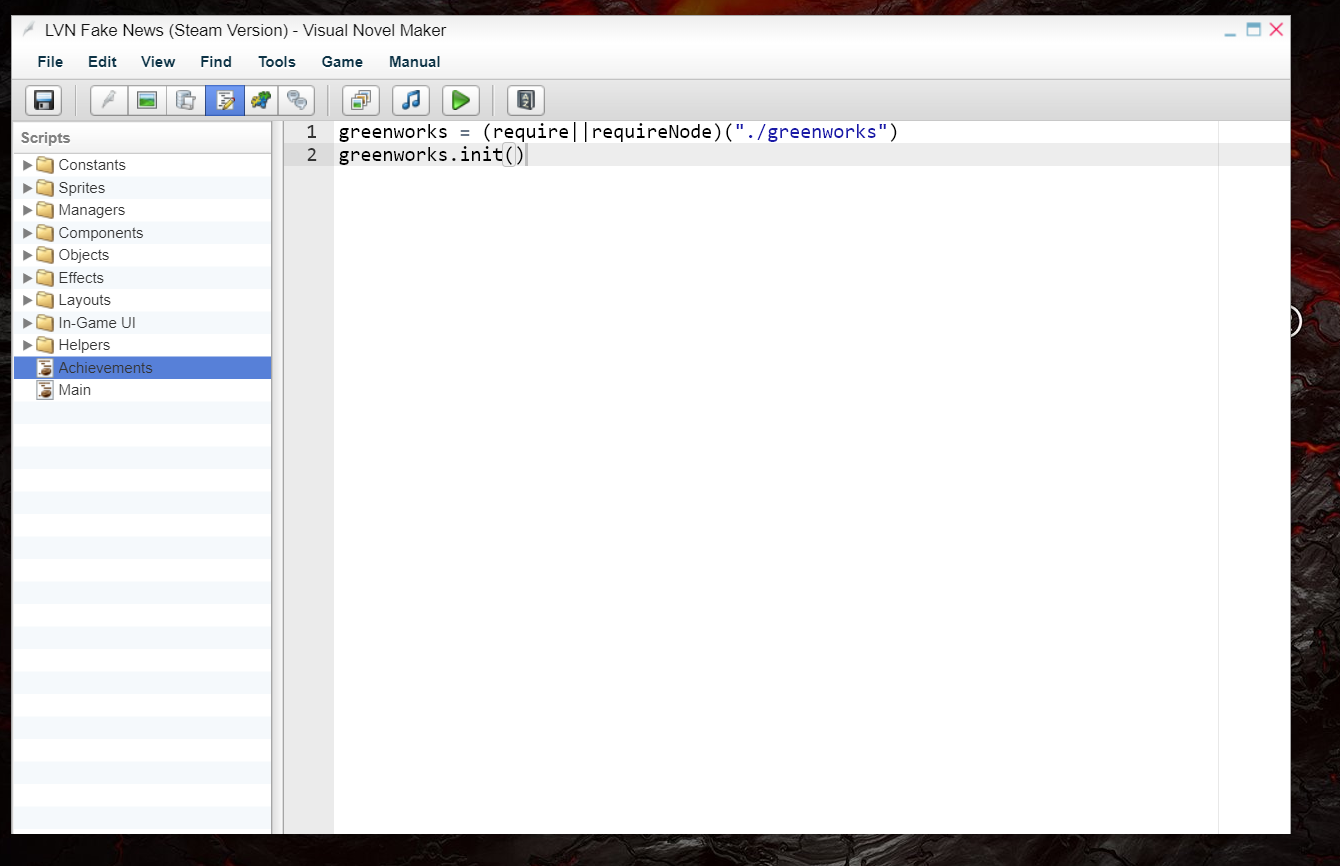
In your game you'll need to make a coffee script.
greenworks = (require||requireNode)("./greenworks")
greenworks.init()
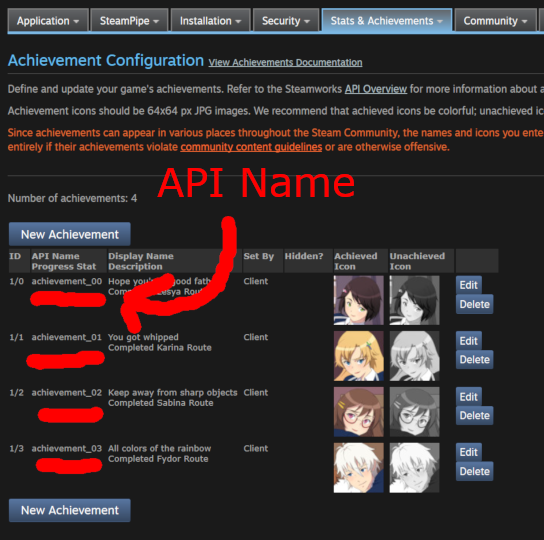
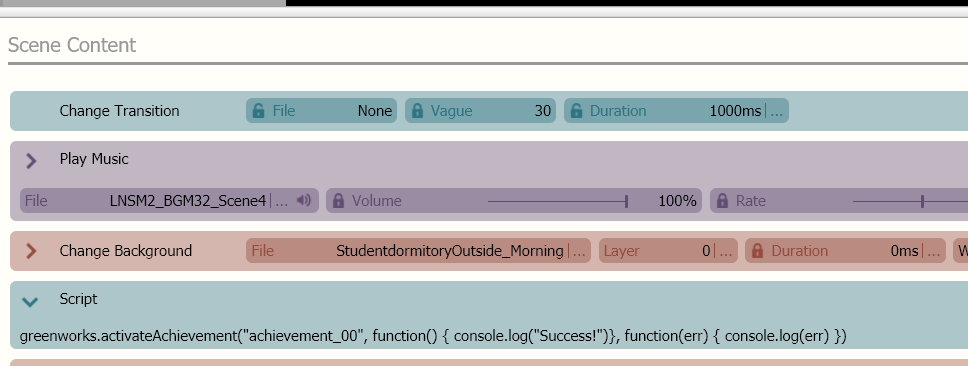
When you want an achievement to unlock put a script command in your action UI. Put the API Name in the quotation marks.
greenworks.activateAchievement("achievement_00", function() { console.log("Success!")}, function(err) { console.log(err) })
You will need to download some files:
steamworks_sdk_144 https://partner.steamgames.com/doc/sdk
greenworks-v0.14.0-nw-v0.33.3-win-x64 https://github.com/greenheartgames/greenworks/releases
nwjs-sdk-v0.33.3-win-x64 (this is for testing) https://dl.nwjs.io/v0.33.3/
nwjs-v0.33.3-win-x64 (this is the version you want to use when uploading to Steam.) https://dl.nwjs.io/v0.33.3/
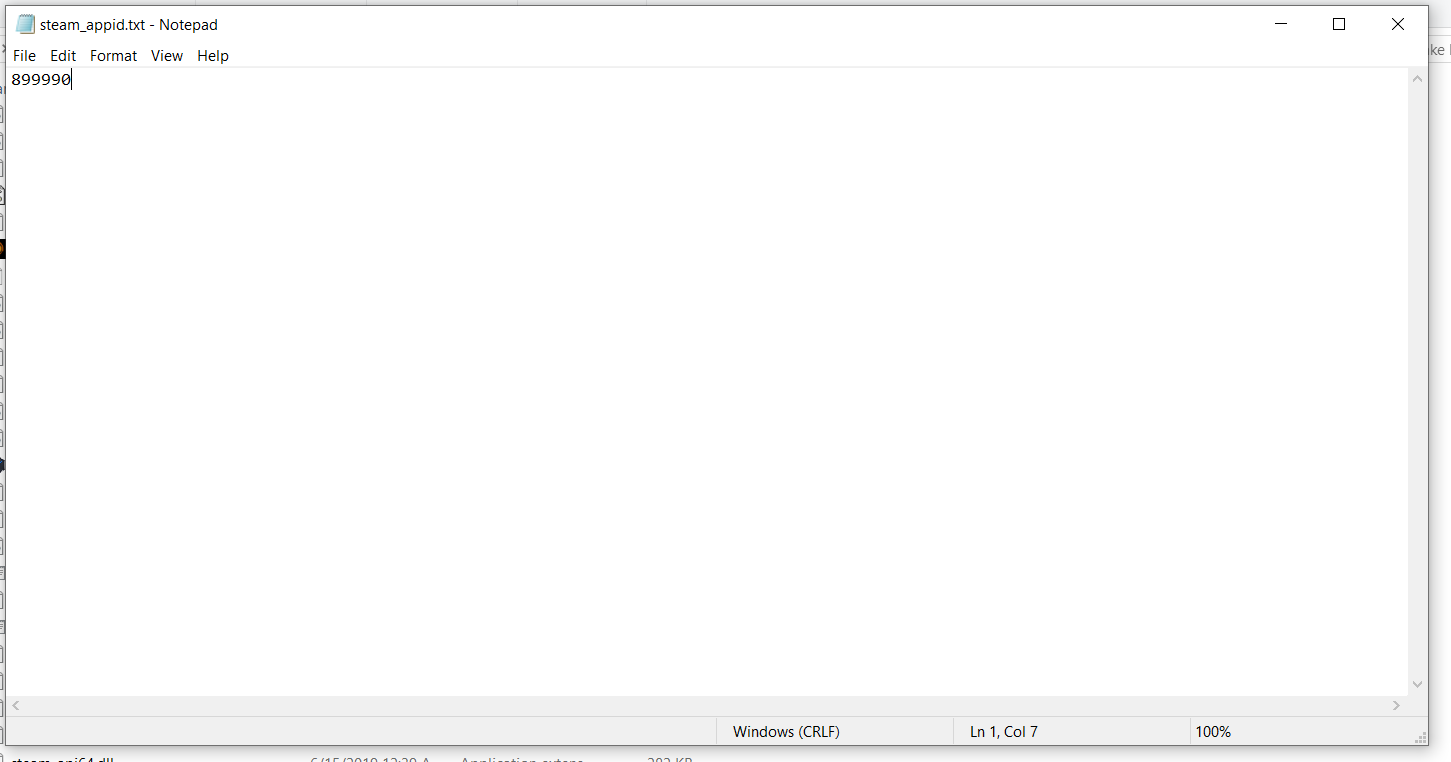
Also open notepad and make a file called "steam_appid.txt" (Make sure file extensions are visible.)
Put your appid number inside.
Export your game, without any of the files above added yet to the game folder.
Put the Game folder into the SDK.
If you don't know how to load your game into the Steam SDK, I have a tutorial on that here: https://rpgmaker.net/articles/2545/
Delete Game.exe (you will be launching your game with a nw.exe file from now on.)
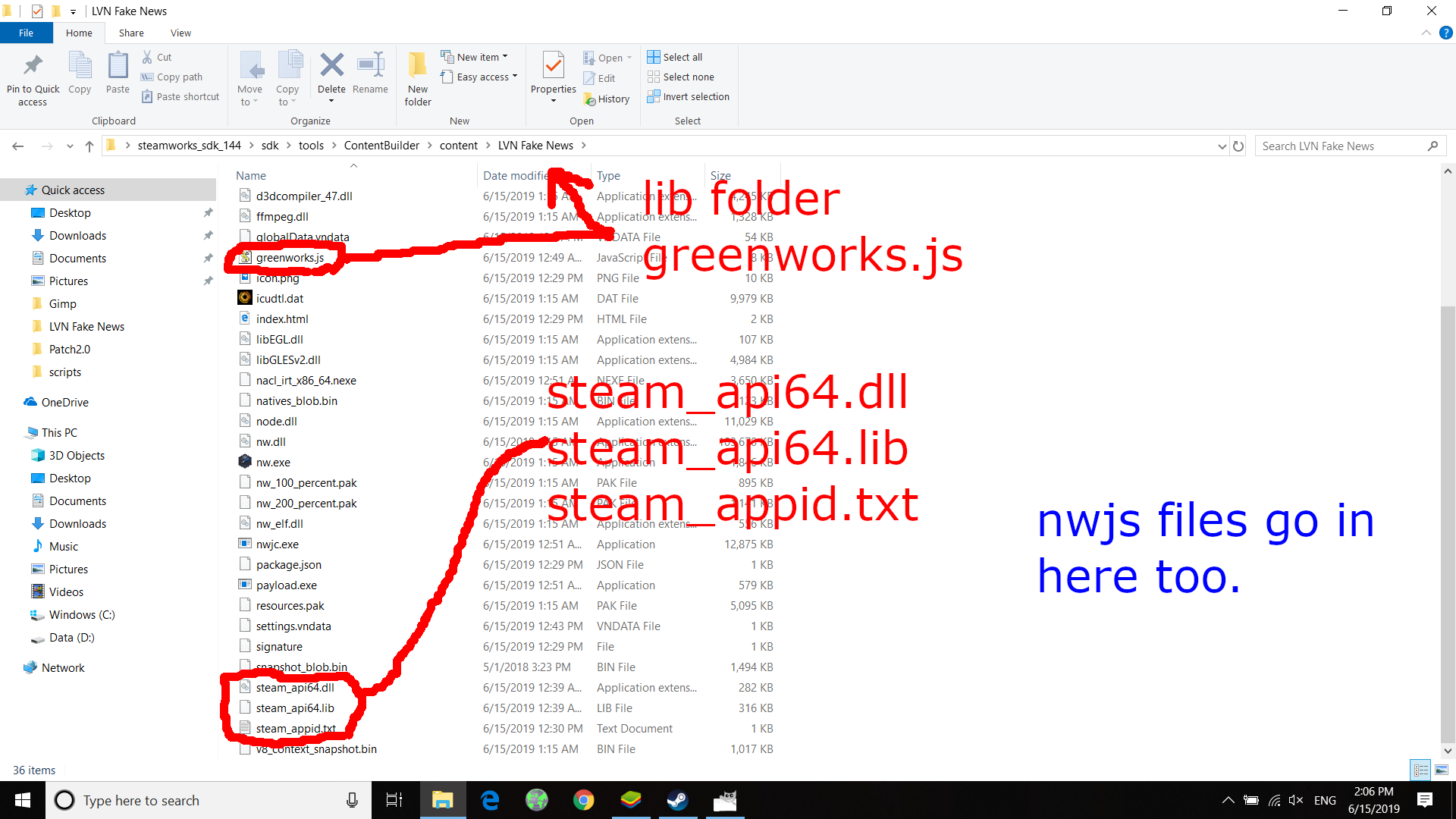
Put "steam_appid.txt" into your game folder.
Copy the lib folder and greenworks.js file and paste into your game folder.
Copy the files from nwjs-sdk and paste them in your game folder (copy and replace.)
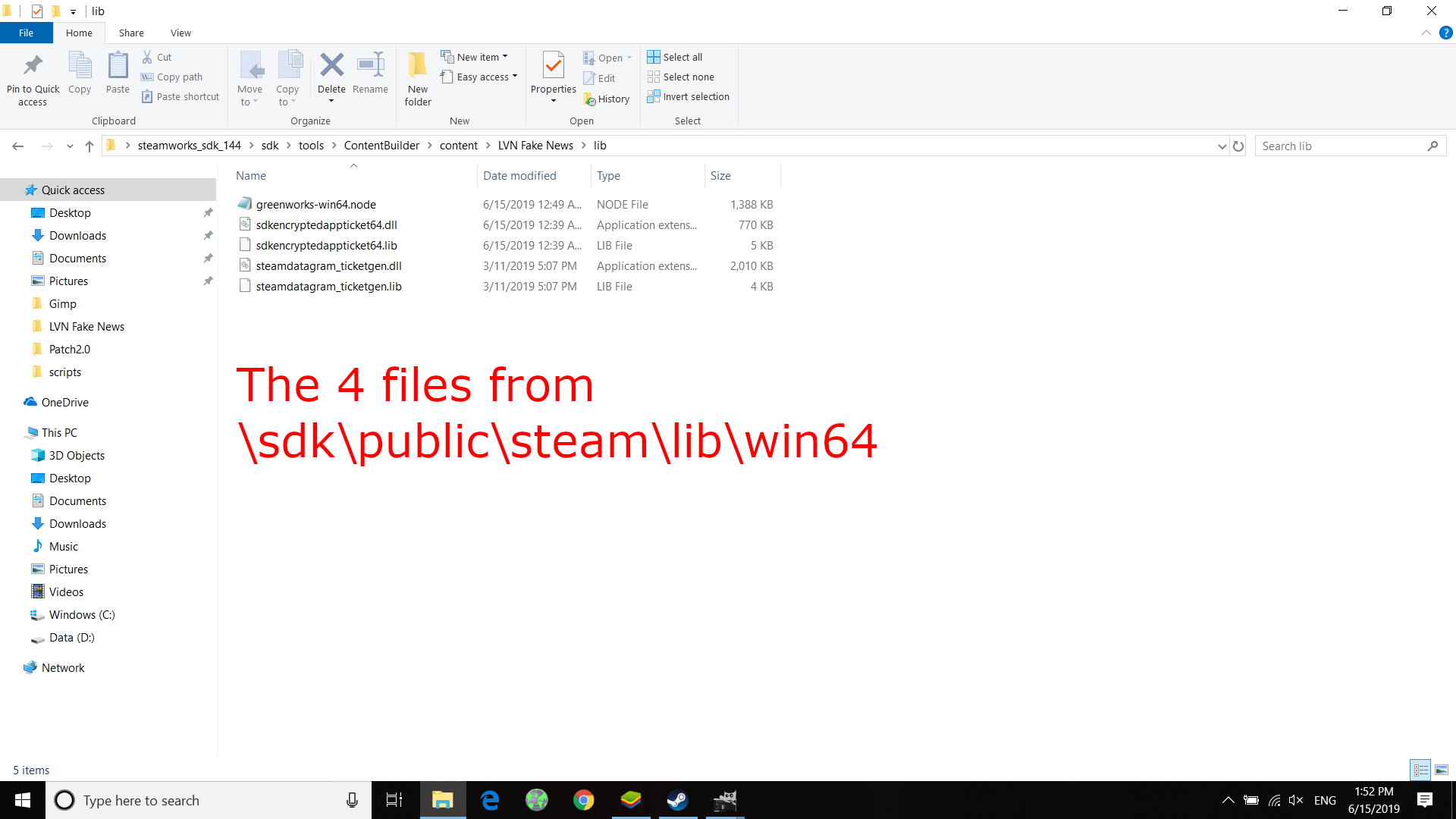
Go to C:\Users\user\Desktop\steamworks_sdk_144\sdk\public\steam\lib\win64
Copy those 4 files and paste them in the lib folder in your game folder.
Go to C:\Users\user\Desktop\steamworks_sdk_144\sdk\redistributable_bin\win64
Copy those 2 files and paste them into your game folder.
Cross your fingers and run nw.exe
*The SDK version is for testing, you can press F12 while in game.
*Copy the non-SDK file and copy and replace them over the SDK version after testing.
Additional Notes:
Updates in Visual Novel Maker may require newer versions of Greenworks and NWJS.
If you want to make Steam Achievements for other OS, download the Greenworks and NWJS for those OS. In addition, when adding content from SDK into your game folder choose the appropriate OS.
Visual Novel Maker (Electron) - Steam Achievements by Sunflower Games
Steam Achievements for VN Maker
sunflower-games.itch.io
Visual Novel Maker Achievements for NWJS version.
Do Not Use if you're using Electron Version.
This is a tutorial on how to add Steam Achievements to your Visual Novel Maker Game.
This tutorial will mostly deal with the SDK / File requirements needed for a Windows 64-bit version of your game.
You should already have a Steam Direct Account and an App ID
In your game you'll need to make a coffee script.
greenworks = (require||requireNode)("./greenworks")
greenworks.init()
When you want an achievement to unlock put a script command in your action UI. Put the API Name in the quotation marks.
greenworks.activateAchievement("achievement_00", function() { console.log("Success!")}, function(err) { console.log(err) })
You will need to download some files:
steamworks_sdk_144 https://partner.steamgames.com/doc/sdk
greenworks-v0.14.0-nw-v0.33.3-win-x64 https://github.com/greenheartgames/greenworks/releases
nwjs-sdk-v0.33.3-win-x64 (this is for testing) https://dl.nwjs.io/v0.33.3/
nwjs-v0.33.3-win-x64 (this is the version you want to use when uploading to Steam.) https://dl.nwjs.io/v0.33.3/
Also open notepad and make a file called "steam_appid.txt" (Make sure file extensions are visible.)
Put your appid number inside.
Export your game, without any of the files above added yet to the game folder.
Put the Game folder into the SDK.
If you don't know how to load your game into the Steam SDK, I have a tutorial on that here: https://rpgmaker.net/articles/2545/
Delete Game.exe (you will be launching your game with a nw.exe file from now on.)
Put "steam_appid.txt" into your game folder.
Copy the lib folder and greenworks.js file and paste into your game folder.
Copy the files from nwjs-sdk and paste them in your game folder (copy and replace.)
Go to C:\Users\user\Desktop\steamworks_sdk_144\sdk\public\steam\lib\win64
Copy those 4 files and paste them in the lib folder in your game folder.
Go to C:\Users\user\Desktop\steamworks_sdk_144\sdk\redistributable_bin\win64
Copy those 2 files and paste them into your game folder.
Cross your fingers and run nw.exe
*The SDK version is for testing, you can press F12 while in game.
*Copy the non-SDK file and copy and replace them over the SDK version after testing.
Additional Notes:
Updates in Visual Novel Maker may require newer versions of Greenworks and NWJS.
If you want to make Steam Achievements for other OS, download the Greenworks and NWJS for those OS. In addition, when adding content from SDK into your game folder choose the appropriate OS.
Downloads / Referenced Files
RPG Maker Web attachments are mirrored locally when available. Other external links remain hosted by their original creator or third-party service.
- Download: Visual Novel Maker (Electron) - Steam Achievements by Sunflower Games
- Source: https://github.com/greenheartgames/greenworks/releases
Referenced Images / Attachments
Creator Claims / Removal
If you are the original creator and want this listing reassigned, edited, or removed, join BMMPlay and contact the moderators with proof that matches the original RPG Maker Web profile, linked GitHub, itch.io page, or another public creator identity.
Replies (0)
No replies yet.
0
replies
44
views
Topic Summary
Loading summary...