

Timing based tile-dodging minigame.
BMM_Archive · July 16, 2026

Original Source
- Original title: Timing based tile-dodging minigame.
- Original author: MattLikesPenguins
- Original date: March 22, 2018
- Source thread: https://forums.rpgmakerweb.com/threads/timing-based-tile-dodging-minigame.93036/
- Source forum path: Game Development Engines > RPG Maker Tutorials > RMVX Tutorials
Summary
Hey guys, I wanted to contribute something here instead of constantly asking questions, so I made this minigame tutorial, which is going to be long as hell because I tend to over-complicate things. As you can see from the demo video, the game consists of four rows of flashing tiles. Each tile alternates between a "normal" side that is safe to touch, and a "hazard" side, which is not. Each row has a different number of tiles, and a different "flash speed". The first thing you will need to do...
Archived First Post
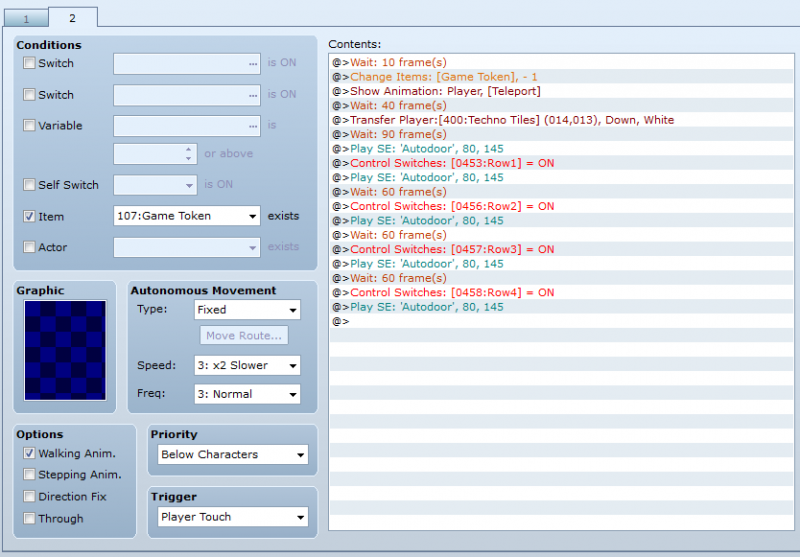
As you can see from the demo video, the game consists of four rows of flashing tiles. Each tile alternates between a "normal" side that is safe to touch, and a "hazard" side, which is not. Each row has a different number of tiles, and a different "flash speed". The first thing you will need to do is create an appropriate number of switches (four rows = four switches). As you see from the screenshot below, these switches need to turn on when you transfer the player to whatever map the minigame is in.
You'll then need to create switches for the tiles themselves; one for the "normal" side, and the other for the "hazard" side. In mine, I used this format: R+(row number)T+(tile side). So the first two switches were R1T1 (row 1, normal tile) and R1T2 (row 1, hazard tile). Do not create additional switches for literally every single tile in a row, just make 1 tile with two "sides" and copy/paste as many of them as you want for that row.
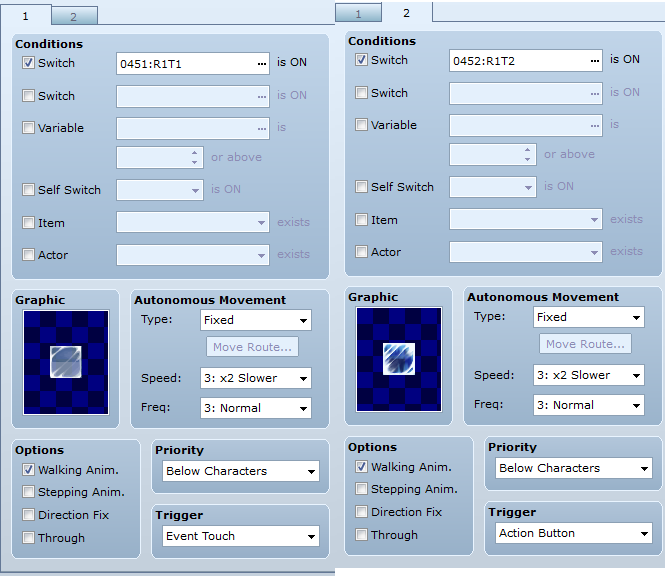
Go ahead and create the rest of the tile switches using this same format (for row 2, create R2T1 and R2T2, for row 3 R3T1 and R3T2, etc...)
Next, you'll need to create a Parallel Process event that activates when the switch for that row is turned on. Changing the Wait times will cause the tiles to flash slower or faster depending on what you decide to set them as. This will make the tiles alternate between normal and hazardous.
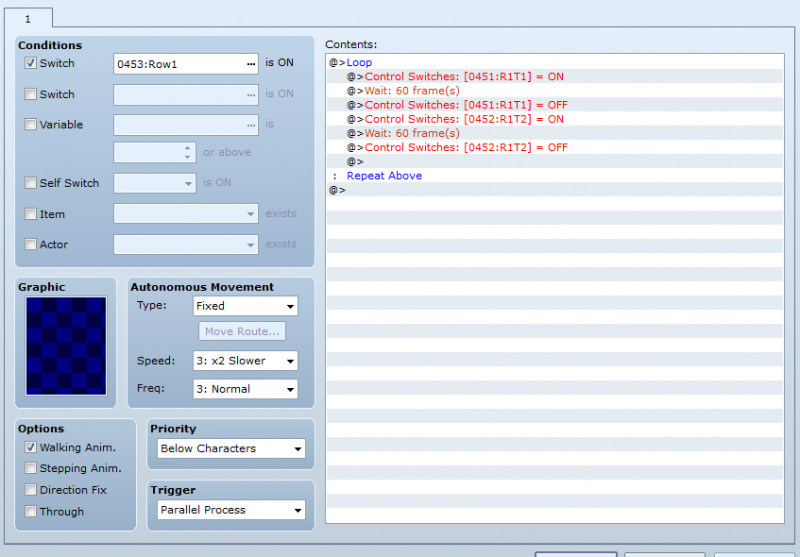
At this point all you have is a row of tiles flashing on and off, so now we're going to start making your hazard tiles hazardous (har har). If you just set the hazard-side of the tiles to player/event touch and add whatever penalty you decide on, it will only work if the player is in motion when they touch them (meaning the player could step onto a "normal" side of a tile and stand still without taking damage/score penalty/etc...) We're going to set it up so that being on the tile when the 'hazard' side is active inflicts damage or penalties or plays Meghan Trainor songs or whatever other sort of punishment you decide.
Create a new Parallel Process even that is activated by turning the switch for that particular row on.
NOTE: I have not tried having both the PP for flashing the tiles and the PP for damage in the same event. I used two separate events, but hey, maybe someone reading this can chime in whether or not they can be combined. Until then, let's go with 2 separate events.
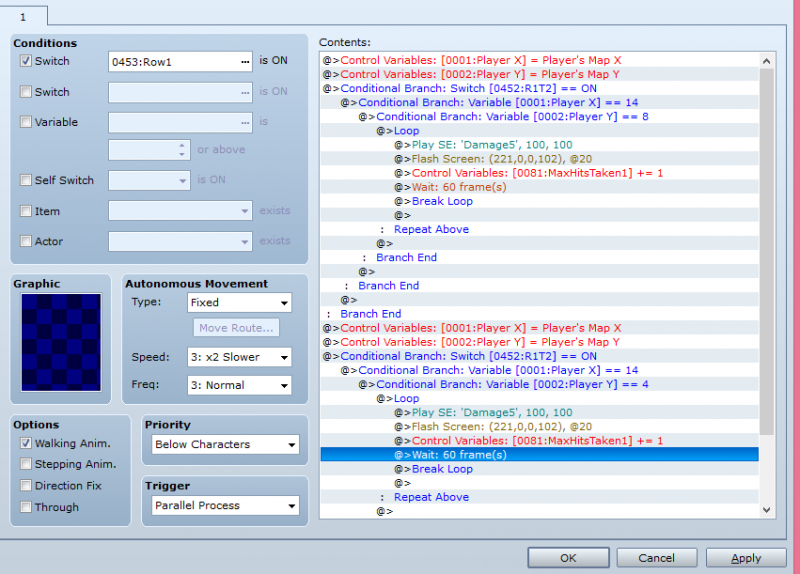
What we're basically doing here is telling the event to penalize the player if their X and Y indicate they are standing on the tile when the 'hazard' side activates (whether they're moving or not). Set up a, for lack of a better word, "three-tier" conditional branch as shown above (there's no need for the 'Else' condition). Enter the X and Y coordinates of the tile along with the condition that the 'hazard' side switch be active. Don't forget to put the 'control variables' set for players map x and y first, before you put the conditional branch in. When that's done, create a loop that will begin once the conditions are met. Inside this loop is where you need to enter whatever penalty/damage you've decided on. I used simple score penalties since it's a minigame but maybe you'd prefer the characters lose HP, MP, etc... whenever they hit one of the hazards.
Note that the example above has a 60-frame wait, and a 'Break Loop' command. This needs to match the wait-time you have set for the tiles to alternate so that the player is 'hit' in sync with the tile flashing instead of racking up a ton of damage/penalties in split-seconds (or barely at all).
If you only want one row and one tile, then congrats, you're finished. Assuming you want more, what you'll need to do is copy everything from [Control variable player X etc..] down to the last Branch End. Paste it below the first one as shown and change the X and Y to the coordinates for the second tile in the row. Repeat this process for the rest of the tiles.
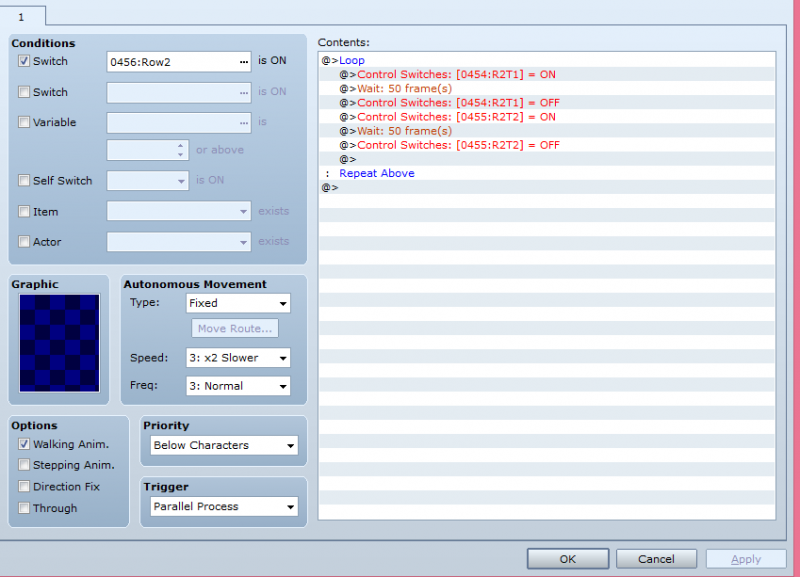
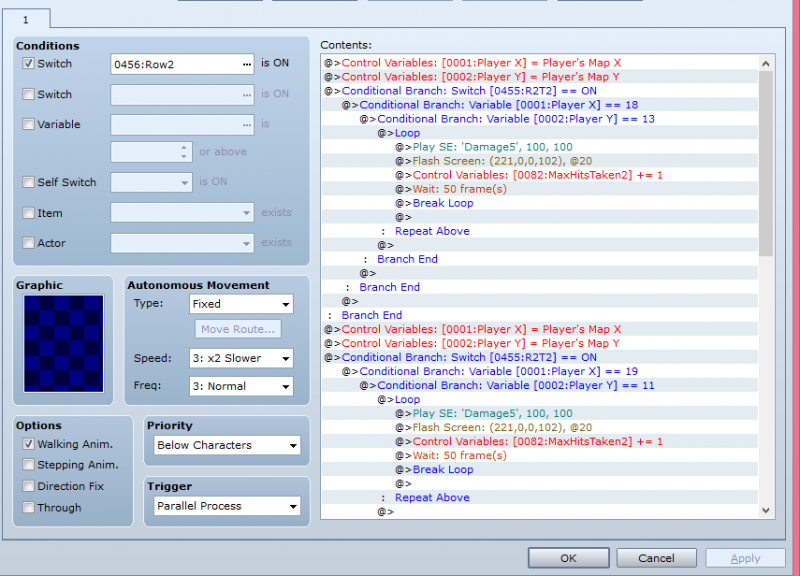
Set up the 2nd, 3rd, 4th, etc... rows the same way, remembering to change switches as needed.
Now we're going to move on to scoring and game-overs. What I've done is create four variables: MaxHitsTaken 1, 2, 3, and 4. You'll notice that in the "damage" loop for row 2, there is a "MaxHitsTaken2 + 1", and a "MaxHitsTaken1 + 1" for Row 1's damage loop. This is so every time the player is 'hit', it adds a +1 to the damage total for that row. In my game, the player can be "hit" a different number of times depending on what Row he/she is on (More possible hits = easier rows, but easier rows = less valuable prizes). Row 1 allows 4 hits before a Game Over is issued, but Row 4 only allows 1. Here's how to set this up:
Create another Parallel Process as shown below:
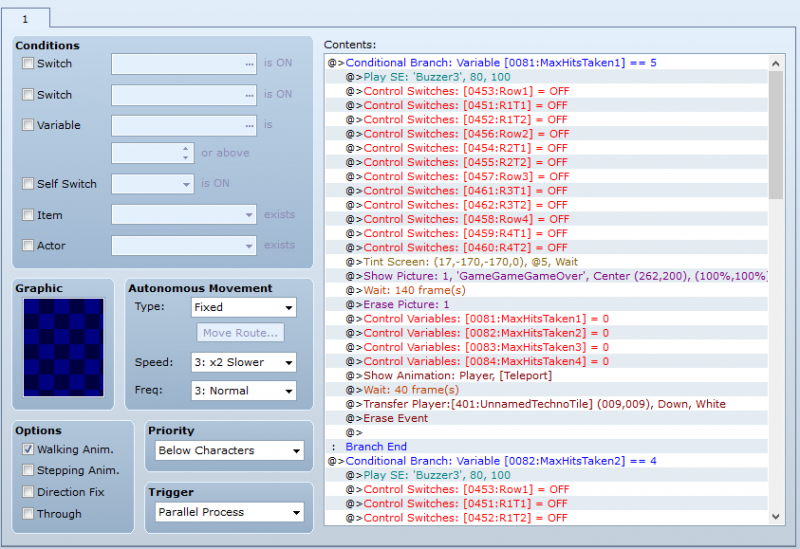
This may look confusing but it's not as bad as it looks. There are 4 Conditional Branches (one per row). As you can see, the condition for the branches is when the player reaches the hits-taken limit. Right underneath, you'll notice that reaching the limit will shut off all rows and tiles. Below that, the screen tints to red and the GAME OVER graphic is displayed, then erased 140 frames later. Under that, you'll notice all four of the 'HitsTaken' counters have been reset to zero. Lastly, the player is taken back to the minigame lobby and the event is erased. This means that the event will start over from the beginning the next and all further times that the minigame is played.
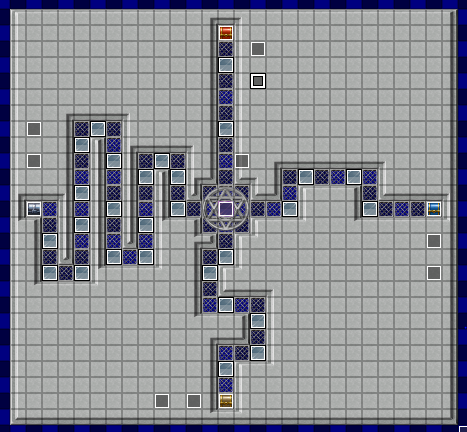
Taking a look at the overhead shot, you'll see that next to each of the four treasure chests are 2 events; one to turn on the loop for that row, and another to turn on the damage/scoring event. Close to the center is the event to tally scores and issue Game Overs. That's how I arranged it, but you may want to do it differently.
That's all I've got. I'm sure somebody will point out how much easier/quicker/more efficient it would be to do....whatever... instead of the way I set mine up, and that's fine, you should go with whatever works best for you.
Downloads / Referenced Files
RPG Maker Web attachments are mirrored locally when available. Other external links remain hosted by their original creator or third-party service.
- Local mirror: 63993-68965832a8b7a8736bffee28b9572e29.png
SHA-256:a74e86f05d0ca12dfc2ee0f851c1e386cd9dbdcb7a1b64cc1da182171593add7
Original attachment URL: https://forums.rpgmakerweb.com/attachments/lead-in-png.85494/ - Local mirror: 63998-6dea2c958a84e0bad82c44b8b179f79d.png
SHA-256:59f64d4d3eb51e937d7eba9fe6408be3700e10a01c018b7094b6a07df0bc046d
Original attachment URL: https://forums.rpgmakerweb.com/attachments/tilesides-png.85499/ - Local mirror: 63995-ed336a6f71dd2b15a23b663d460aa446.png
SHA-256:5cc0d6edde90b460077b7bf2f68742bf3334d8f5ff2d3dafcc6b295fe15c4258
Original attachment URL: https://forums.rpgmakerweb.com/attachments/row1loop-png.85496/ - Local mirror: 64006-c4a0d1c7b9ea2841bd0d08a7319f48f3.png
SHA-256:5a3202cf705870d625e081a453d51fa9fb8a8edec39d0df071547c5154069fd1
Original attachment URL: https://forums.rpgmakerweb.com/attachments/row1damageevent-png.85507/ - Local mirror: 64008-ab5d39af4ad4348b863c30a09908716f.png
SHA-256:3f21bb837d7b12fe50ebfcdaae3736492aa4d07fcf9e6ba0dc4cd208a51018ae
Original attachment URL: https://forums.rpgmakerweb.com/attachments/row2loop-png.85509/ - Local mirror: 64007-a828d63825dc5d15feefd7ac7caa8a8a.png
SHA-256:a10eafdd332865a16187d1bacb30ce51cc1cfb13189e868157395f488ca16499
Original attachment URL: https://forums.rpgmakerweb.com/attachments/row2damageevent-png.85508/ - Local mirror: 64015-3caedf6622abb6b7991887973e00ad11.png
SHA-256:5fbc53db0bd907835bea23e8382a4023efebebdc0cab821de5443ebc4ab79844
Original attachment URL: https://forums.rpgmakerweb.com/attachments/scoreevent-png.85516/ - Local mirror: 63994-6db9ff2bc6f8b34583491efb3e20333d.png
SHA-256:a81146efc4ff2f9760603681c64efdaa30e089bf6555909461da0ac9da879174
Original attachment URL: https://forums.rpgmakerweb.com/attachments/overview-png.85495/
Referenced Images / Attachments
Creator Claims / Removal
If you are the original creator and want this listing reassigned, edited, or removed, join BMMPlay and contact the moderators with proof that matches the original RPG Maker Web profile, linked GitHub, itch.io page, or another public creator identity.
Replies (0)
No replies yet.
Topic Summary
Loading summary...