

MVPreviously On Story(Updated 2017/09/02)
BMM_Archive · July 15, 2026

Original Source
- Original title: Previously On Story(Updated 2017/09/02)
- Original author: Tsumio
- Original date: August 27, 2017
- Source thread: https://forums.rpgmakerweb.com/threads/previously-on-story-updated-2017-09-02.83247/
- Source forum path: Game Development Engines > RPG Maker Javascript Plugins > JS Plugin Releases (RMMV)
Summary
Plugin Name:PreviouslyOnStory.js Summary:This plugin implement the synopsis function. Download: (Updated 2017/09/30)
Archived First Post
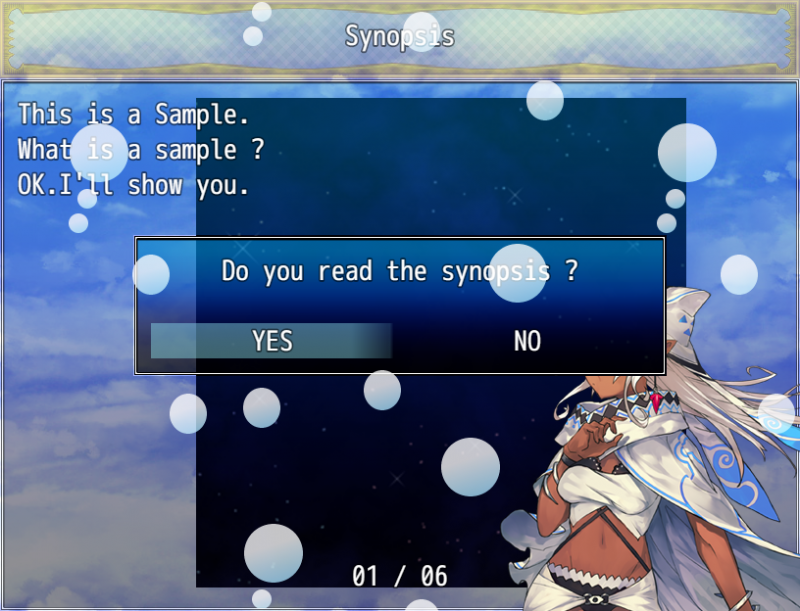
Summary:This plugin implement the synopsis function.
Download:
https://raw.githubusercontent.com/Tsumio/rmmv-plugins/master/plugins/PreviouslyOnStory.js
(Updated 2017/09/30)
Hello
Hi!
I'm not good at English.
But I want to communicate with all of you and I want to publish the plugin.
If you have any problems, feel free to ask me !
Video
Images
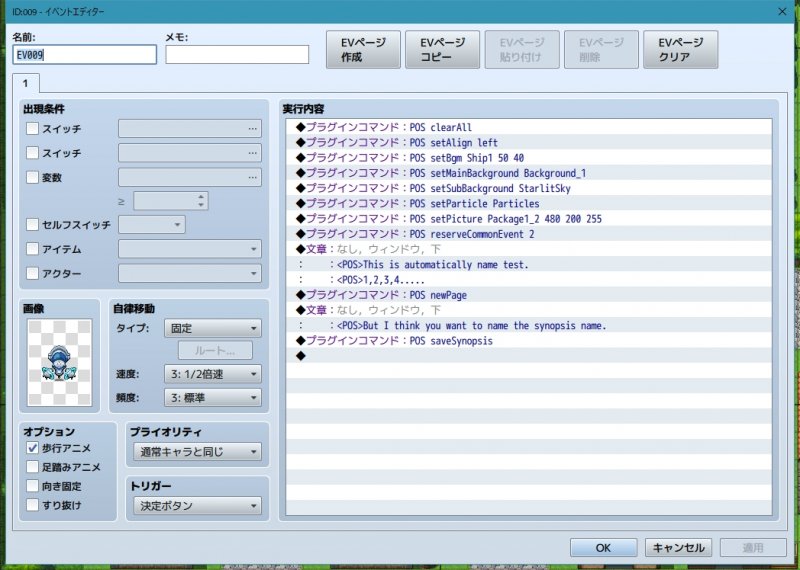
----feature----
* -> When saving data is loaded, it will shift to the synopsis scene.
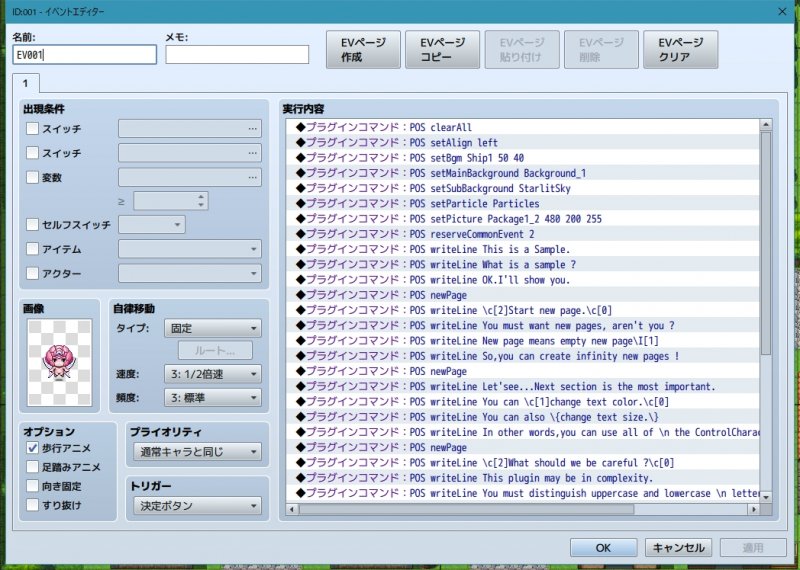
* -> Synopsis can be registered from the plugin command.
* -> Synopsis also can be registered from 'ShowText of EventCommand'.(v1.0.1)
* -> Background and BGM settings can register from plugin commands.
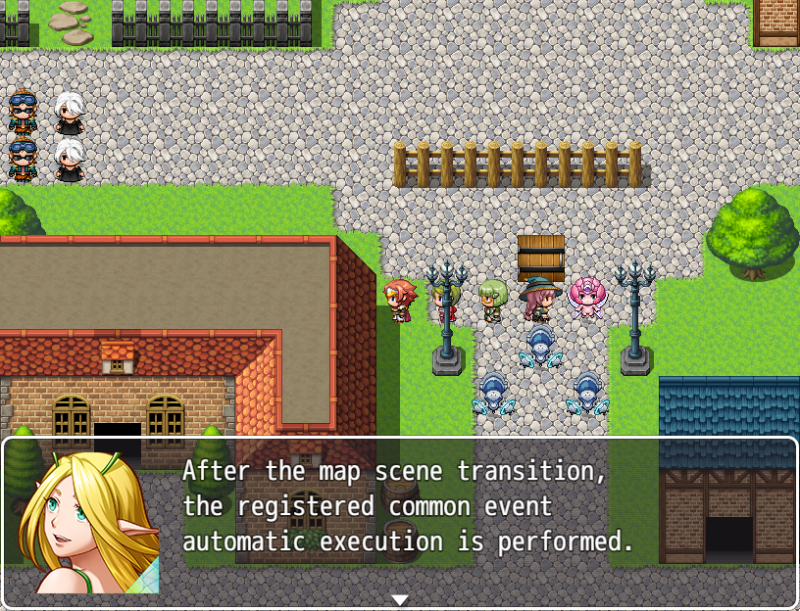
* -> You can execute the registered common event when saving data is loaded.
* -> You can scroll background images and set particle image.
* -> You can play voice data.(v1.1.1)
* -> This plugin can operate with cursor keys and mouse.
* -> This plugin also can operate with decision key and cancel key.
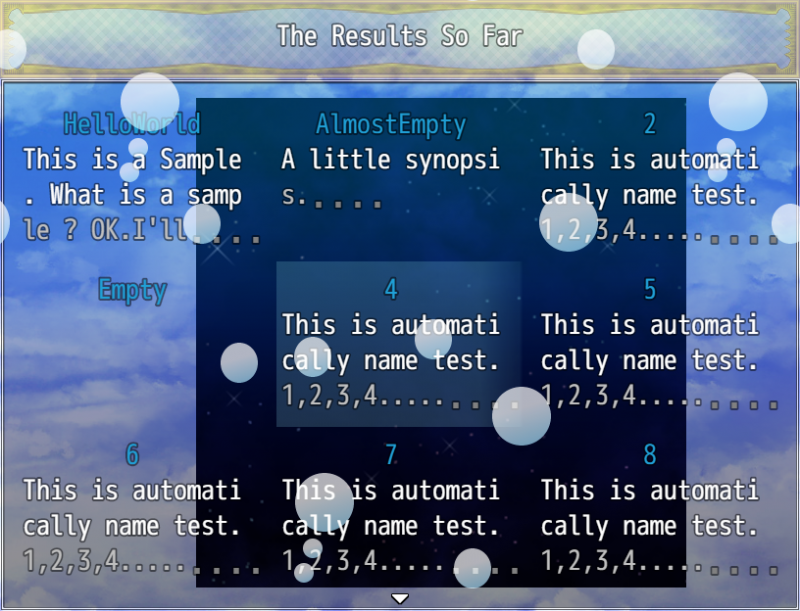
* -> The saved synopsis can be read again with the LookingBack scene.(v1.1.0)
----how to use----
* You can use this plugin after setting some plugin parameters.
*
* All images are load from "img\tsumio" folder.
* Be sure to prepare necessary images in "img\tsumio" folder.
*
* All voice data are loaded from "audio\se\voice" folder.
* Be sure to prepare necessary voice data in "audio\se\voice" folder.
*
* If minus is specified for the background image and particle speed, scroll backward.
----plugin command----
* Plugin commands are distinguish uppercase and lowercase.
* And separate each word with a space.
* Please make sure.
* Line breaks are possible with "\n" or a new "writeLine".
* When using "\n", please make sure to insert a space between before and after.
* "POS writeLine AddtionalString" : Add a string to the synopsis. It is also possible to use some control characters.
* "POS newPage" : Add a new page to the synopsis. Subsequent writeLines are done for the new page.
* "POS setMainBackground BackgroundName" : Set the image of the main background.
* "POS setSubBackground BackgroundName" : Set the image of the sub background.
* "POS setParticle ParticleName" : Set the image of the particle.
* "POS setBgm FileName Volume Pitch" : Set up BGM.
* "POS setPicture FileName XPosition YPosition Opacity" : Set up a picture.
* "POS setAlign Align" : Set up the align of the strings."left" or "center" can be specified.
* "POS reserveCommonEvent EventNumber" : Set the common event number to be executed after transitioning the map scene.
* "POS setVoice VoiceFileName" : Set the voice playing the current page.
* "POS clearAll" : Clear all settings in plugin command.
* "POS clearTextAndPage" : Clear text and page settings.
* "POS clearAllBackground" : Clear main background and sub background settings.
* "POS clearParticle" : Clear particle settings.
* "POS clearBgm" : Clear bgm settings.
* "POS clearPicture" : Clear a picture settings.
* "POS clearCommonEvent" : Clear common event settings.
* "POS saveSynopsis FileName" : Save current synopsis data as FileName.If you don't set FileName, the index is given automatically.
* "POS loadSynopsis FileName" : Load the saved synopsis data.
* "POS getDataLength" : The number of saved synopsis data is output to the console screen (for debugging).
* "POS initialize" : Delete all synopsis data.
----about saving synopsis file----
* If you don't set FileName, the index is given automatically.
* And, if a file with the same name already exists, it will be overwritten.
----if an error occurs after plugin update----
* All synopsis data will be deleted, but errors may not occur.
----how to execute writeLine from 'ShowText of EventCommand'----
* In the same way as showing text, launch the event command and enter "<POS>" anywhere on each line.
* For example:
<POS>This is test message.
Te\I[1]st<POS>test test。
Position of tag POS is OK anywhere.<POS>
----about looking back scene----
* Please note this point first.
* It is possible to read the synopsis saved (command "POS saveSynopsis FileName") in the replay scene again.
* The LookingBack scene can be displayed from the menu scene.
* The background and particles of this LookingBack scene are applied to the current background and particle.
* When you read the synopsis scene from LookingBack scene, the saved background and particles will be played back.
* And, the function of the LookingBack scene can be turned off.
* The title applied to the LookingBack scene is the saved name of the synopsis.
----ChangeLog----
* 1.1.1 2017/09/30 Add GitHub address.
* 1.1.1 2017/09/02 Add the voice system.
* 1.1.0 2017/08/26 Add the looking back scene sytem and fix some bugs.
* 1.0.2 2017/08/25 Add the Saving and Loading system.
* 1.0.1 2017/08/24 Fix some bugs and expand 'writeLine'.
* 1.0.0 2017/08/23 Release
----remarks----
--Terms of Use(MIT License)--
* You may edit the source code to suit your needs,
* so long as you don't claim the source code belongs to you.
* Anyway,this software is released under the MIT License.
Downloads / Referenced Files
RPG Maker Web attachments are mirrored locally when available. Other external links remain hosted by their original creator or third-party service.
- Download: https://raw.githubusercontent.com/Tsumio/rmmv-plugins/master/plugins/PreviouslyOnStory.js
- Local mirror: 49481-ebe9498662d4b2ff55273574faf58ed3.png
SHA-256:7595e26ce3500a1c457012290a34c19a0a0529ba03cba86dc8f61066e19278c5
Original attachment URL: https://forums.rpgmakerweb.com/attachments/image_20170827_112009-png.70983/ - Local mirror: 49482-21bc93dbe9b0434f340bfa2dc2d98391.png
SHA-256:dbf0cabc2dce974b800fa4f383aa82950b57e03a84e70741ac9dc447157b6243
Original attachment URL: https://forums.rpgmakerweb.com/attachments/image_20170827_112016-png.70984/ - Local mirror: 49483-aec7c94cf7af5eae8cd8f011e0f2a306.png
SHA-256:843429e88bc6a062561d8332656217da88ad427e51c80cb645d3ade2c26513d5
Original attachment URL: https://forums.rpgmakerweb.com/attachments/image_20170827_112024-png.70985/ - Local mirror: 49484-d3afe69956be69b5f5cd99721289c225.jpg
SHA-256:aa3fbbd468c2e4b7aa3fcfa82f2afc33797cd7b5538a6e0e4f60b340b4a5d3a2
Original attachment URL: https://forums.rpgmakerweb.com/attachments/ws000048-jpg.70986/ - Local mirror: 49485-36fd7702a63706c86cb35242a27851a2.jpg
SHA-256:c160adee44e37aa3bc7bf31ecfa42b560ad63799b526076927a0655ec633cf09
Original attachment URL: https://forums.rpgmakerweb.com/attachments/ws000049-jpg.70987/
License / Terms Note
--Terms of Use(MIT License)-- Spoiler: Terms of Use(MIT License) * This plugin is free for both commercial and non-commercial use. * You may edit the source code to suit your needs,
Referenced Images / Attachments
Creator Claims / Removal
If you are the original creator and want this listing reassigned, edited, or removed, join BMMPlay and contact the moderators with proof that matches the original RPG Maker Web profile, linked GitHub, itch.io page, or another public creator identity.
Replies (0)
No replies yet.
Topic Summary
Loading summary...