

MVGDT Elements Leveling
BMM_Archive · July 15, 2026

BMM_Archive
Preserved forum archive. This topic stores the original first post and locally mirrored RPG Maker Web attachments when available. It is posted by the BMMPlay archive account, not by the original creator.
Original Source
- Original title: GDT Elements Leveling
- Original author: Gilles
- Original date: June 26, 2016
- Source thread: https://forums.rpgmakerweb.com/threads/gdt-elements-leveling.64207/
- Source forum path: Game Development Engines > RPG Maker Javascript Plugins > JS Plugin Releases (RMMV)
Summary
{ "lightbox_close": "Close", "lightbox_next": "Next", "lightbox_previous": "Previous",
Archived First Post

GDT: Elements Leveling v1.5
Introduction
This plugin gives your characters the possibility to level up their elements by using skills of this element.
Leveling up elements can give you two advantages:
- Skills of this element get stronger
- Learn better Skills of this element (or combined elements)
Notetags
Skill:
<elementxp:<span style="color: #0000CD">xp> You can choose how much xp an element should gain after using this spell (you gain xp for every enemy you hit)
Classes;
<elementSkill: <span style="color: #0000CD">elementId, levelOfElement, SkillTolearnId> Which skill should be learned after an element reached a specific level
<elementSkill: <span style="color: #0000CD">elementId1;elementId2, levelOfElement1;levelOfElement2, SkillTolearnId> You can use 2 or more element level requirements if you want to
A bit more help is inside the Plugin Help after installing the plugin
Lunatic Tag
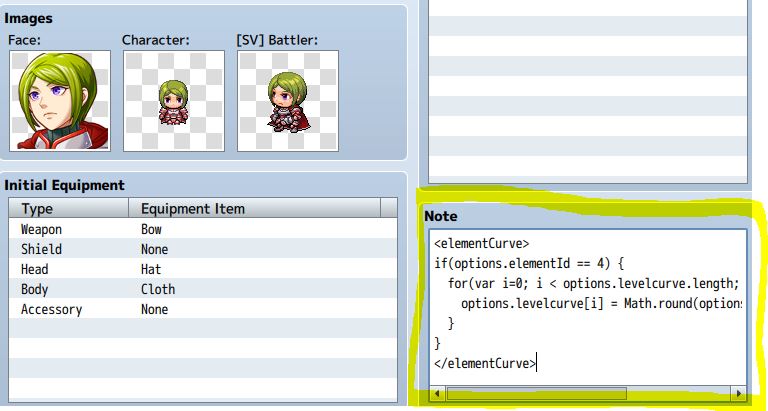
Classes & Actors: <elementCurve> Script </elementCurve>
This can change the elementCurve for specifig Actors, Classes and even different Elements
For detailed Information look into the Plugin Help (Example in Screenshot below)
Installation-Guide
Just copy the plugin into your plugin folder and add it to your plugin list
If you want to you can configure the plugin parameters, level the level curve
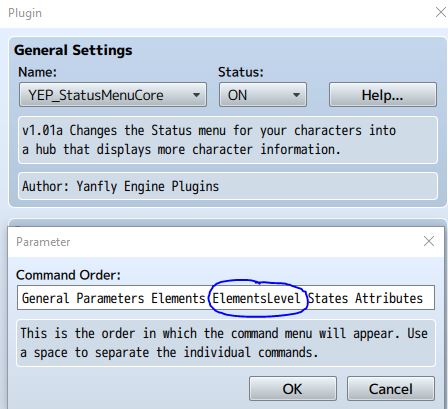
If you want to use the Menu for Yanflys StatusMenuCore just add ElementsLevel to Command Order Parameter(Screenshot)
And be sure to have the StatusMenuCore to load before GDT Elements Level
The parameters for the status work the same as for the Element Status Menu in Yanflys StatusMenuCore
Download
- Plugin: GDT_Core
- Plugin: GDT_ElementsLeveling (needs GDT_Core)
Credit and Thanks
- Gamedev-Tutorials
You can use and edit this plugin as you want. This plugin is open for non commercial and commercial use. Just give me a little credit =)
Changelog
v1.1: Just some Bugfixes
v1.2: A Skill can now have multiple depending Skill Levels to be learned
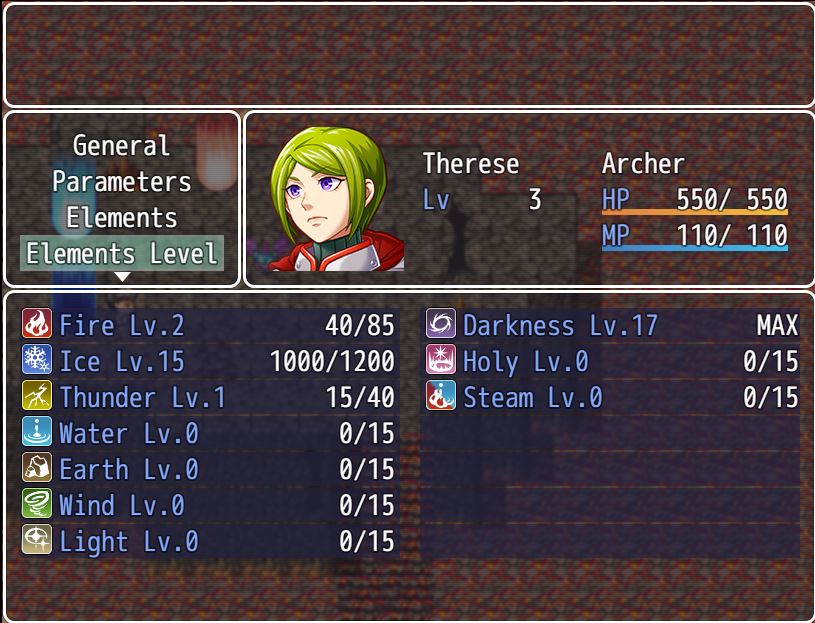
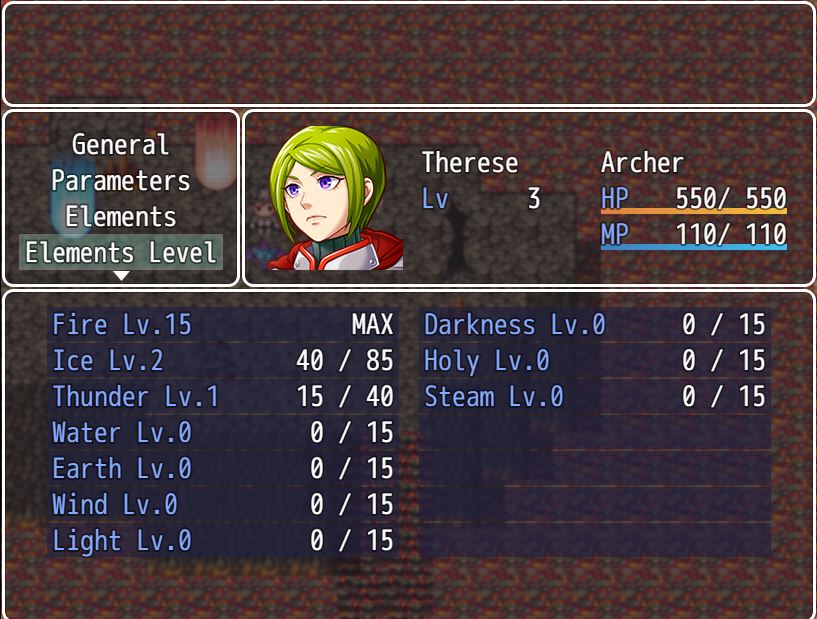
v1.3: Elements Level Status Window added for Yanflys StatusMenuCore. Just Add ElementsLevel to the Menus. Spaces are now allowed in Notetags
v1.3.1: Bugfix: There was a bug when your class didn't had any skill to learn.
v1.4: Added Icons to the Status Window
v1.5: Lunatic Tag: ElementCurve added
Demo
Screenshot
With Icons
Without Icons
Lunatic Tag: elementCurve
Downloads / Referenced Files
RPG Maker Web attachments are mirrored locally when available. Other external links remain hosted by their original creator or third-party service.
- Download: Screenshot
License / Terms Note
Credit and Thanks - Gamedev-Tutorials You can use and edit this plugin as you want. This plugin is open for non commercial and commercial use. Just give me a little credit =) Changelog
Referenced Images / Attachments
Creator Claims / Removal
If you are the original creator and want this listing reassigned, edited, or removed, join BMMPlay and contact the moderators with proof that matches the original RPG Maker Web profile, linked GitHub, itch.io page, or another public creator identity.
Replies (0)
No replies yet.
0
replies
14
views
Topic Summary
Loading summary...