


MVMinigame: Flip a Coin
BMM_Archive · July 15, 2026

Preserved forum archive. This topic stores the original first post and locally mirrored RPG Maker Web attachments when available. It is posted by the BMMPlay archive account, not by the original creator.
Original Source
- Original title: Minigame: Flip a Coin
- Original author: Pincalibur
- Original date: November 13, 2015
- Source thread: https://forums.rpgmakerweb.com/threads/minigame-flip-a-coin.50435/
- Source forum path: Game Development Engines > RPG Maker Javascript Plugins > JS Plugin Releases (RMMV)
Summary
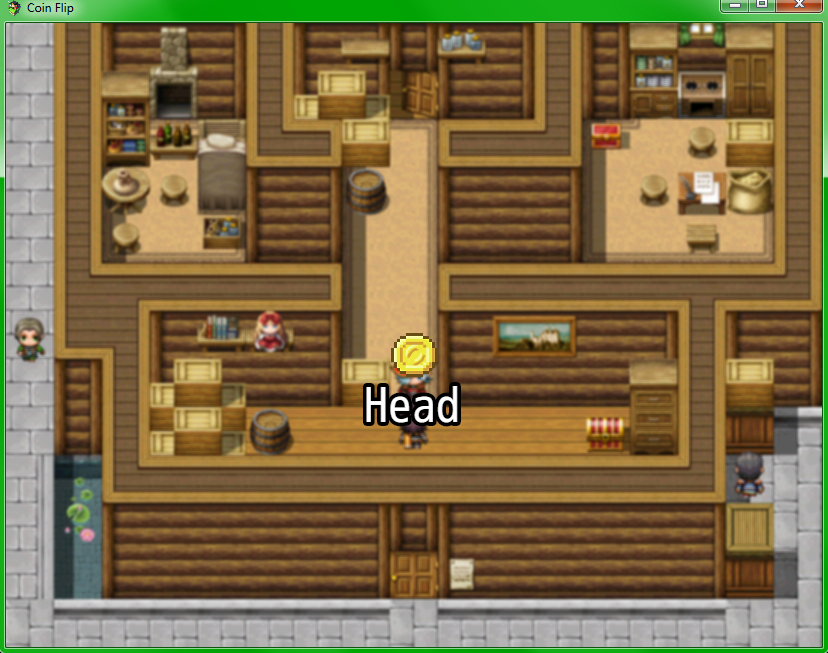
Hi there, this is my Flip a Coin Minigame. Because I started learning JS two days ago, I decided to start small. How to implement:


Archived First Post
Hi there,
this is my Flip a Coin Minigame.
Because I started learning JS two days ago, I decided to start small.
How to implement:
Demo
I created a Demo for you guys, so you can see how to use the plug-in.
The coin-animation I created may be used together with the script.
Download: https://www.dropbox.com/s/w5xrjkp8jw3aogv/PINCALIBUR_COIN_FLIP.zip?dl=0
Protected download
Script only
/*:* @plugindesc This is a Coinflip Minigame. ** @author Pincalibur ** @help Call the Minigame with the Plug-in-command: CallCoinFlipThe Player chooses a side, which will be written into the Variable 001. (default)Value '0' for head, Value '1' for tail.If the Player guesses right, the result-value '1' will be written into the Variable: 002 (default). If he loses '0'. If the Player quits the game , it gets the value '2'.Press Left or Right to switch to head or tail. Press Enter to start or Escape to cancel the game.** @version 1.1** @param variableIDPlayerChoice* @desc The variable-ID to use for the player's choice. Can't be 0.* @default 1** @param variableIDResult* @desc The variable-ID to use for the result. Can't be 0.* @default 2** @param coinHeadLabel* @desc The shown text for the frontside.* @default Head** @param coinTailLabel* @desc The shown text for the backside.* @default Tail** @param coinHeadImageName* @desc The name for the headimage.* @default head** @param coinTailImageName* @desc The name for the tailimage.* @default tail** @param coinPosX* @desc The X value for the Coinposition* @default 385** @param coinPosY* @desc The Y value for the Coinposition* @default 310*//*-----------------------------------------------------** Parameters**----------------------------------------------------*/var parameters = PluginManager.parameters('PINC_CoinFlip');var variableNumberPlayerChoice = Number(parameters['variableIDPlayerChoice'] || 1);var variableNumberResult = Number(parameters['variableIDResult'] || 2);var coinHeadLabel = String(parameters['coinHeadLabel'] || Head);var coinTailLabel = String(parameters['coinTailLabel'] || Tail);var coinHeadImageName = String(parameters['coinHeadImageName'] || head);var coinTailImageName = String(parameters['coinTailImageName'] || tail);var coinPosX = Number(parameters['coinPosX'] || 385);var coinPosY = Number(parameters['coinPosY'] || 310);/*-----------------------------------------------------** Plugin Command "CallCoinFlip"**----------------------------------------------------*/var _Game_Interpreter_pluginCommand = Game_Interpreter.prototype.pluginCommand;Game_Interpreter.prototype.pluginCommand = function(command, args) { _Game_Interpreter_pluginCommand.call(this, command) if (command === 'CallCoinFlip') { SceneManager.push(Scene_CoinFlip); }}/*-------------------------------------------------------------* * Scene_CoinFlip** The Scene, which is acting as Coinflip-Minigame* *------------------------------------------------------------*/function Scene_CoinFlip() { this.initialize.apply(this, arguments);}Scene_CoinFlip.prototype = Object.create(Scene_Base.prototype);Scene_CoinFlip.prototype.constructor = Scene_CoinFlip;Scene_CoinFlip.prototype.initialize = function() { Scene_Base.prototype.initialize.call(this);};Scene_CoinFlip.prototype.create = function() { this.coinX = coinPosX; this.coinY = coinPosY; this.headImgName = coinHeadImageName; this.tailImgName = coinTailImageName; this.userChoice = 0; this.result = 0; this.playerChoiceVariable = variableNumberPlayerChoice; this.resultVariable = variableNumberResult; this.createBackground(); this.drawCoin(); this.drawCoinText(); Scene_Base.prototype.create.call(this);};Scene_CoinFlip.prototype.createBackground = function() { this.backgroundSprite = new Sprite(); this.backgroundSprite.bitmap = SceneManager.backgroundBitmap(); this.addChild(this.backgroundSprite);};Scene_CoinFlip.prototype.drawCoin = function() { this.coinSprite = new Sprite(); this.coinSprite.position.x = this.coinX; this.coinSprite.position.y = this.coinY; this.headBitmap = ImageManager.loadPicture(this.headImgName); this.tailBitmap = ImageManager.loadPicture(this.tailImgName); this.coinSprite.bitmap = this.headBitmap; this.addChild(this.coinSprite);};Scene_CoinFlip.prototype.drawCoinText = function() { var coinText = coinHeadLabel; this.maxWidth = Graphics.width; this.coinTextX = this.coinX - 385; this.coinTextY = this.coinY + 48; this.coinTextSprite = new Sprite(new Bitmap(Graphics.width, Graphics.height)); this.addChild(this.coinTextSprite);; this.coinTextSprite.bitmap.outlineColor = 'black'; this.coinTextSprite.bitmap.outlineWidth = 8; this.coinTextSprite.bitmap.fontSize = 48; this.coinTextSprite.bitmap.drawText(coinText, this.coinTextX, this.coinTextY, this.maxWidth, 48, 'center');};Scene_CoinFlip.prototype.start = function() { Scene_Base.prototype.start.call(this);};Scene_CoinFlip.prototype.update = function() { this.getInput(); Scene_Base.prototype.update.call(this);};Scene_CoinFlip.prototype.terminate = function() { Scene_Base.prototype.terminate.call(this);};Scene_CoinFlip.prototype.getInput = function() { if(Input.isTriggered('left')){ this.switchCoinSide(); } if(Input.isTriggered('right')){ this.switchCoinSide(); } if(Input.isTriggered('cancel')){ this.result = 2; this.saveResultInGameVariable(); this.clearGame(); } if(Input.isTriggered('ok')){ this.flipCoin(); this.savePlayerChoiceInGameVariable(); this.saveResultInGameVariable(); this.clearGame(); }};Scene_CoinFlip.prototype.switchCoinSide = function(){ if(this.userChoice === 0){ this.userChoice = 1; this.coinSprite.bitmap = this.tailBitmap; this.switchCoinText(coinTailLabel); } else { this.userChoice = 0; this.coinSprite.bitmap = this.headBitmap; this.switchCoinText(coinHeadLabel); }};Scene_CoinFlip.prototype.switchCoinText = function(coinText){ this.coinTextSprite.bitmap = new Bitmap(Graphics.width, Graphics.height); this.coinTextSprite.bitmap.outlineColor = 'black'; this.coinTextSprite.bitmap.outlineWidth = 8; this.coinTextSprite.bitmap.fontSize = 48; this.coinTextSprite.bitmap.drawText(coinText, this.coinTextX, this.coinTextY, this.maxWidth, 48, 'center');};Scene_CoinFlip.prototype.flipCoin = function(){ //0 is Head, 1 is Tail; var flipResult = Math.floor(Math.random() * 2); if (this.userChoice === flipResult){ this.result = 1; } else { this.result = 0; }} Scene_CoinFlip.prototype.savePlayerChoiceInGameVariable = function(){ $gameVariables._data[this.playerChoiceVariable] = this.userChoice;}Scene_CoinFlip.prototype.saveResultInGameVariable = function(){ $gameVariables._data[this.resultVariable] = this.result;}Scene_CoinFlip.prototype.clearGame = function(){ SceneManager.pop();}
I hope you enjoy my first Plugin!
If you want any additionally features, tell me.
I would like to be credited, if you use my ressources!
If you release a game and you use my ressources ,I would be happy to play it!
Thank you
this is my Flip a Coin Minigame.
Because I started learning JS two days ago, I decided to start small.
How to implement:
- Copy the "PINC_CoinFlip.js" into your /js/plugin
- Copy the "head.png" and "tail.png" into your /img/pictures
- Add PINC_CoinFlip in your Plug-in-Manager
- Edit parameters if needed
Demo
I created a Demo for you guys, so you can see how to use the plug-in.
The coin-animation I created may be used together with the script.
Download: https://www.dropbox.com/s/w5xrjkp8jw3aogv/PINCALIBUR_COIN_FLIP.zip?dl=0
Protected download
Script only
/*:* @plugindesc This is a Coinflip Minigame. ** @author Pincalibur ** @help Call the Minigame with the Plug-in-command: CallCoinFlipThe Player chooses a side, which will be written into the Variable 001. (default)Value '0' for head, Value '1' for tail.If the Player guesses right, the result-value '1' will be written into the Variable: 002 (default). If he loses '0'. If the Player quits the game , it gets the value '2'.Press Left or Right to switch to head or tail. Press Enter to start or Escape to cancel the game.** @version 1.1** @param variableIDPlayerChoice* @desc The variable-ID to use for the player's choice. Can't be 0.* @default 1** @param variableIDResult* @desc The variable-ID to use for the result. Can't be 0.* @default 2** @param coinHeadLabel* @desc The shown text for the frontside.* @default Head** @param coinTailLabel* @desc The shown text for the backside.* @default Tail** @param coinHeadImageName* @desc The name for the headimage.* @default head** @param coinTailImageName* @desc The name for the tailimage.* @default tail** @param coinPosX* @desc The X value for the Coinposition* @default 385** @param coinPosY* @desc The Y value for the Coinposition* @default 310*//*-----------------------------------------------------** Parameters**----------------------------------------------------*/var parameters = PluginManager.parameters('PINC_CoinFlip');var variableNumberPlayerChoice = Number(parameters['variableIDPlayerChoice'] || 1);var variableNumberResult = Number(parameters['variableIDResult'] || 2);var coinHeadLabel = String(parameters['coinHeadLabel'] || Head);var coinTailLabel = String(parameters['coinTailLabel'] || Tail);var coinHeadImageName = String(parameters['coinHeadImageName'] || head);var coinTailImageName = String(parameters['coinTailImageName'] || tail);var coinPosX = Number(parameters['coinPosX'] || 385);var coinPosY = Number(parameters['coinPosY'] || 310);/*-----------------------------------------------------** Plugin Command "CallCoinFlip"**----------------------------------------------------*/var _Game_Interpreter_pluginCommand = Game_Interpreter.prototype.pluginCommand;Game_Interpreter.prototype.pluginCommand = function(command, args) { _Game_Interpreter_pluginCommand.call(this, command) if (command === 'CallCoinFlip') { SceneManager.push(Scene_CoinFlip); }}/*-------------------------------------------------------------* * Scene_CoinFlip** The Scene, which is acting as Coinflip-Minigame* *------------------------------------------------------------*/function Scene_CoinFlip() { this.initialize.apply(this, arguments);}Scene_CoinFlip.prototype = Object.create(Scene_Base.prototype);Scene_CoinFlip.prototype.constructor = Scene_CoinFlip;Scene_CoinFlip.prototype.initialize = function() { Scene_Base.prototype.initialize.call(this);};Scene_CoinFlip.prototype.create = function() { this.coinX = coinPosX; this.coinY = coinPosY; this.headImgName = coinHeadImageName; this.tailImgName = coinTailImageName; this.userChoice = 0; this.result = 0; this.playerChoiceVariable = variableNumberPlayerChoice; this.resultVariable = variableNumberResult; this.createBackground(); this.drawCoin(); this.drawCoinText(); Scene_Base.prototype.create.call(this);};Scene_CoinFlip.prototype.createBackground = function() { this.backgroundSprite = new Sprite(); this.backgroundSprite.bitmap = SceneManager.backgroundBitmap(); this.addChild(this.backgroundSprite);};Scene_CoinFlip.prototype.drawCoin = function() { this.coinSprite = new Sprite(); this.coinSprite.position.x = this.coinX; this.coinSprite.position.y = this.coinY; this.headBitmap = ImageManager.loadPicture(this.headImgName); this.tailBitmap = ImageManager.loadPicture(this.tailImgName); this.coinSprite.bitmap = this.headBitmap; this.addChild(this.coinSprite);};Scene_CoinFlip.prototype.drawCoinText = function() { var coinText = coinHeadLabel; this.maxWidth = Graphics.width; this.coinTextX = this.coinX - 385; this.coinTextY = this.coinY + 48; this.coinTextSprite = new Sprite(new Bitmap(Graphics.width, Graphics.height)); this.addChild(this.coinTextSprite);; this.coinTextSprite.bitmap.outlineColor = 'black'; this.coinTextSprite.bitmap.outlineWidth = 8; this.coinTextSprite.bitmap.fontSize = 48; this.coinTextSprite.bitmap.drawText(coinText, this.coinTextX, this.coinTextY, this.maxWidth, 48, 'center');};Scene_CoinFlip.prototype.start = function() { Scene_Base.prototype.start.call(this);};Scene_CoinFlip.prototype.update = function() { this.getInput(); Scene_Base.prototype.update.call(this);};Scene_CoinFlip.prototype.terminate = function() { Scene_Base.prototype.terminate.call(this);};Scene_CoinFlip.prototype.getInput = function() { if(Input.isTriggered('left')){ this.switchCoinSide(); } if(Input.isTriggered('right')){ this.switchCoinSide(); } if(Input.isTriggered('cancel')){ this.result = 2; this.saveResultInGameVariable(); this.clearGame(); } if(Input.isTriggered('ok')){ this.flipCoin(); this.savePlayerChoiceInGameVariable(); this.saveResultInGameVariable(); this.clearGame(); }};Scene_CoinFlip.prototype.switchCoinSide = function(){ if(this.userChoice === 0){ this.userChoice = 1; this.coinSprite.bitmap = this.tailBitmap; this.switchCoinText(coinTailLabel); } else { this.userChoice = 0; this.coinSprite.bitmap = this.headBitmap; this.switchCoinText(coinHeadLabel); }};Scene_CoinFlip.prototype.switchCoinText = function(coinText){ this.coinTextSprite.bitmap = new Bitmap(Graphics.width, Graphics.height); this.coinTextSprite.bitmap.outlineColor = 'black'; this.coinTextSprite.bitmap.outlineWidth = 8; this.coinTextSprite.bitmap.fontSize = 48; this.coinTextSprite.bitmap.drawText(coinText, this.coinTextX, this.coinTextY, this.maxWidth, 48, 'center');};Scene_CoinFlip.prototype.flipCoin = function(){ //0 is Head, 1 is Tail; var flipResult = Math.floor(Math.random() * 2); if (this.userChoice === flipResult){ this.result = 1; } else { this.result = 0; }} Scene_CoinFlip.prototype.savePlayerChoiceInGameVariable = function(){ $gameVariables._data[this.playerChoiceVariable] = this.userChoice;}Scene_CoinFlip.prototype.saveResultInGameVariable = function(){ $gameVariables._data[this.resultVariable] = this.result;}Scene_CoinFlip.prototype.clearGame = function(){ SceneManager.pop();}
If you want any additionally features, tell me.
I would like to be credited, if you use my ressources!
If you release a game and you use my ressources ,I would be happy to play it!
Thank you
Downloads / Referenced Files
Log in to download
Log in, then follow the RPG Maker Developers Group to see these download links.
Log in to downloadLicense / Terms Note
I would like to be credited, if you use my ressources! If you release a game and you use my ressources ,I would be happy to play it! Thank you
Referenced Images / Attachments
Creator Claims / Removal
If you are the original creator and want this listing reassigned, edited, or removed, join BMMPlay and contact the moderators with proof that matches the original RPG Maker Web profile, linked GitHub, itch.io page, or another public creator identity.
Replies (0)
No replies yet.
0
replies
13
views
Topic Summary
Loading summary...
