

Yanfly Autosave Plugin options not working.
BMM_Archive · July 15, 2026

Original Source
- Original title: Yanfly Autosave Plugin options not working.
- Original author: Derek
- Original date: April 30, 2022
- Source thread: https://forums.rpgmakerweb.com/threads/yanfly-autosave-plugin-options-not-working.147188/
- Source forum path: Game Development Engines > Legacy Engine Support > RPG Maker MV Support
Summary
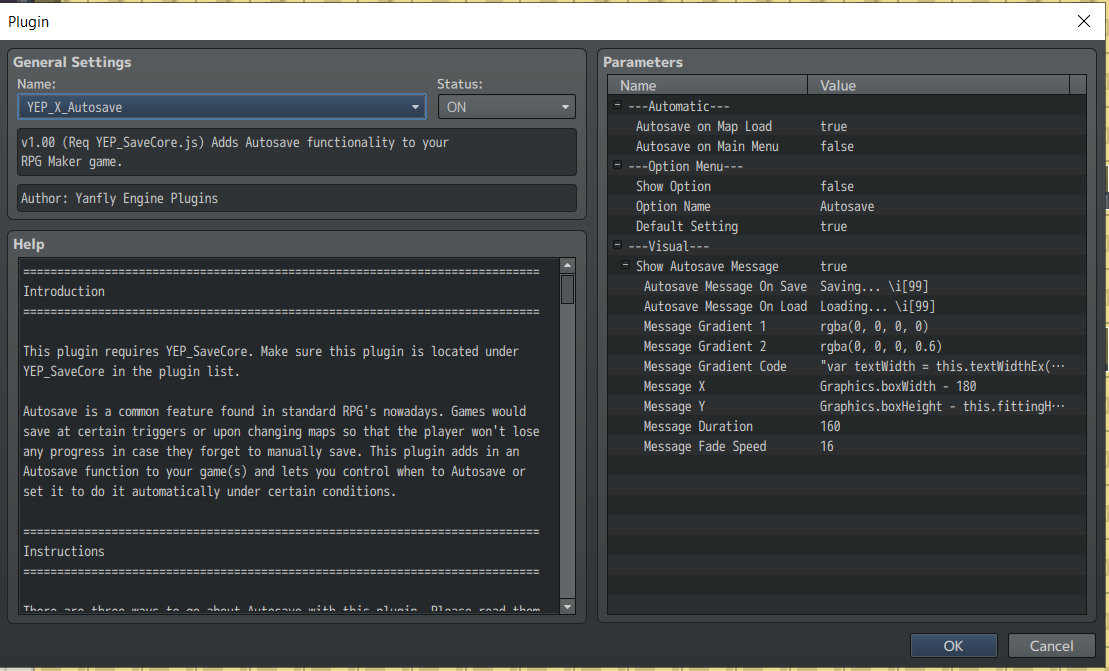
I have a weird issue happening with my game. I'm using Yanfly plugins and one that is essential is the Autosave Plugin. I have it turned on and its working, however, I don't want the game to save when exiting the menu, but it still does even after changing it to false in the options for that plugin. Has anyone else had this issue? If so is there a work around or solution. Also, is it possible to "force" save to begin the autosave process? This game relies heavily on...
Archived First Post
Downloads / Referenced Files
RPG Maker Web attachments are mirrored locally when available. Other external links remain hosted by their original creator or third-party service.
- Local mirror: 203768-d31d6eee7305c0b5452b087a9273bb5b.png
SHA-256:aecab322271a04bb6c39cfc831a98760f9f59fc6208d31cddeadeccecaca0cfd
Original attachment URL: https://forums.rpgmakerweb.com/attachments/capture-png.224688/
Referenced Images / Attachments
Creator Claims / Removal
If you are the original creator and want this listing reassigned, edited, or removed, join BMMPlay and contact the moderators with proof that matches the original RPG Maker Web profile, linked GitHub, itch.io page, or another public creator identity.
Replies (0)
No replies yet.
Topic Summary
Loading summary...