

MADO Window Builder not displaying body and other problems.
BMM_Archive · July 15, 2026

Original Source
- Original title: MADO Window Builder not displaying body and other problems.
- Original author: FallenVixen
- Original date: January 6, 2022
- Source thread: https://forums.rpgmakerweb.com/threads/mado-window-builder-not-displaying-body-and-other-problems.143660/
- Source forum path: Game Development Engines > Legacy Engine Support > RPG Maker MV Support
Summary
First off, for whatever reason the body color will always display black even if you've changed the hue. I guessed that maybe it was because of the layout that MADO creates and how it's different, but no, even if i change the part of the skin that would've originally been the window color, it still won't detect it (If i resize the window skin to the default layout it'll just entirely delete the body and leave it transparent too). So this is what my window skin looks like (showing only...
Archived First Post
So this is what my window skin looks like (showing only the left side as i don't want my skin to be publicly accessible cause it's edited):
MADO doesn't seem to actually touch the upper left corner where the body of windows would usually be, instead it creates a way bigger section and uses it differently.
But as both here are blue anyways, IN THEORY, it should display blue in-game.
Yet, for whatever reason, this is what it actually looks like when playtesting:
It's black. Where did the color go??
The color will only display right in the title screen, but everywhere else it just went to buy milk and never came back.
It just displays a single line at the bottom of text instead of highlighting the whole box like it otherwise should.
Highlight will work fine everywhere else, it's just the main menu.
 )
)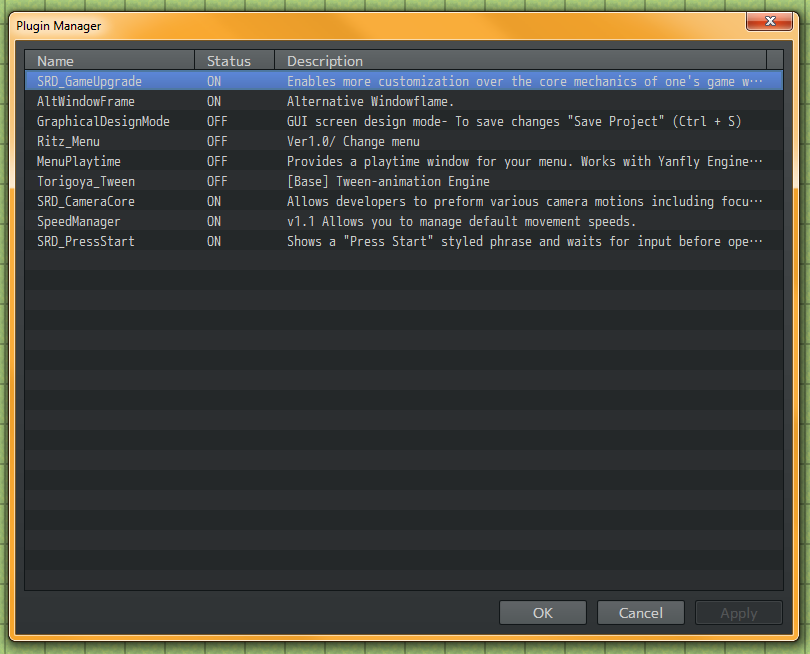
So like, okay, deactivate them to make sure that all of these problems aren't because of my other plugins, but even then...
Cursor highlight is back, but body color is still entirely gone.
I'm stumped here, I don't wanna get rid of MADO because as i said the plugins i'm using ask for the altwindowframe.js plugin to work (also spent money), but this is kind of being a pain and they don't seem to be uncommon issues from what i've seen around.
If anyone could help me sort all of this stuff out it would be greatly appreciated.
Downloads / Referenced Files
RPG Maker Web attachments are mirrored locally when available. Other external links remain hosted by their original creator or third-party service.
- Local mirror: 190915-7714f7c0e8f85129596977d7cb818418.png
SHA-256:87d90a6616a0ee78c5f73c447e1bb5a67efcb1b85042e7eb7f54f9f733c0d131
Original attachment URL: https://forums.rpgmakerweb.com/attachments/1641453964672-png.211835/
Referenced Images / Attachments
Creator Claims / Removal
If you are the original creator and want this listing reassigned, edited, or removed, join BMMPlay and contact the moderators with proof that matches the original RPG Maker Web profile, linked GitHub, itch.io page, or another public creator identity.
Replies (0)
No replies yet.
Topic Summary
Loading summary...