public

Rpg Maker Developers Group

Simple enough for a child, powerful enough for a developer

3 Followers

change choice box position

BMM_Archive · July 15, 2026

BMM_Archive
Preserved forum archive. This topic stores the original first post and locally mirrored RPG Maker Web attachments when available. It is posted by the BMMPlay archive account, not by the original creator.

Original Source

  • Original title: change choice box position
  • Original author: pasunna
  • Original date: April 26, 2019
  • Source thread: https://forums.rpgmakerweb.com/threads/change-choice-box-position.108402/
  • Source forum path: Game Development Engines > Legacy Engine Support > RPG Maker MV Support

Summary

Hi I use yanfly engine core to set message window position and size (because I use 16:9 and if the box too long player will lost focus in text) but the choice is not move to align with the message box

Archived First Post

Hi
I use yanfly engine core to set message window position and size
(because I use 16:9 and if the box too long player will lost focus in text)
but the choice is not move to align with the message box
how to change that or I need to change the main rmmv code?
thank you
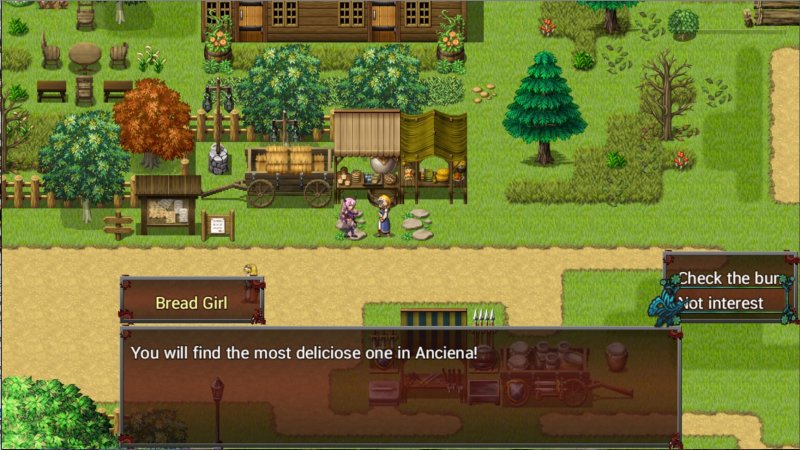

Capture.JPG

Downloads / Referenced Files

RPG Maker Web attachments are mirrored locally when available. Other external links remain hosted by their original creator or third-party service.


  • Local mirror: 93459-59ce4657e688c6c292aa17b80c6dbe2f.jpg
    SHA-256: 78657841839a2293b8229c372fe09316ad6f2fece2a33bd1a5fdb56902e4805d
    Original attachment URL: https://forums.rpgmakerweb.com/attachments/capture-jpg.114379/

Referenced Images / Attachments

Capture.JPG
Capture.JPG
Creator Claims / Removal

If you are the original creator and want this listing reassigned, edited, or removed, join BMMPlay and contact the moderators with proof that matches the original RPG Maker Web profile, linked GitHub, itch.io page, or another public creator identity.

Replies (0)

No replies yet.

0 replies 21 views

Log in to reply.
