Good evening
I'm having a really strange problem, and I haven't been able to trace down a way to fix it.
I have several skills in my project that transform the user's battler sprite into a different file. The several skills that I have that have this feature work as expected, and the actor will assume the desired form until the state wears off, or whatever. I recently made an additional skill of this type, where the only discernible difference between it and the other skills mentioned is that the sprite that the user transforms into is larger than the default battler sprite (128x96 vs 64x64).
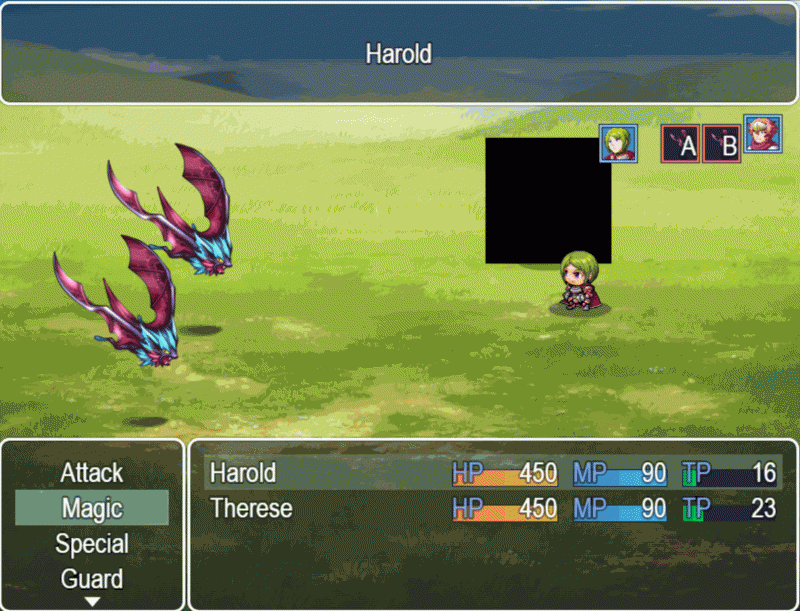
Whenever the newly transformed actor is the subject of something that causes him to blink (getting hit, or being a possible target of an allied spell, for example) instead of blinking white, a blank black square covers his sprite and the following error comes up in the console several thousand times:
WebGL: drawElements: texture bound to texture unit 3 is not renderable. It maybe non-power-of-2 and have incompatible texture filtering or is not 'texture complete'. Or the texture is Float or Half Float type with linear filtering while OES_float_linear or OES_half_float_linear extension is not enabled.
Other weird things about this issue:
- I am able to duplicate it in a test project in which only the needed core plugins to make the effect work are enabled
- In that test project, the problem persists for a random amount of time.
- On an early attempt, it cleared after one round of being hit by test enemies
- With an ally in the party, the problem only happened if you quickly told the second actor to start casting a spell on the friendly target.
- After doing the above, sometimes the issue would clear in a few blinks, but on one attempt almost a minute passed before the blinking black box stopped showing up.
- This issue doesn't happen at all if the actor uses the oversized sprite as his battler graphic from the beginning.
- The issue doesn't happen if the sprite the actor transforms into is the normal size.
- The issue doesn't happen if BattleEngineCore is not enabled
- While it clears after a round, or a few seconds of targeting by an allied spell in the test project, in my own project, the issue never seems to correct itself at all.
Originally I thought it might have been an issue where the graphic filesize was too large, and didn't have time to load entirely, so I took to preloading the file, and had no effect. I also changed the frames from 128x96 to 128x128, with no change as well, however shrinking the sprite to 64x64 does prevent the error.
I suspect this is an issue with the battle engine core highlighting sprites, but I can't locate in code where it does that.
Here's a gif of it happening in the test project:
Protected download
Has anyone experienced this before? Know any workarounds? Someone in the discord server had the same problem once with a battler sprite that was way smaller than the default ones, and he solved it by making the sprite 64x64. This is not an option in my case as the sprite needs to be large.
edit:
I have pinpointed where the error is coming from, but I don't know where to go to figure out how to fix it so that it doesn't happen.
in rpg_sprites the following function is called whenever a battler is being selected by a skill, (or possibly hit by one, though I'm not sure about that).
Sprite_Battler.prototype.updateSelectionEffect = function() {
var target = this._effectTarget;
if (this._battler.isSelected()) {
this._selectionEffectCount++;
if (this._selectionEffectCount % 30 < 15) {
target.setBlendColor([255, 255, 255, 64]);
} else {
target.setBlendColor([0, 0, 0, 0]);
}
} else if (this._selectionEffectCount > 0) {
this._selectionEffectCount = 0;
target.setBlendColor([0, 0, 0, 0]);
}
};
After messing with the function a bit, I noticed that as long as the bolded function has a value for the fourth parameter, the black square shows up. When selecting a target, the above is the function that causes the target to blink white. That setBlendColor function is located in rpg_core.js, and I have no idea how it does what it does, or why it's erroring out only when my battler changes sizes. Any insight is appreciated.
Edit#2:
Okay, so it turns out this isn't a problem with Yanfly's plugins at all. I have managed (with difficulty) to reproduce it in a test project that doesn't have the battle engine core plugin at all. Because it seems to be a timed thing, I was only briefly able to see it, but it's definitely present in the default battle engine.
I think it's an issue with the setBlendColor function quoted above that's causing this, but that function is coming from pixi.js and I don't know enough to dig around there to try to figure out what it's doing.
So, to recap what I know about the problem now, with everything done:
- If an actor uses the function Game_Battler.setBattlerImage() to change battler images in the middle of a fight, and the sprite swapped to has different dimensions than the original sprite:
- As soon as the sprite is swapped, any attempt to highlight it reports a WebGL error (above), and causes the frames where a blendcolor is applied to the sprite to show a black box instead of the highlighted color. The error given sometimes shows line 1009 in pixi.js as the cause, or line 22165.
- This is most noticeable when selecting a newly transformed battler with a skill that targets a party member, but it also happens when a battle animation has the 'flash target' function on it. (IE: getting hit with a skill immediately after changing)
- On pixi.js version 4.5.4, this issue will eventually clear up on it's own, often in a few seconds, sometimes before an event can happen to trigger the error or the problem at all, sometimes it takes as much as a minute for the issue to clear. The randomness makes it difficult for me to figure out where it's being fixed from.
- On pixi version 4.0.0 the error does not ever clear on it's own. Something changed between the two versions mitigated part of the problem.
- If the actor changes to a sprite that is the same size as the sprite he started the battle with, there is no error.
- If I call the function SceneManager._scene._spriteset.createActors() after changing the sprite of an actor, the 'new' sprite for the actor that walks onto screen does not have this problem
With that info, I believe when hot-swapping these sprites for sprites of different sizes, I need to call some sort of refresh function, which appears to happen at a random interval automatically, at least in the newer version of pixi.js. Alternatively I need to find a way to completely replace a Sprite_Actor object with a completely new one from scratch, as a brand new one doesn't seem to have the problem.
Can anyone help with that?




 Lexar 1TB Professional Go Portable SSD
Compact portable SSD for fast file transfers, mobile video, and creator storage.
View on Amazon
Lexar 1TB Professional Go Portable SSD
Compact portable SSD for fast file transfers, mobile video, and creator storage.
View on Amazon