Greetings, fellow developers!
I've tried to make my first custom Action Sequence, a simple dual strike. I know that i could use the "Repeat" option on the Skills tab, but I want each strike to use a different animation. Right now I'm facing a weird bug, where the game crashes as soon as the user moves back home.
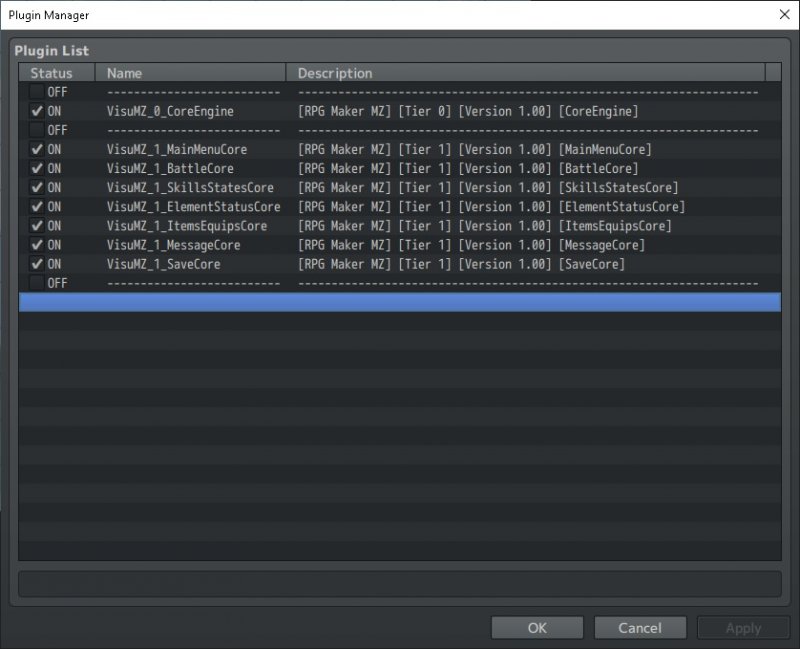
Here are the plugins I'm currently using.
Protected download
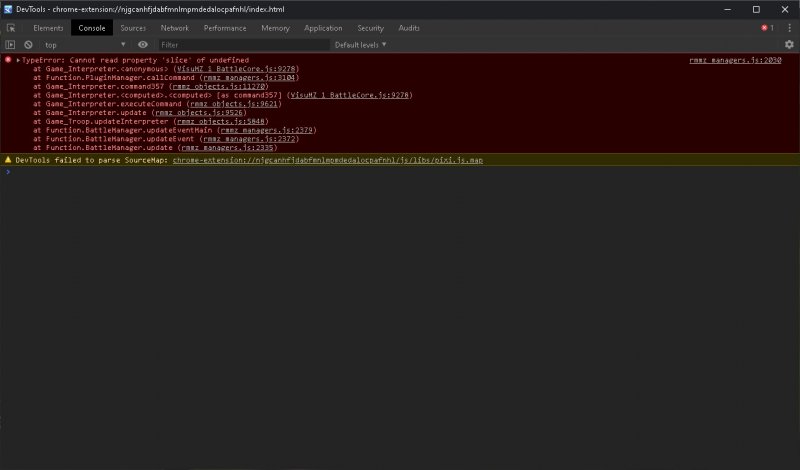
Here's the console errog log. The weirdest part is that there is absolutely nothing called "Slice" in my project.
Protected download
And here's the Action Sequence bug i'm facing.
Code:
◆Plugin Command:VisuMZ_1_BattleCore, ACSET: Setup Action Set
:              :Display Action = true
:              :Immortal: On = true
:              :Battle Step = true
:              :Wait For Movement = true
:              :Cast Animation = false
:              :Wait For Animation = false
◆Plugin Command:VisuMZ_1_BattleCore, MOVE: Move To Target(s)
:              :Targets (Moving) = ["user"]
:              :Targets (Destination) = ["all targets"]
:              :Target Location = front base
:              :Melee Distance = 24
:              :Offset Adjustment = horz
:              :Offset: X = 0
:              :Offset: Y = 0
:              :Duration = 12
:              :Face Destination? = true
:              :Movement Easing = Linear
:              :Movement Motion = walk
:              :Wait For Movement? = true
◆Plugin Command:VisuMZ_1_BattleCore, MOTION: Motion Type
:              :Targets = ["user"]
:              :Motion Type = attack
:              :Show Weapon? = true
◆Plugin Command:VisuMZ_1_BattleCore, MOTION: Wait By Motion Frame
:              :Motion Frames to Wait? = 3
◆Plugin Command:VisuMZ_1_BattleCore, MECH: Action Effect
:              :Targets = ["current target"]
◆Plugin Command:VisuMZ_1_BattleCore, MOTION: Motion Type
:              :Targets = ["user"]
:              :Motion Type = attack
:              :Show Weapon? = true
◆Plugin Command:VisuMZ_1_BattleCore, MOTION: Wait By Motion Frame
:              :Motion Frames to Wait? = 3
◆Plugin Command:VisuMZ_1_BattleCore, MECH: Action Effect
:              :Targets = ["current target"]
◆Plugin Command:VisuMZ_1_BattleCore, ANIM: Wait For Animation
◆Plugin Command:VisuMZ_1_BattleCore, MOVE: Move To Point
:              :Targets = ["user"]
:              :Destination Point = home
:              :Offset Adjustment = horz
:              :Offset: X = 0
:              :Offset: Y = 0
:              :Duration = 12
:              :Face Destination? = true
:              :Movement Easing = Linear
:              :Movement Motion = walk
:              :Wait For Movement? = true
◆Plugin Command:VisuMZ_1_BattleCore, ACSET: Finish Action
:              :Wait For New Line = true
:              :Wait For Effects = true
:              :Clear Battle Log = true
:              :Home Reset = true
:              :Wait For Movement = true




 ProtoArc EM11 Wireless Bluetooth Vertical Mouse
Vertical ergonomic mouse for long desk sessions and reduced wrist strain.
View on Amazon
ProtoArc EM11 Wireless Bluetooth Vertical Mouse
Vertical ergonomic mouse for long desk sessions and reduced wrist strain.
View on Amazon