

 OXS 2.0 TV Sound Bar
Compact sound bar pick for boosting TV, movie, and console audio.
View on Amazon
OXS 2.0 TV Sound Bar
Compact sound bar pick for boosting TV, movie, and console audio.
View on Amazon
Bmmplay may earn a commission from qualifying purchases made through these links.
No products in the cart.


Simple enough for a child, powerful enough for a developer
BMM_Archive · July 15, 2026
Hello, i was trying to replace normal menu with my own command menu, and that command menu would have option to push normal menu, yanfly journal, options, saves and to title command. For now i have 2 problems: 1. I don't know how to exactly replace that, when i make input.keyMapper[27] (which is escape key) command displays but for other things escape don't work, and i don't know how to hide command menu when it is displayed. 2. Command Journal and Command menu doesn't have text, it's blank
Input.keyMapper['27'] = 'AltParty';
_allias_scene_map_update = Scene_Map.prototype.update;
Scene_Map.prototype.update = function() {
    _allias_scene_map_update.call(this);
    if (Input.isTriggered('AltParty')) SceneManager.push(Scene_AltParty);
};

function Scene_AltParty() {
    this.initialize.apply(this, arguments);
}

Scene_AltParty.prototype = Object.create(Scene_MenuBase.prototype);
Scene_AltParty.prototype.constructor = Scene_AltParty;

Scene_AltParty.prototype.initialize = function() {
    Scene_MenuBase.prototype.initialize.call(this);
};

Scene_AltParty.prototype.create = function () {
    Scene_MenuBase.prototype.create.call(this);
    this.createCommandWindow();
}

Scene_AltParty.prototype.stop = function() {
    Scene_MenuBase.prototype.stop.call(this);
    this._commandWindow.close();
};

Scene_AltParty.prototype.createCommandWindow = function() {
    this._commandWindow = new Window_AltParty();
    this._commandWindow.setHandler('menu',  this.commandMenu.bind(this));
    this._commandWindow.setHandler('quest', this.commandQuest.bind(this));
    this._commandWindow.setHandler('gameEnd',   this.commandGameEnd.bind(this));
    this._commandWindow.setHandler('options', this.commandOptions.bind(this));
    this._commandWindow.setHandler('save', this.commandSave.bind(this));
    this.addWindow(this._commandWindow);
};

Scene_AltParty.prototype.commandMenu = function() {
    SceneManager.push(Scene_Menu);
}


Scene_AltParty.prototype.commandQuest = function() {
    SceneManager.push(Scene_Quest);
}

Scene_AltParty.prototype.commandOptions = function() {
    SceneManager.push(Scene_Options);
}

Scene_AltParty.prototype.commandSave = function() {
    SceneManager.push(Scene_Save);
}

Scene_AltParty.prototype.commandGameEnd = function() {
    SceneManager.push(Scene_GameEnd);
}
//---------------------OKNO---------------------------------------------------
function Window_AltParty() {
    this.initialize.apply(this, arguments);
}

Window_AltParty.prototype = Object.create(Window_Command.prototype);
Window_AltParty.prototype.constructor = Window_AltParty;

Window_AltParty.prototype.initialize = function() {
    Window_Command.prototype.initialize.call(this, 0, 0);
    this.updatePlacement();
    this.openness = 0;
    this.open();
};

Window_AltParty.prototype.windowWidth = function() {
    return 240;
};

Window_AltParty.prototype.updatePlacement = function() {
    this.x = (Graphics.boxWidth - this.width) / 2;
    this.y = (Graphics.boxHeight - this.height) / 2;
};

Window_AltParty.prototype.makeCommandList = function() {
    this.addCommand(TextManager.menu, 'menu');
    this.addCommand(TextManager.quest, 'quest');
    this.addCommand(TextManager.options, 'options');
    this.addCommand(TextManager.save, 'save');
    this.addCommand(TextManager.gameEnd,  'gameEnd');
};Log in, then follow the RPG Maker Developers Group to see these download links.
Log in to download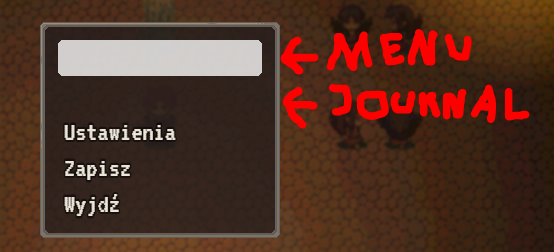
If you are the original creator and want this listing reassigned, edited, or removed, join BMMPlay and contact the moderators with proof that matches the original RPG Maker Web profile, linked GitHub, itch.io page, or another public creator identity.
OXS 2.0 TV Sound Bar
Compact sound bar pick for boosting TV, movie, and console audio.
View on Amazon
Bmmplay may earn a commission from qualifying purchases made through these links.
No replies yet.
Loading summary...
Bmmplay creator tools
Log in or create an account to use this creator tool.
Join the conversation
Your reaction is ready. Log in and you will return to this page to add it.
Are you sure you want to close this music player?
 PlayStation DualSense Wireless Controller - Midnight Black
Extra PS5 controller in Midnight Black for multiplayer, remote play, and backup charging rotation.
View on Amazon
PlayStation DualSense Wireless Controller - Midnight Black
Extra PS5 controller in Midnight Black for multiplayer, remote play, and backup charging rotation.
View on Amazon
Bmmplay may earn a commission from qualifying purchases made through these links.
Community safety