


Changing text color in YEP_ShopMenuCore
BMM_Archive · July 15, 2026

Preserved forum archive. This topic stores the original first post and locally mirrored RPG Maker Web attachments when available. It is posted by the BMMPlay archive account, not by the original creator.
Original Source
- Original title: Changing text color in YEP_ShopMenuCore
- Original author: TSR
- Original date: November 21, 2019
- Source thread: https://forums.rpgmakerweb.com/threads/changing-text-color-in-yep_shopmenucore.115477/
- Source forum path: Game Development Engines > RPG Maker Javascript Plugins > Javascript/Plugin Support
Summary
Hi everybody! I'm new here and it's my firts post; I hope it's the right place to post this... I'm currently trying to edit Yanfly ShopMenuCore so that it show elements/states rates with icons. This is the main function I added:
Archived First Post
Hi everybody!
I'm new here and it's my firts post; I hope it's the right place to post this...
I'm currently trying to edit Yanfly ShopMenuCore so that it show elements/states rates with icons.
This is the main function I added:
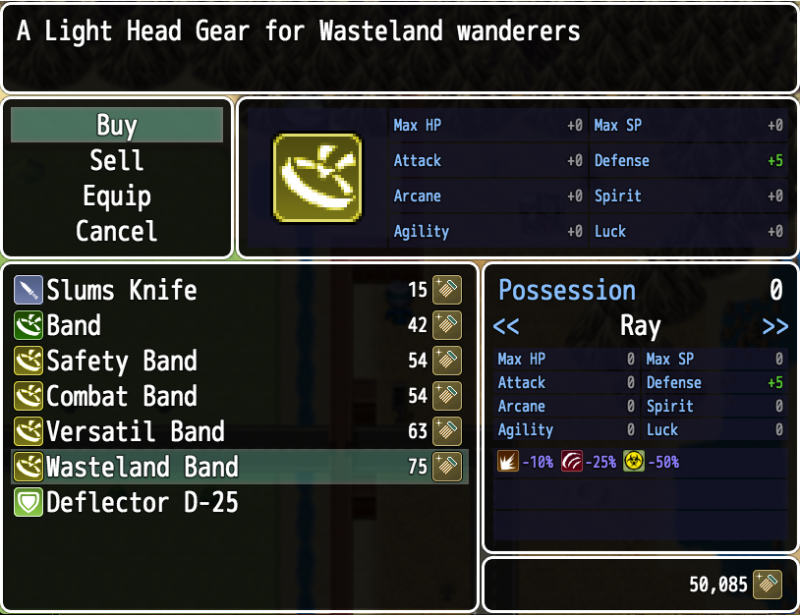
And this how it looks:
Protected download
So it work fine except for the color changes...
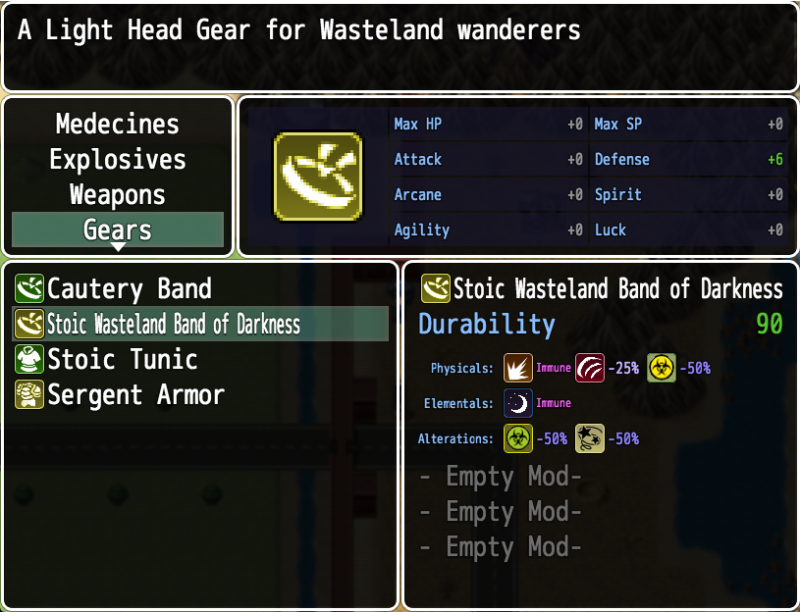
I would like it to look like this:
Protected download
A different color depending on the rate value.
This was scripted in the Yanfly ItemCore <Info Eval> notetag where text codes are accepted.
Since text codes can't be used inside the plugin js files I tried to use the function:
this.changeTextColor(this.textColor(id));
But it change the color of the whole text according to the last entry that was checked in the loop...
I think this is because the this keyword represent the whole function, but I can't figure out how to apply the function to a specific entry;
rateList[id].changeTextColor... makes the game crash.
So I was wondering if someone can point me toward some solutions?
Thanks in advance to anyone who will take the time to reply.
TSR
I'm new here and it's my firts post; I hope it's the right place to post this...
I'm currently trying to edit Yanfly ShopMenuCore so that it show elements/states rates with icons.
This is the main function I added:
Code:
Window_ShopStatus.prototype.drawAttributes = function() {
    let item = this._item
    let rateList = [1, 1, 1, 1]
    let iconList = [78, 76, 31, 92];
    let iconPos = [4, 69, 132, 196];
    let attributes = ''
    let p = 0;
    let i;
    for (i in item.traits) {
      if (item.traits.code === 11) {
        var id = item.traits.dataId - 1;
        rateList[id] *= item.traits.value;
      }
    }
    for (i = 0; i < 4; i++) {
      if (rateList !== 1) {
        rateList = Math.floor(-1 * (100 - rateList * 100));
        if (rateList >= 200) {
          this.changeTextColor(this.textColor(10));
        } else if (rateList >= 100) {
          this.changeTextColor(this.textColor(2))
        } else if (rateList >= 1) {
          this.changeTextColor(this.textColor(14))
        } else if (rateList >= -25) {
          this.changeTextColor(this.textColor(5))
        } else if (rateList >= -50) {
          this.changeTextColor(this.textColor(13))
        } else if (rateList > -75) {
          this.changeTextColor(this.textColor(31))
        } else if (rateList <= -75) {
          rateList = 'Immune'
          this.changeTextColor(this.textColor(27))
        } else if (rateList < -100) {
          rateList = 'Regen'
          this.changeTextColor(this.textColor(24))
         }
        var iconIndex = iconList;
        var bitmap = ImageManager.loadSystem('IconSet');
        var pw = Window_Base._iconWidth;
        var ph = Window_Base._iconHeight;
        var sx = iconIndex % 16 * pw;
        var sy = Math.floor(iconIndex / 16) * ph;
        var dw = 24;
        var dh = 24;
        var dx = iconPos[p];
        var dy = 180;
        this.contents._context.imageSmoothingEnabled = false;
        this.contents.blt(bitmap, sx, sy, pw, ph, dx, dy, dw, dh)
        this.contents._context.imageSmoothingEnabled = true;
        attributes += rateList + '%' + '    ';
        p += 1;
      }
    }
    var rect = this.getBigRectPos(0);
    this.drawText(attributes, rect.x + 30, rect.y - 3, rect.width);
};
And this how it looks:
Protected download
So it work fine except for the color changes...
I would like it to look like this:
Protected download
A different color depending on the rate value.
This was scripted in the Yanfly ItemCore <Info Eval> notetag where text codes are accepted.
Since text codes can't be used inside the plugin js files I tried to use the function:
this.changeTextColor(this.textColor(id));
But it change the color of the whole text according to the last entry that was checked in the loop...
I think this is because the this keyword represent the whole function, but I can't figure out how to apply the function to a specific entry;
rateList[id].changeTextColor... makes the game crash.
So I was wondering if someone can point me toward some solutions?
Thanks in advance to anyone who will take the time to reply.
TSR
Downloads / Referenced Files
Log in to download
Log in, then follow the RPG Maker Developers Group to see these download links.
Log in to downloadReferenced Images / Attachments
Creator Claims / Removal
If you are the original creator and want this listing reassigned, edited, or removed, join BMMPlay and contact the moderators with proof that matches the original RPG Maker Web profile, linked GitHub, itch.io page, or another public creator identity.
Replies (0)
No replies yet.
0
replies
6
views
Topic Summary
Loading summary...

