Preserved forum archive. This topic stores the original first post and locally mirrored RPG Maker Web attachments when available. It is posted by the BMMPlay archive account, not by the original creator.
Source forum path: Game Development Engines > Legacy Engine Support > RPG Maker MV Support
Summary
I'm currently working on a project that features a day & night system. We're currently using GALV's LayerGraphics to create a light overlay that gets activated at nighttime to create light effects, such as light shining from windows and illumination & shadow coming from windows. { "lightbox_close": "Close",
Archived First Post
I'm currently working on a project that features a day & night system.
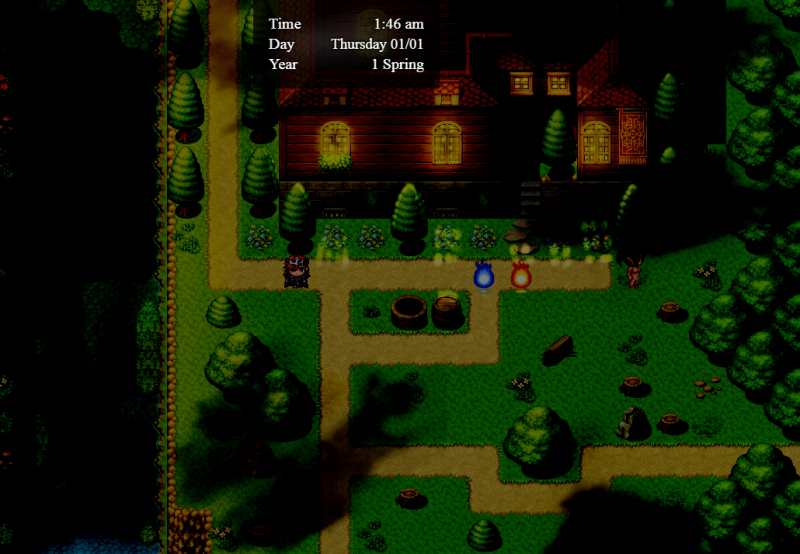
We're currently using GALV's LayerGraphics to create a light overlay that gets activated at nighttime to create light effects, such as light shining from windows and illumination & shadow coming from windows.
Protected download
As you can see, the result is rather disappointing.
The screen is tinted via screen tint function, while the lightmap is a layer above characters but not on picture level (GALV's plugin doesn't allow that.)
There are a couple of big issues with this:
1. The lightmap gets tinted by the night screen tint. This dulls the lighting and makes it look way too dark.
2. Light & shadow cast by the lightmap on the ground, however, is above character level, which makes it appear above characters when it shouldn't.
3. The cloud shadows on the ground get way too dark. They're soft and light at day, but at night become pretty glaring in their rough darkness.
I've been looking at lighting plugins such as Terrax lighting, Khas' ultra lighting and OcRam's lights plugin, but so far I'm not sure which of them actually allows what I want to be done.
My goal:
1. I want event lighting, such as torches with light effect:
I'd like to have access to object lighting like in the plugins (probably the easiest demand to be met, since they all fulfill that) where I can connect a small lightmap to a specific object (torch on a wall, etc.) This is almost guaranteed by the above plugins, but it's relevant in a moment:
2. I want to be able to use a lightmap unaffected by the night effect.
I'd like to have the ability to use a lightmap in addition to the object lights, as visible in the picture above, so that specific fine shadows & lights such as the glow on the trees or the ground can be painted on.
3. I want below-character lighting & shadow effects.
This is basically like the lightmap, except it should be below character level, where I can set both light and shadow that isn't affected by the night effect.
4. I want a night effect that doesn't tint the other light effects or at least doesn't dull them significantly, while still giving the feeling that it's dark and not just a little bit darker than usual.
5. The time system is variable, and there's more than just day and night. (Moghunter's time system, tints switched off)
That means that I can't create light effects specifically for a night by using some kind of overexposed glare that gets normalized by the night, since I'd mean I'd have to basically create multiple lightmaps for every lighting phase of the day (except bright daylight).
As you can imagine, that's a hell of a plugin wrangling mess, especially if you add Moghunter's weather effects to it.
My plan was to handle everything entirely through Moghunter's weather effects:
Layer 0, the night effect not as tint but as transparent dark picture overlay
Layer 1, underneath characters but above tiles for shadow and ground lightmap
Layer 2, the Lightmap
Layer 3+, the weather effects
Doesn't work though. Despite the order, the night overlay will overlay above everything that's rendered underneath it, so the lightmap and the ground lights would also be affected. To make matters worse, there doesn't seem to be a below character layer, only a parallax layer, and to make matters even more worse, it's blend effects don't include add or only a strange version of it that makes the light look glaringly too bright. and wrong.
All three of the light plugins above share that they have a way to make things darker and that they have a way to combat that darkness with their light effects. But I have no idea which of them is actually compatible (or can be made compatible) with a ground and an above character based lightmap and allows that to function.
My attempts at testing it were pretty discouraging. Seperate lightmaps absolutely don't work, and Khas lightning plugin doesn't seem to have a map based lightmap that can be used? And while Khas' seems to be the best from a function standpoint of view...it's a plugin where lighting seemingly cannot exist unless the screen is darkned first. So bright light effects in daylight are impossible.
So I basically need something that allows object lighting as well as above character and ground based light and shadow maps and that's got a night effect that doesn't dull the light effects so I can use them at variable daytimes.
Does anyone have experience with getting complex light & shadow effects both in object/event-lighting and lightmaps into a game that features variable daytimes without the night dulling the effects or other glaring issues popping up?
I'd appreciate it if someone who's got a more complex system like that working could shed some light on what plugins were used to resolve the issues or whether there are other ways to sort things out. Preferably without having to create 3 or 4 versions of every lightmap.
Downloads / Referenced Files
Log in to download
Log in, then follow the RPG Maker Developers Group to see these download links.
If you are the original creator and want this listing reassigned, edited, or removed, join BMMPlay and contact the moderators with proof that matches the original RPG Maker Web profile, linked GitHub, itch.io page, or another public creator identity.


 Chromecast with Google TV HD
Compact streaming device for movies, live TV apps, and personalized entertainment.
View on Amazon
Chromecast with Google TV HD
Compact streaming device for movies, live TV apps, and personalized entertainment.
View on Amazon